

A well-run workspace is what any professional looks for, one that does not require constant attention to keep in order. MindSuite was conceived to put an end to that kind of hassle. Rather than have to juggle half a dozen different downloads, the program puts window management, text tools, encryption and performance tuning under one roof with a single installer. The net effect is a desktop that is more organized and works at a quicker pace.
In this guide we set out to show you what MindSuite is all about and how its various components can be used in your day-to-day work.
What Is MindSuite
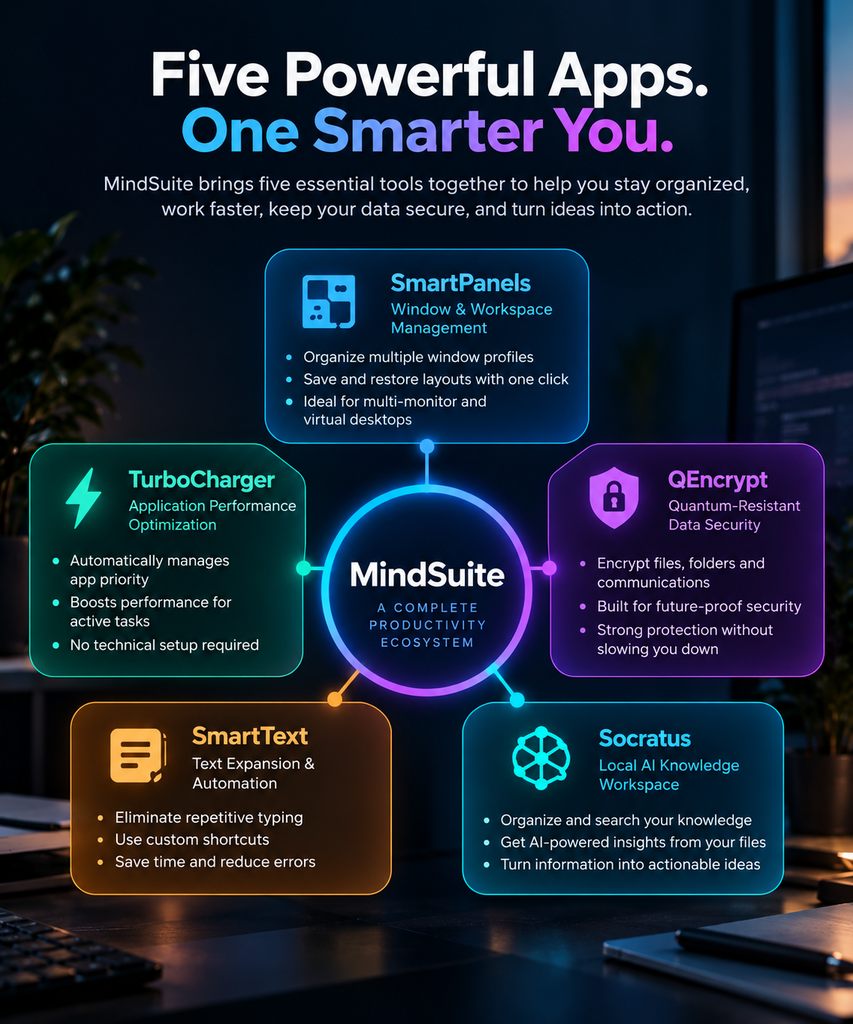
FiveRivers Technologies has put together MindSuite, a professional software bundle that brings five individual applications under one roof. With a single download and setup file, there is no need to install tools in isolation; the full suite is at your disposal, though you are free to select only those apps you require.
The package is made up of SmartPanels, TurboCharger, QEncrypt, SmartText and Socratus. While each application is designed to handle your particular issue, in combination they create a system for streamlining daily work, putting your files under lock and key and keeping your screen in order.
In that sense MindSuite is something of an exception to the rule. Where most productivity software will address just one function, this bundle covers several pain points, an economy of time and money that sets it apart from the competition.
There is also the matter of convenience. Since all five programs operate from the same installer and dashboard, any monitoring or updates can be done in one spot. One does not have to juggle five support channels or accounts. It is this kind of unified experience that makes MindSuite a draw for small teams and professionals with little time to spare.
How MindSuite Improves Daily Workflows
There is no point in a cluttered desktop when it puts the brakes on productivity. The time spent toggling windows, looking for a file or simply waiting for a laptop to catch its breath can mount up over a day.
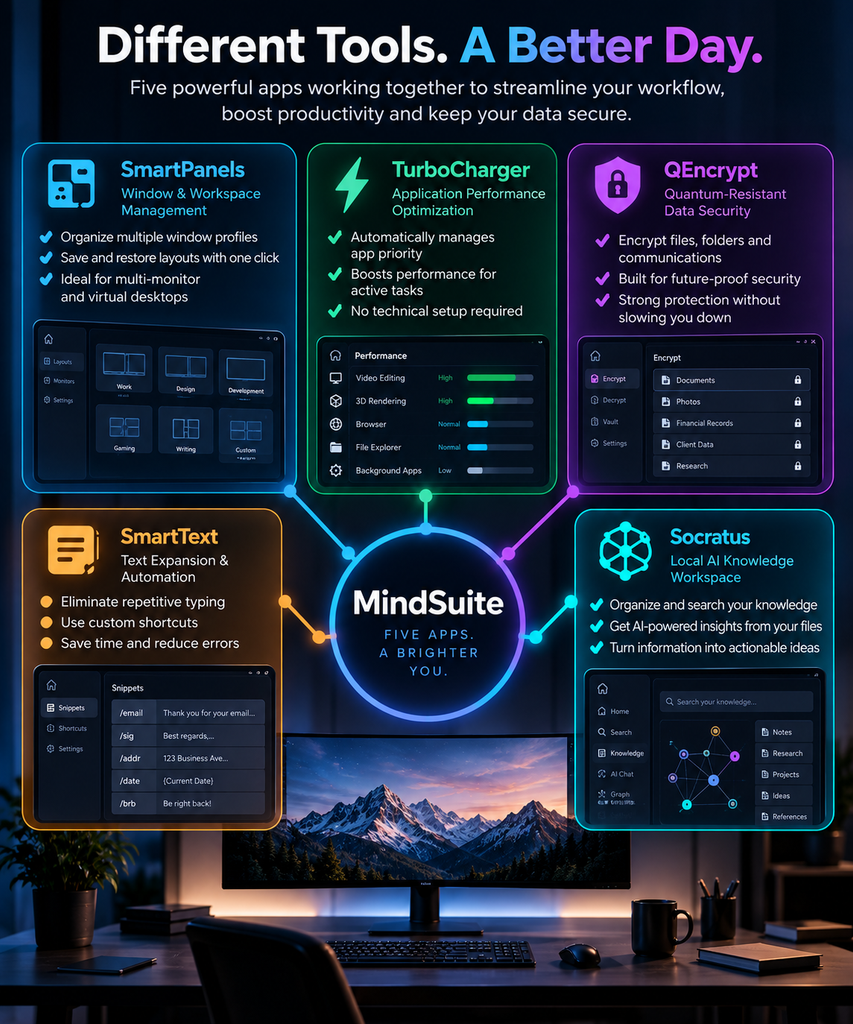
With MindSuite we put an end to that kind of aggravation by means of our five integrated apps. Here is how each of them makes its mark.
- SmartPanels: Window and Workspace Management
With SmartPanels to serve as your workspace manager, one can organize and control several window profiles with just a click. For those who make a habit of moving between various project configurations, the software will recall and put your layout back in place at once. The result is less time wasted on shuffling windows around and more time put into the work itself.
It is a handy tool for anyone juggling multiple monitors or virtual desktops. Rather than having to go through the motions of repositioning and resizing every window by hand, SmartPanels has your arrangement on file and will produce it when called for. In doing so, it eliminates a good deal of the friction one might otherwise encounter on a day-to-day basis.
- TurboCharger: Application Performance Optimization
With TurboCharger, your active applications are put in good hands. The software will handle the management of application priority on its own, making sure the program you need most has the resources at its disposal. For those occasions when a particular project or task calls for it, custom priority rules can be put in place as well.
There is no need for the kind of technical know-how and manual fine-tuning that other performance tools demand; TurboCharger does away with such obstacles. It goes about its business in the background, unobtrusively shifting priority levels so as not to get in the way. In short, it makes for a much simpler day of multitasking without the distractions.
- QEncrypt: Quantum-Resistant Data Security
There is no room for compromise when it comes to security, and QEncrypt is built to meet that demand. With encryption standards in a state of flux, the need for future-proofing has only grown with each passing year. That is why QEncrypt provides quantum-resistant encryption to shield sensitive data from the threats of tomorrow as well as the present.
Yet the solution does not come at the expense of performance; files, folders and communications are put under lock and key without putting a drag on the machine. Such a combination of robust defence and practicality is what makes it an ideal component of the MindSuite bundle. For teams entrusted with confidential documents or client and financial records, this extra measure of safety is particularly valuable.
- SmartText: Text Expansion and Automation
With SmartText, repetitive typing is a thing of the past. The tool will expand your shortcuts on the fly, handle expression calculations and put in inline context as you go.
If your day involves churning out the same sort of emails, reports or messages, you will find it to be a genuine time saver. There is no need to put in the effort of retyping familiar phrases; set up a shortcut and let SmartText do the rest by expanding it automatically. In doing so it not only spares you from typing fatigue but also ensures a uniform style in everything from your chat apps to formal documents.
- Socratus: Your intelligent second brain
With Socratus, the task of creating, editing and putting your text files in order is simplified, no matter how many folders or cloud accounts are involved. The application offers a single, streamlined interface so there is no more going from one app to another to find a note. It does not matter if the file is on a local drive or in the cloud; Socratus has it all at hand.
Such centralisation is in keeping with the rest of the MindSuite tools. There are no silos here. Your security settings, window layouts and notes are all integrated to work as one.
Key Features That Make MindSuite a Strong Management Suite
There is more to MindSuite than one would find in a standalone tool. To start, the single installer is a time saver; a user need only download a file and pick out the desired applications to have it all under one panel. Then there is the matter of cost. The bundle pricing is generally more economical than going after each application on its own, which is value that budget-minded teams will appreciate.
MindSuite also offers some flexibility in how one goes about it. With plans for the entire bundle available on an annual or multi-year basis, it is easy to find what suits your finances. And for those not particularly technical, the installation is uncomplicated. After downloading and selecting, the progress can be followed from a single screen. When you are done, the tools are at your disposal. It is a straightforward way to set things up and avoids the kind of friction that often deters people from new productivity software.
Finally, these are tools made to complement one another. There is far less redundancy here than if one were to cobble together a collection of unrelated apps. Whether it is the window manager, the text tools or the encryption and performance optimizers, they are all updated by the same system. That keeps the desktop running as it should and minimises any conflict.
Why MindSuite Ranks Among the Best Productivity Apps
There are no shortage of tools that promise to make you more efficient, but it is uncommon to find one that puts security, performance and organization in the same package. MindSuite does just that, which is what makes it one of the top productivity apps available. Rather than having to put in the time to source, buy and set up five different programs, here is a bundle that has been put through its paces and works as a single system.
Then there is the question of cost. The pricing for the full suite is structured to be rewarding; if you were to go out and buy each tool on its own, it would run you far more than the three- or five-year plans offered in the bundle. For a freelancer or a small business, as well as larger teams, that difference is significant. It makes MindSuite a sensible option, not something of a luxury.
You also must consider reliability. Since the development team behind all five of the apps is the same, updates are consistent. There is no need to wait on a half dozen companies to put in patches or new features. Over time that kind of consistency engenders trust, and it is the sort of authority and expertise one expects from good software.
As for flexibility, MindSuite is accommodating. Some will not require every tool right away, so the app allows you to install only what suits your current workflow and put off the rest until you are ready. You will not find that with some of the competition; they tend to be all-or-nothing when it comes to their management suites.
MindSuite Compared to Buying Tools Separately
When you put it in real terms, the distinction is clear. If one were to go about purchasing SmartPanels, TurboCharger, QEncrypt, SmartText and Socratus on their own, the costs mount up quickly; a year’s worth of those individual items would be well in excess of two hundred dollars. MindSuite as a bundle brings that figure down by virtue of pricing that is less than the sum of its parts. On a three-year plan the disparity is even more pronounced, making it the economical choice for those in need of multiple tools.
Then there is the matter of interoperability. Tools from different vendors do not tend to communicate with one another. An encryption utility and a window manager will have little in common when it comes to settings, nor will a note app from yet another provider share support or updates. MindSuite puts an end to such disconnects. With every application under the same management roof, support is centralized and updates are handled in unison. One can appreciate the value of that after the hours put into resolving version conflicts with mismatched software.
The learning curve is another consideration. Five disparate applications present five interfaces to master. MindSuite avoids this by applying a uniform design to all of them, from SmartPanels to Socratus. The result is that once an interface is understood, the rest are second nature. For new members of the team, it means a quicker onboarding process and less of the friction typically encountered with new productivity suites.
Who Benefits Most from MindSuite
While MindSuite is made for a broad audience, some will find more value in it than others.
- Take the remote worker with an array of monitors; SmartPanels are worth it on their own. With a single click, you can put the workspace back in order and have a few minutes to spare in the morning.
- For freelancers, QEncrypt offers the kind of reassurance that is hard to come by when dealing with sensitive client data over public Wi-Fi or shared networks.
- Then there are the writers, marketers, and customer support staff who get the most out of Socratus and SmartText. Shortcuts do away with the need to type out full sentences, and all those stray notes can be put in one spot where they can be found.
- Designers and developers running resource-intensive software will also tell you there is a difference; TurboCharger ensures priority work stays responsive no matter how many other programs are open.
Startups and small businesses are drawn to MindSuite as well. It is an appealing way to consolidate several subscriptions into one cost you can count on. Rather than having to keep tabs on five different invoices and renewal dates, a team can handle it all from a single dashboard. That sort of straightforwardness is enough to make MindSuite the go-to for anyone in the market for a reliable management suite.
Frequently Asked Questions About MindSuite
Is MindSuite worth it for a single freelancer?
Yes. Even solo users benefit from combining window management, encryption, and text automation in one bundle. The pricing scales well even for individual accounts, so a MindSuite subscription rarely feels like overkill.
Does MindSuite work if I only need one or two tools?
Yes. During setup, you can select the complete suite or only the applications you need. This flexibility means MindSuite never forces you into paying for tools you will not use.
How does MindSuite compare to typical productivity software?
Most productivity software focuses on one narrow task, such as note-taking or file encryption alone. MindSuite instead combines five functions under one roof. This is why many reviewers place it among the best productivity apps for combined value.
Can I switch between the yearly and multi-year plan later?
Yes. You can change or adjust your plan as your needs evolve. MindSuite grows with your workflow instead of locking you into one fixed option.
Does MindSuite work on both Windows and multiple devices?
MindSuite is built for Windows systems and supports installation across multiple machines. This makes it easy for teams to keep every device running the same organized, secure setup.
Getting Started with MindSuite
Getting up and running with MindSuite does not take long. The process comes down to a few simple steps.
- First, head to the official site to download the unified installer.
- Next, you can choose either the full suite or just the applications you need right now.
- From there, the installation panel lets you track progress for each tool.
- Once it finishes, you are ready to work immediately.
With no further configuration needed, all five tools stand ready to use. For any professional looking to recover time lost to a cluttered desktop or sluggish apps, a connected system like this is the practical choice. MindSuite is built to address exactly these everyday frustrations. Whether it is QEncrypt safeguarding your data or SmartPanels keeping your windows in order, each tool has its place. With bundle pricing and a flexible setup, the suite stays just as accessible for a team as it is for an individual.
There is no need to keep patching together half a dozen different applications. A single connected system serves you better. Come explore MindSuite and find the bundle that suits your workflow. It is the first step toward a faster, more secure way of working.