
With our best thoughts, it isn’t that we forget them – we simply can’t get to them. They become hidden in files, held in lengthy pieces of writing, spread among different programs, or are quickly jotted down and then left alone.
It’s common knowledge that the actual problem in the modern world is not writing things down, but remembering the correct thought when it’s needed; this is something all of us understand.
A ground-breaking SmartNotes application is altering how we deal with our ideas and recollections. Using a completely new method, the app doesn’t see notes as unchanging text documents; it gives them the condition of active knowledge, and realises people don’t think in straight lines – but in cycles, links and interwoven thinking. SmartNotes completely changes the usual job of making notes from being just a place to keep things, to being like a vibrant brain.
Why Traditional Notes Apps Fail Human Memory
When traditional note-taking apps were first made, they didn’t account for the modern world we live in. They thought that users would meticulously label, sort, and remember where all their notes are, but we know that isn’t true.
Traditional note-taking apps fall apart because of the following:
- They cut up information into tiny pieces
- Expect us to create lots of manual folders
- Use almost perfect keywords to search for our past notes
But they can’t get the subtleties of what we mean and where we were when we wrote those notes.
Coming from the way humans think, we don’t file things away in neat little folders; we understand ideas by connecting them to other ideas, their importance, and the surroundings they were in. It’s this disconnection between how we think and how software is designed that led to the creation of the intelligent note-taking app.
The SmartNotes App as a “Second Brain”
When you’re trying out a smart notes application, what you want is something which doesn’t simply keep what you type – but is clever enough to understand the links between your ideas.
Often described as a second brain, a proper smart notes application can show relationships between concepts as your brain does. Your notes aren’t on their own, but joined up, and are put in order by the sense you meant them to have. Earlier thoughts come back when you want to recall them; one of the main things that makes smart notes so useful and our memories less likely to be wrong.
Our SmartNotes app doesn’t just get more and more full of knowledge, it – and this may surprise you – builds up, over a period of time, into better, stronger ideas and structures.
The awful thought of a person who really likes to learn having to search through all sorts of random ideas isn’t going to happen here. SmartNotes does the opposite, and will give you the correct information when you require it.
From Capturing Thoughts to Retrieving Insight
Most individuals assume taking notes is simply getting ideas down on paper – although, really, the difficulty lies in finding them again, and this is what stops people getting things done.
Frequently, one will have an idea, yet be unable to recall where they made the note; a regular notes application is no use in this case, but a clever one alters everything. A smart notes app, because of its organised structure and understanding of what things mean, shows you relevant points without you having to search endlessly.
Our SmartNotes application lets you look for connections, spot trends, and grasp the overall subject, so turning what were once ordinary, uninteresting, and unhelpful notes into something useful and which actively assists you.
How the Smart Notes App Fits into Real Workflows
Using SmartNotes isn’t a solo thing – the app is really intended to connect pieces of what you do.
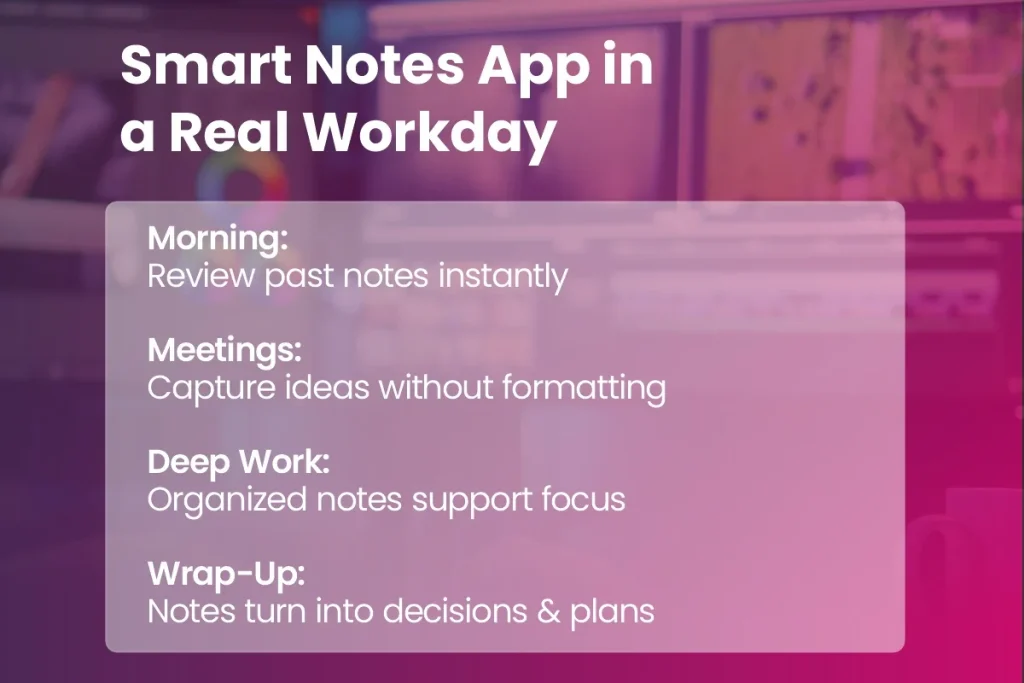
Before Meetings
Older notes give you the context to begin with when you enter a meeting, meaning you won’t be starting from zero.
During The Meeting
You are able to jot down all thoughts as they happen, and not be concerned with arrangement, as the app handles that side of things.
After Meetings
As people who use it know, notes change into useful things to look at after the meeting, and are a simple method to remember what was resolved, what people thought, and what needs doing.
Long-Term Knowledge
With the passage of time, the notes become a full, findable store of information – the reason why a lot of people say SmartNotes feels like it acts as an addition to the user’s brain, and not a thing apart.
Who the Smart Notes App Is Really Built For
This is intended for pretty much anyone who deals with many involved bits of data and thoughts, and often goes from one way of thinking to another. We thought, whilst we were making the Smart Notes application, that it wasn’t aimed at a single type of person.
From a useful point of view, it is, at its heart, a very good thing for:
- Pupils working through schoolwork.
- Those who have meetings, dates for the diary, and a large amount of paperwork to control.
- People who write, and who require to watch over concepts, beginnings, and what they’ve looked at.
- Groups of people who collaborate, and who need to develop a collective store of what is known.
SmartNotes Inside MindSuite: When Notes Become Part of a System
The capabilities of SmartNotes are given a major boost when running within the MindSuite Software Bundle.
- SmartNotes starts to work hand-in-hand with SmartWindows for workspace control.
- SmartText for lightning-fast writing.
- FastWindows for a boost in performance.
- QEncrypt for secure storage.
MindSuite software makes SmartNotes a central part of a complete system to get things done – bringing together thoughts, to-do’s, what your computer is doing, security, and it all works as a really good, unified set. You won’t have to move from application to application anymore, and with it all in a single location you will be able to make your process more efficient, not waste time, and lessen the amount of stuff in your head you have to think about.
Why a Smart Notes App Makes More Sense Than Another App
Today’s professionals aren’t short on tools – they’ve got too many. Each new application they set up adds to the trouble, the amount of thought needed, and the endless changing between things they are doing.
It’s common knowledge that a good notes program can fix this, however it isn’t very helpful by itself. Notes aren’t generally put to use when alone; instead, they help with jobs, meetings, composition, arrangement, and choices – and MindSuite understands that, putting SmartNotes into a smooth, unified setup. Instead of managing several programs, people who use MindSuite receive the sharpness of a process.
Final Thoughts
When we think about what productivity will be like going forward, it isn’t about getting any more information, it is instead about being able to get to the correct knowledge when you require it. A clever notes application brings making notes up to date for this century, and mirrors the manner in which you think, and do your job.
SmartNotes – when used along with the MindSuite setup – alters the method we are able to arrange and pull up knowledge, with very little effort. Arriving quickly on the scene, this is not simply a location for keeping ideas; it is a planning system for anyone who is tired of usual note-taking, and who wishes to vastly improve their work.
Looking for a Smart Note Taking App?
If you’re ready to move beyond traditional note-taking and start working with your ideas instead of chasing them, SmartNotes within MindSuite is for you.