

When you weigh the price of putting encryption in place against what a data breach could cost you in financial, legal, and reputational terms, the former is usually a small matter. It is an extra layer of protection for your business records, customer details, intellectual property, or even personal files that you simply won’t get from a standard storage device.
These days, with cyber threats on the move and companies having to think about a post-quantum world, secure storage is no longer optional if you want a sound cybersecurity plan.
You will find most security experts don’t see encryption as something you can do without; it is a necessity for any sensitive data. And for those who want a more forward-looking form of protection, there are modern solutions like Qencrypt Vault.
By making use of next-generation cryptography, they give organizations the means to fortify their defences against whatever threat may be coming down the line.
Why Photo Privacy Has Become a Major Concern
Smartphone privacy is no longer a niche concern. As devices become central to personal and professional life, the amount of sensitive data stored locally has increased dramatically.
Growing mobile data sensitivity
According to Pew Research Center, around 60% of smartphone users in the U.S. have at least one type of sensitive personal document stored on their device (such as IDs, financial info, or health records).
Meanwhile, a Statista report (2025) estimates that users globally take over 1.8 trillion photos annually, with a significant portion stored on mobile devices. This massive growth increases the need for structured privacy tools beyond simple gallery management.
Why hidden storage matters
Users typically want to:
- Protect personal identity documents
- Separate private memories from shared albums
- Prevent accidental exposure during phone sharing
- Secure sensitive screenshots and messages
- Reduce risks from device loss or theft
These needs explain the popularity of both Apple’s Hidden album and third-party vault applications.
How to Hide Photos on iPhone Using Apple’s Built-In System
Apple integrates privacy directly into iOS via the Photos app. This is the most widely used method for basic photo hiding.
Step-by-step: how to hide photos on iPhone
To hide an image or video:
- Open Photos
- Select the media file
- Tap the three-dot menu
- Choose Hide
- Confirm selection
Once hidden, the item is removed from the main library and moved to a dedicated hidden album.
Face ID protection for hidden photos
With the latest iOS updates, Apple has beefed up security by putting Face ID or Touch ID in front of the Hidden album. You won’t be able to get at your hidden photos without first passing a biometric check. In fact, if you go into settings, you can have the album concealed altogether. It is a good deal more private than what you would find on an older version of iOS.
Advantages of Apple’s Hidden Album
- Seamless system integration: Because it is built directly into iOS and the Photos app, no additional installation or setup is required. It works instantly across devices using the same Apple ID and feels like a natural part of the gallery experience without requiring learning new tools.
- Strong biometric protection: Face ID and Touch ID reduce unauthorized access risk by ensuring only the device owner can open the hidden album. This adds an extra authentication layer that helps protect private media, even if someone else briefly accesses the phone.
- No extra storage apps needed: Users don’t rely on third-party services for basic hiding, which reduces exposure to external data collection risks. Everything stays within Apple’s controlled ecosystem, minimizing the need to trust additional developers or permissions.
- Free and always available: Every iPhone includes this feature by default at no extra cost. It is consistently updated through iOS upgrades, ensuring users benefit from ongoing security improvements without needing subscriptions or downloads.
Limitations of Apple’s Hidden Album
1. Same-device security dependency: The Hidden album is still tied to the device’s main security system. If someone knows the passcode, they may still gain access.
2. Limited encryption control: Apple does not allow users to independently manage encryption keys for hidden media.
3. iCloud synchronization exposure: If iCloud Photos is enabled, hidden content may sync across devices linked to the same Apple ID.
4. No advanced file organization: There are no secure folders, tagging systems, or document classification tools.
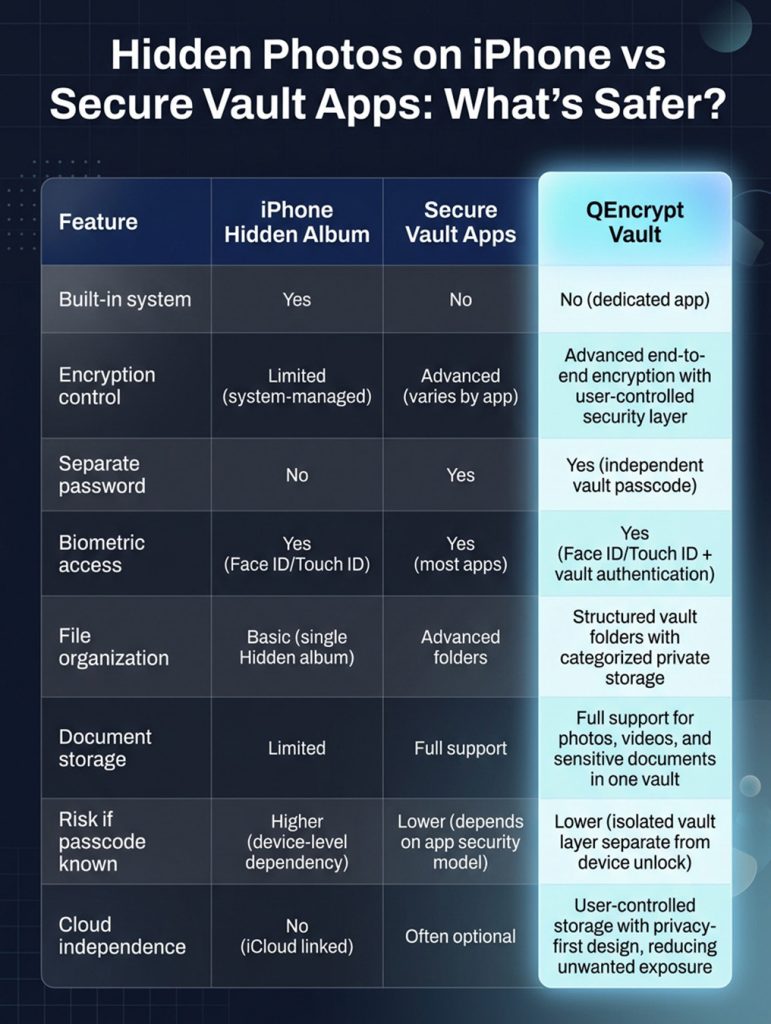
What Are Secure Vault Apps?
Secure vault apps are third-party applications designed specifically for encrypted private storage. Unlike Apple’s Hidden album, they are built with privacy as the core function rather than as a convenience feature.
These apps typically include:
- End-to-end encryption
- Independent vault passwords
- Secure media import systems
- Decoy login modes
- Cloud encryption options
- Private document storage
How Vault Apps Protect Private Photo Storage
Vault apps rely on encryption to secure content. Encryption converts readable files into unreadable code that can only be unlocked with the correct key.
Even if someone gains access to the phone storage:
- Files remain unreadable without authentication
- Data cannot be easily extracted or viewed
- Protection is independent of device security
Why encryption matters
A Verizon Data Breach Report found that over 80% of data breaches involved stolen or weak credentials rather than system hacking.
This highlights why independent encryption layers can significantly improve privacy protection.
When Apple’s Hidden Album Is Enough
Apple’s system is suitable for everyday privacy needs.
Best use cases:
- Personal media separation: Users who want to keep private selfies or casual personal images separate from shared albums.
- Temporary concealment: Screenshots or images that only need short-term hiding.
- Low-risk privacy needs: Content that is not highly sensitive, such as personal memories.
When Secure Vault Apps Are a Better Choice
Vault apps are designed for higher-risk privacy scenarios.
Ideal situations:
1. Sensitive documents: Tax files, IDs, and passports require stronger protection than basic hiding.
2. Business confidentiality: Contracts, client data, and internal documents benefit from encryption.
3. Advanced privacy needs: Users concerned about device sharing or theft risk.
4. Long-term secure storage: Vault apps provide structured organization for ongoing private data management.
Key Features to Look for in iPhone Security Apps
- Strong encryption standards: Modern vault apps should use AES-256 encryption or equivalent industry-grade protection.
- Independent authentication: A separate password ensures access is not tied only to device unlock methods.
- Secure backup options: Encrypted backups reduce the risk of permanent data loss.
- Zero-knowledge architecture: Some advanced apps ensure even developers cannot access stored data.
- Regular security updates: Frequent updates help address vulnerabilities and maintain trust.
Common Privacy Risks Users Overlook
- Weak device passcodes: Simple PINs remain one of the most common security weaknesses.
- Shared Apple ID access: Family-shared accounts can unintentionally expose private content.
- Cloud syncing exposure: Automatic syncing can increase access points for stored photos.
- Device theft scenarios: If a phone is stolen and a passcode is compromised, hidden photos may still be accessible without stronger encryption layers.
Security Best Practices for Photo Privacy
- Use Face ID or Touch ID whenever possible
- Enable two-factor authentication for Apple ID
- Keep iOS updated regularly
- Use strong, unique passcodes
- Disable unnecessary cloud syncing for sensitive files
- Store critical documents in encrypted environments
- Avoid sharing device credentials
- Periodically review hidden and vault content
The Future of Photo Privacy on iPhone
You will find Apple is putting more muscle behind its privacy controls on iOS, moving past the kind of superficial hiding to put in place system-level protections. Take the Secure Enclave, for instance: a piece of hardware on any modern iPhone that keeps biometric info like Face ID or Touch ID walled off from the rest of the operating system. In this way, an app and iOS cannot access your authentication data directly.
Then there is the matter of on-device processing. Apple has been expanding this so that when it comes to analyzing photos for categorization or recognition, the work is done locally on the phone and not offloaded to a cloud server, which minimizes risk.
iOS is also being stricter with its app sandboxing. Third-party apps now have less leeway to dig into your storage, photos, or system metadata. That curbs the sort of data leakage between apps, though it does put more pressure on encrypted vaults that use zero-knowledge models to do their job without interference.
Given the scale of global breaches these days, with billions of records compromised every year, the whole approach to privacy is changing. It is all about user-controlled keys and hardware-backed encryption now. Secure photo storage is no longer something you can just opt for; it is a necessity.
FAQs
1. How to hide photos on iPhone easily?
You can hide photos by selecting an image in the Photos app, tapping the three-dot menu, and choosing “Hide.” The photo is moved to the hidden album and protected by Face ID or your passcode.
2. Are hidden photos on iPhone completely private?
Hidden photos are protected by Face ID or passcode, but they still rely on your device’s main security system. If someone knows your passcode, they may still access them.
3. What is the difference between hidden album and vault apps?
The Hidden album is built into the iPhone and offers basic privacy, while vault apps use encryption and separate passwords for stronger protection. Vault apps are better for sensitive files and long-term secure storage.
4. Can hidden photos be accessed from iCloud?
Yes, if iCloud Photos is enabled, hidden photos may sync across your Apple devices using the same Apple ID. This makes them accessible on any trusted device linked to your account.
5. Are vault apps safer than iPhone hidden photos?
In most cases, yes, because vault apps use encryption and independent authentication layers. This makes them harder to access even if someone gets into your phone.
Final Thoughts
To understand how to hide photos on your iPhone, you first need to recognize the difference between convenient privacy and security that relies on encryption. Then there is Apple’s Hidden album, which for most people is a straightforward way to have some quick privacy without having to install anything extra. But you should be aware that, because it ties into the device’s own security, it won’t hold up in more high-risk situations.
If you are dealing with sensitive documents or need to keep them confidential over the long term, a secure vault app is a better option. These apps provide their own authentication, structured storage, and proper encryption.
In the end, what you go with comes down to the data in question. The built-in system from Apple will do fine for casual purposes. When you want a sturdier line of defense for your private photos, an encrypted vault is the way to go. And if you prefer an all-in-one approach, QEncrypt Vault has you covered with its secure environment for everything from videos and photos to any documents you wish to keep under lock and key.