Meta Title: What Is MindSuite? Best Productivity Management Suite 

All in one tools

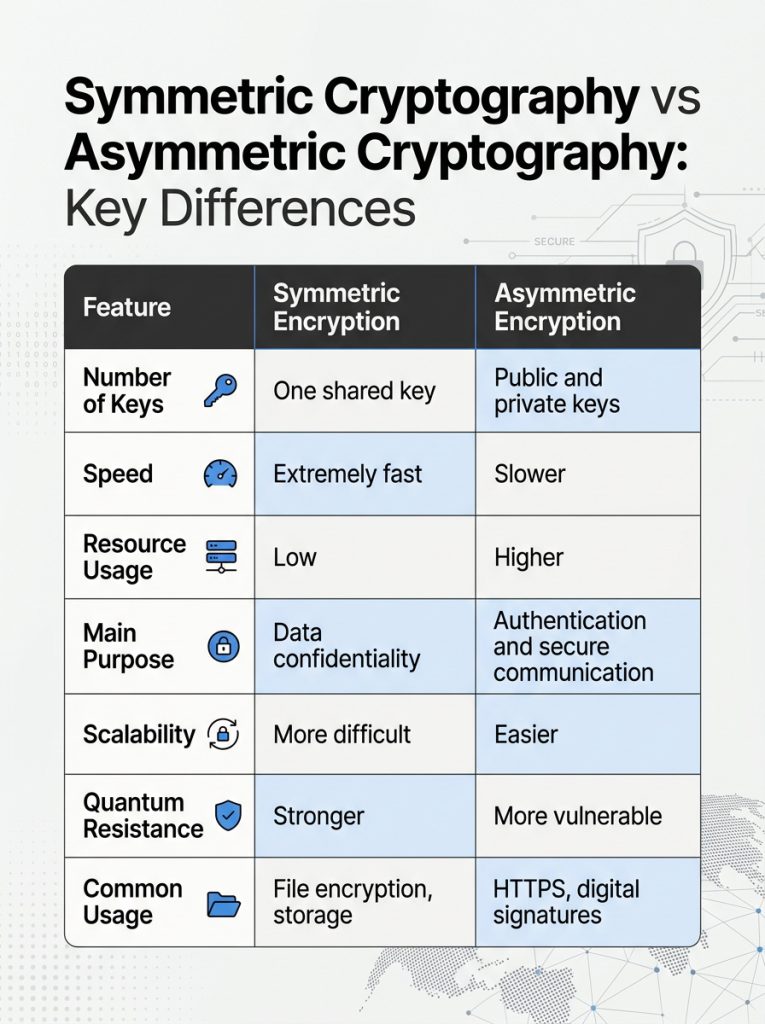
A well-run workspace is what any professional looks for, one that does not require constant attention to keep in order. MindSuite was conceived to put an end to that kind of hassle. Rather than have to juggle half a dozen different downloads, the program puts window management, text tools, encryption and performance tuning under one roof with a single installer. The net effect is a desktop that is more organized and works at a quicker pace. 

In this guide we set out to show you what MindSuite is all about and how its various components can be used in your day-to-day work.  
What Is MindSuite 

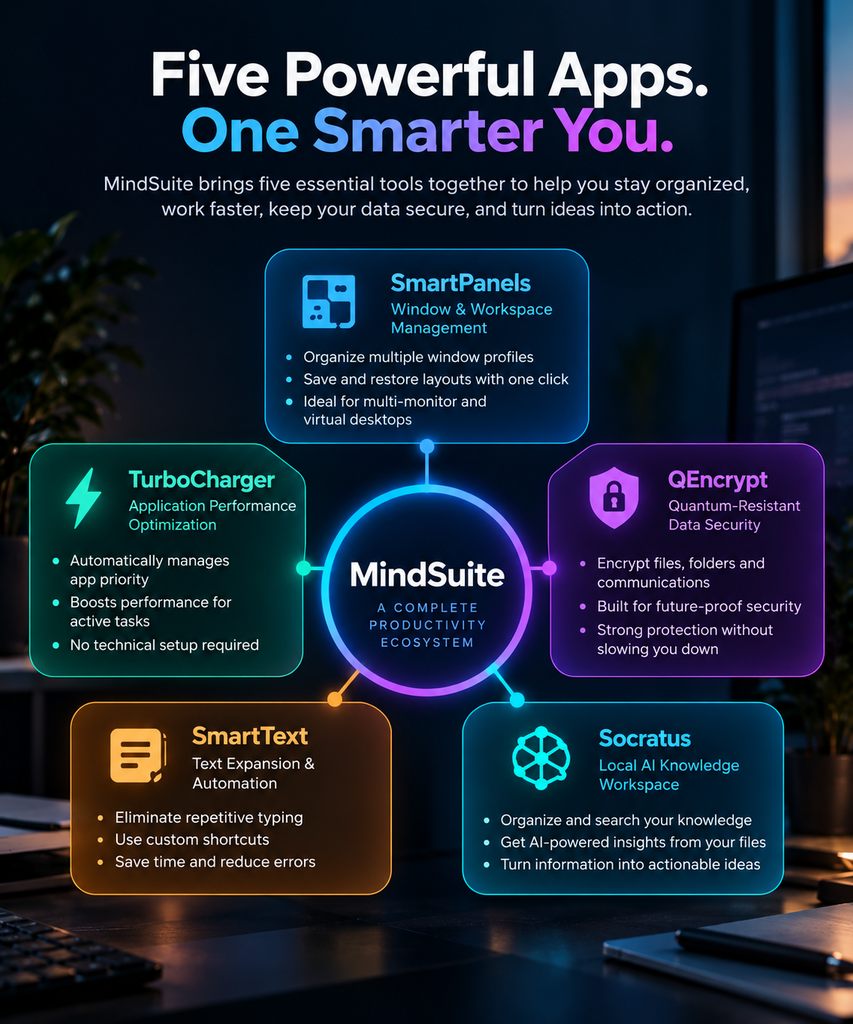
FiveRivers Technologies has put together MindSuite, a professional software bundle that brings five individual applications under one roof. With a single download and setup file, there is no need to install tools in isolation; the full suite is at your disposal, though you are free to select only those apps you require. 

The package is made up of SmartPanels, TurboCharger, QEncrypt, SmartText and Socratus. While each application is designed to handle your particular issue, in combination they create a system for streamlining daily work, putting your files under lock and key and keeping your screen in order.  

In that sense MindSuite is something of an exception to the rule. Where most productivity software will address just one function, this bundle covers several pain points, an economy of time and money that sets it apart from the competition.  

There is also the matter of convenience. Since all five programs operate from the same installer and dashboard, any monitoring or updates can be done in one spot. One does not have to juggle five support channels or accounts. It is this kind of unified experience that makes MindSuite a draw for small teams and professionals with little time to spare. 

How MindSuite Improves Daily Workflows 
There is no point in a cluttered desktop when it puts the brakes on productivity. The time spent toggling windows, looking for a file or simply waiting for a laptop to catch its breath can mount up over a day.  

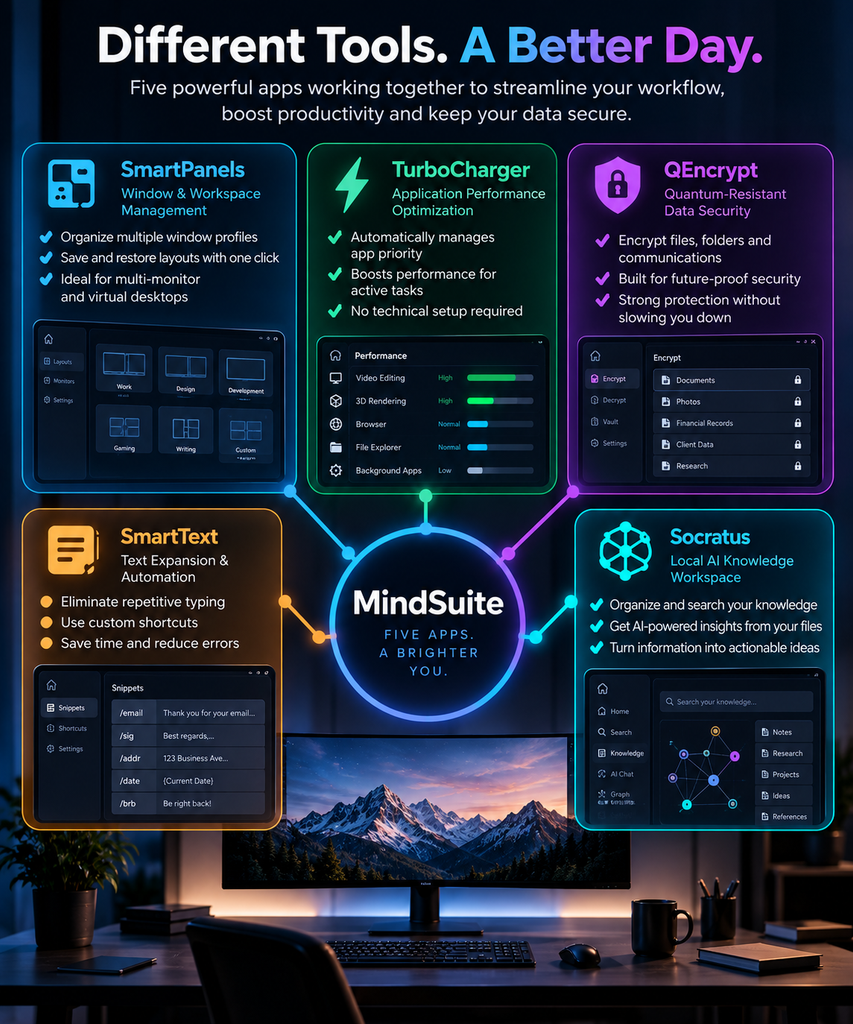
With MindSuite we put an end to that kind of aggravation by means of our five integrated apps. Here is how each of them makes its mark. 

  • SmartPanels: Window and Workspace Management 

With SmartPanels to serve as your workspace manager, one can organize and control several window profiles with just a click. For those who make a habit of moving between various project configurations, the software will recall and put your layout back in place at once. The result is less time wasted on shuffling windows around and more time put into the work itself. 

It is a handy tool for anyone juggling multiple monitors or virtual desktops. Rather than having to go through the motions of repositioning and resizing every window by hand, SmartPanels has your arrangement on file and will produce it when called for. In doing so, it eliminates a good deal of the friction one might otherwise encounter on a day-to-day basis. 

Explore SmartPanels! 

  • TurboCharger: Application Performance Optimization 

With TurboCharger, your active applications are put in good hands. The software will handle the management of application priority on its own, making sure the program you need most has the resources at its disposal. For those occasions when a particular project or task calls for it, custom priority rules can be put in place as well. 

There is no need for the kind of technical know-how and manual fine-tuning that other performance tools demand; TurboCharger does away with such obstacles. It goes about its business in the background, unobtrusively shifting priority levels so as not to get in the way. In short, it makes for a much simpler day of multitasking without the distractions. 

Explore TurboCharger! 

  • QEncrypt: Quantum-Resistant Data Security 

There is no room for compromise when it comes to security, and QEncrypt is built to meet that demand. With encryption standards in a state of flux, the need for future-proofing has only grown with each passing year. That is why QEncrypt provides quantum-resistant encryption to shield sensitive data from the threats of tomorrow as well as the present. 

Yet the solution does not come at the expense of performance; files, folders and communications are put under lock and key without putting a drag on the machine. Such a combination of robust defence and practicality is what makes it an ideal component of the MindSuite bundle. For teams entrusted with confidential documents or client and financial records, this extra measure of safety is particularly valuable. 

Explore QEncrypt! 

  • SmartText: Text Expansion and Automation 

With SmartText, repetitive typing is a thing of the past. The tool will expand your shortcuts on the fly, handle expression calculations and put in inline context as you go. 

If your day involves churning out the same sort of emails, reports or messages, you will find it to be a genuine time saver. There is no need to put in the effort of retyping familiar phrases; set up a shortcut and let SmartText do the rest by expanding it automatically. In doing so it not only spares you from typing fatigue but also ensures a uniform style in everything from your chat apps to formal documents. 

Explore SmartText! 

  • Socratus: Your intelligent second brain 

With Socratus, the task of creating, editing and putting your text files in order is simplified, no matter how many folders or cloud accounts are involved. The application offers a single, streamlined interface so there is no more going from one app to another to find a note. It does not matter if the file is on a local drive or in the cloud; Socratus has it all at hand. 

Such centralisation is in keeping with the rest of the MindSuite tools. There are no silos here. Your security settings, window layouts and notes are all integrated to work as one. 

Explore Socratus! 

Key Features That Make MindSuite a Strong Management Suite 

There is more to MindSuite than one would find in a standalone tool. To start, the single installer is a time saver; a user need only download a file and pick out the desired applications to have it all under one panel. Then there is the matter of cost. The bundle pricing is generally more economical than going after each application on its own, which is value that budget-minded teams will appreciate. 

MindSuite also offers some flexibility in how one goes about it. With plans for the entire bundle available on an annual or multi-year basis, it is easy to find what suits your finances. And for those not particularly technical, the installation is uncomplicated. After downloading and selecting, the progress can be followed from a single screen. When you are done, the tools are at your disposal. It is a straightforward way to set things up and avoids the kind of friction that often deters people from new productivity software. 

Finally, these are tools made to complement one another. There is far less redundancy here than if one were to cobble together a collection of unrelated apps. Whether it is the window manager, the text tools or the encryption and performance optimizers, they are all updated by the same system. That keeps the desktop running as it should and minimises any conflict. 

Why MindSuite Ranks Among the Best Productivity Apps 

There are no shortage of tools that promise to make you more efficient, but it is uncommon to find one that puts security, performance and organization in the same package. MindSuite does just that, which is what makes it one of the top productivity apps available. Rather than having to put in the time to source, buy and set up five different programs, here is a bundle that has been put through its paces and works as a single system. 

Then there is the question of cost. The pricing for the full suite is structured to be rewarding; if you were to go out and buy each tool on its own, it would run you far more than the three- or five-year plans offered in the bundle. For a freelancer or a small business, as well as larger teams, that difference is significant. It makes MindSuite a sensible option, not something of a luxury. 

You also must consider reliability. Since the development team behind all five of the apps is the same, updates are consistent. There is no need to wait on a half dozen companies to put in patches or new features. Over time that kind of consistency engenders trust, and it is the sort of authority and expertise one expects from good software. 

As for flexibility, MindSuite is accommodating. Some will not require every tool right away, so the app allows you to install only what suits your current workflow and put off the rest until you are ready. You will not find that with some of the competition; they tend to be all-or-nothing when it comes to their management suites. 

MindSuite Compared to Buying Tools Separately 

When you put it in real terms, the distinction is clear. If one were to go about purchasing SmartPanels, TurboCharger, QEncrypt, SmartText and Socratus on their own, the costs mount up quickly; a year’s worth of those individual items would be well in excess of two hundred dollars. MindSuite as a bundle brings that figure down by virtue of pricing that is less than the sum of its parts. On a three-year plan the disparity is even more pronounced, making it the economical choice for those in need of multiple tools. 

Then there is the matter of interoperability. Tools from different vendors do not tend to communicate with one another. An encryption utility and a window manager will have little in common when it comes to settings, nor will a note app from yet another provider share support or updates. MindSuite puts an end to such disconnects. With every application under the same management roof, support is centralized and updates are handled in unison. One can appreciate the value of that after the hours put into resolving version conflicts with mismatched software. 

The learning curve is another consideration. Five disparate applications present five interfaces to master. MindSuite avoids this by applying a uniform design to all of them, from SmartPanels to Socratus. The result is that once an interface is understood, the rest are second nature. For new members of the team, it means a quicker onboarding process and less of the friction typically encountered with new productivity suites. 

Who Benefits Most from MindSuite 

While MindSuite is made for a broad audience, some will find more value in it than others.  

  1. Take the remote worker with an array of monitors; SmartPanels are worth it on their own. With a single click, you can put the workspace back in order and have a few minutes to spare in the morning.  
  1. For freelancers, QEncrypt offers the kind of reassurance that is hard to come by when dealing with sensitive client data over public Wi-Fi or shared networks. 
  1. Then there are the writers, marketers, and customer support staff who get the most out of Socratus and SmartText. Shortcuts do away with the need to type out full sentences, and all those stray notes can be put in one spot where they can be found.  
  1. Designers and developers running resource-intensive software will also tell you there is a difference; TurboCharger ensures priority work stays responsive no matter how many other programs are open. 

Startups and small businesses are drawn to MindSuite as well. It is an appealing way to consolidate several subscriptions into one cost you can count on. Rather than having to keep tabs on five different invoices and renewal dates, a team can handle it all from a single dashboard. That sort of straightforwardness is enough to make MindSuite the go-to for anyone in the market for a reliable management suite. 

Frequently Asked Questions About MindSuite 

Is MindSuite worth it for a single freelancer?  

Yes. Even solo users benefit from combining window management, encryption, and text automation in one bundle. The pricing scales well even for individual accounts, so a MindSuite subscription rarely feels like overkill. 

Does MindSuite work if I only need one or two tools?  

Yes. During setup, you can select the complete suite or only the applications you need. This flexibility means MindSuite never forces you into paying for tools you will not use. 

How does MindSuite compare to typical productivity software?  

Most productivity software focuses on one narrow task, such as note-taking or file encryption alone. MindSuite instead combines five functions under one roof. This is why many reviewers place it among the best productivity apps for combined value. 

Can I switch between the yearly and multi-year plan later?  

Yes. You can change or adjust your plan as your needs evolve. MindSuite grows with your workflow instead of locking you into one fixed option. 

Does MindSuite work on both Windows and multiple devices? 

MindSuite is built for Windows systems and supports installation across multiple machines. This makes it easy for teams to keep every device running the same organized, secure setup. 

Getting Started with MindSuite 

Getting up and running with MindSuite does not take long. The process comes down to a few simple steps.  

  1. First, head to the official site to download the unified installer.  
  2. Next, you can choose either the full suite or just the applications you need right now.  
  3. From there, the installation panel lets you track progress for each tool.  
  4. Once it finishes, you are ready to work immediately. 

        With no further configuration needed, all five tools stand ready to use. For any professional looking to recover time lost to a cluttered desktop or sluggish apps, a connected system like this is the practical choice. MindSuite is built to address exactly these everyday frustrations. Whether it is QEncrypt safeguarding your data or SmartPanels keeping your windows in order, each tool has its place. With bundle pricing and a flexible setup, the suite stays just as accessible for a team as it is for an individual. 

        There is no need to keep patching together half a dozen different applications. A single connected system serves you better. Come explore MindSuite and find the bundle that suits your workflow. It is the first step toward a faster, more secure way of working. 

        [Explore Mindsuite] 

        Public Key and Private Key Cryptography: Key Differences 

        Quantum encryption

        Without robust cryptography, there is no data security, yet many people do not understand how it works. Public Key and Private Key Cryptography are distinct ways of going about information protection, and they are not interchangeable in the problems they address; one is predicated on a shared secret, the other on a pair with a mathematical bond. The difference is so significant that anyone responsible for business records or sensitive emails and files should appreciate it. 

        We have put together this guide to set out both methods in terms anyone can follow. It will clarify how each system works, where it is best applied, and why the distinction is fundamental to encryption today.  

        Understanding Encryption Basics 

        One should grasp what encryption is all about prior to making a comparison of key types. In essence, it turns plain data into unreadable code; the original message can be restored and read only by someone with the right key. It is this straightforward concept that is the safeguard for financial transactions, passwords, files, and email on a daily basis. 

        What Is Cryptography? 

        Cryptography is the science of securing information through mathematical techniques. It keeps data confidential, verifies identities, and prevents tampering. Every encryption system, whether simple or advanced, relies on some form of a key. That key determines who can lock and unlock the data. 

        Why Businesses Need Strong Security Methods 

        There is a great deal of sensitive information that companies have to put in order every day. Whether it’s internal communications, financial statements, or customer records, companies must safeguard them. Without sound security, attackers can easily access the data. One way to reassure clients and partners is to adopt appropriate cryptography, which helps reduce risk. Then there are the regulators who want to see evidence of robust data protection from businesses more than ever. Put it this way: a breach will be a stain on a company’s good name for years to come. Thus, when a crisis strikes, leaders can act quickly and wisely if they understand what tools they have.  

        What Is Public Key Cryptography? 

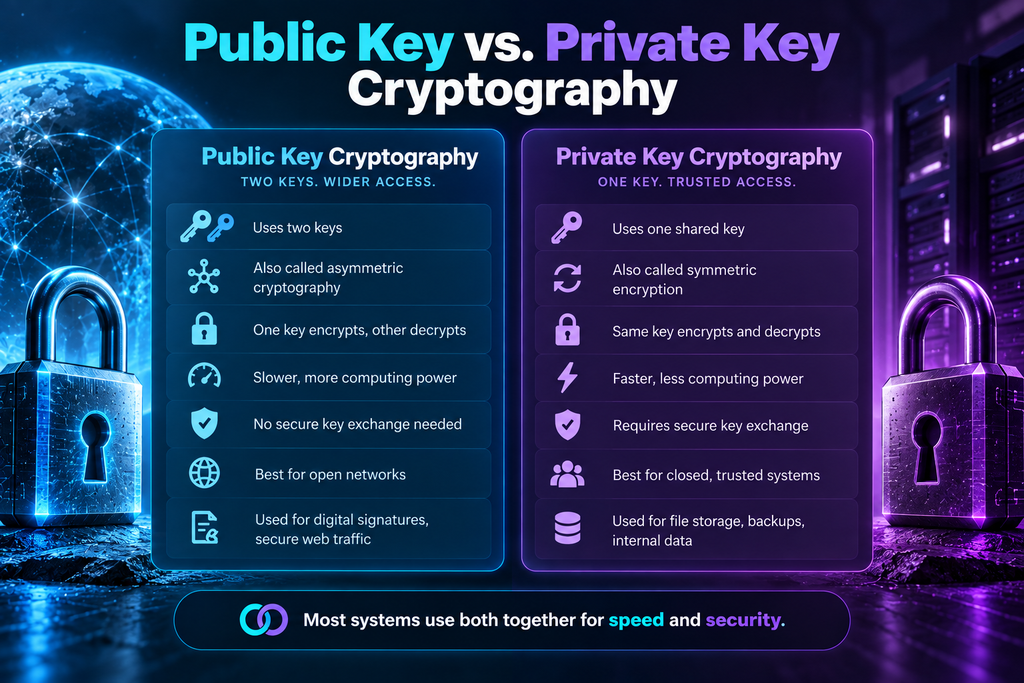
        Public key cryptography, also called asymmetric cryptography, uses two separate keys. One key is public and shared openly. The other key stays private and known only to its owner. These keys are mathematically related, but one cannot be easily derived from the other. 

        How Public Key Cryptography Works 

        The public key is available for all to put a message in cipher. To read it, one requires the corresponding private key. In this way, there is no need to exchange a secret key beforehand. Digital signatures are accommodated as well, providing assurance of the sender’s identity. 

        Common Use Cases 

        The connections to a website, the integrity of digital signatures, and secure email are all put in place by public key cryptography. Online identity verification is another matter that it handles well. The use of two keys means that even on an open network where strangers have to make contact in safety, there is robust protection to be had.  

        One will find banks, the healthcare sector, and government bodies putting this technology to use every day. In fact, should a padlock appear in the browser, one can assume public key cryptography is at work behind the scenes. It is an unobtrusive but steady form of security that requires nothing of the user to see that routine online business is conducted safely. 

        What Is Private Key Cryptography? 

        With private key cryptography, or symmetric encryption, as it is more commonly known, all parties use one and the same key. The identical key is required of the sender and receiver alike for the purposes of encrypting and decrypting. Given its speed and efficiency, the approach is well suited to handling sizeable amounts of data. 

        How Private Key Cryptography Works 

        Data is locked and unlocked with one and the same key, so it has to be in the possession of both parties prior to any communication. There is no protection for the information should the key be obtained by someone who ought not to have it; he would be able to read all of it. For that reason, the sharing of keys in a secure manner is indispensable. 

        Common Use Cases 

        Private key encryption in use for everything from file storage and safeguarding databases to the communications of an internal system. Provided there is a means of exchanging the key in advance and a measure of trust between the parties, it is an effective method. The speed with which it can be applied enables the expeditious encryption of sizeable files.  

        Organizations often use it for backup, archived data, or internal messaging. And because it is less taxing on the processor, even a resource-limited device has no trouble with it. Overall, private key encryption is a sensible choice for everyday use. 

        Public Key and Private Key Cryptography: Key Differences 

        A side-by-side look at public and private key cryptography will show what each has to offer in the way of strengths and their limitations as well. They are two parts of a comprehensive security plan, each with its own role; together, they make up for deficiencies that one or the other could not address alone. 

        • Speed and Performance 

        The relative simplicity of the mathematics at work means private key cryptography is a quicker way to handle data. One has to expend more computing resources with public key cryptography to deal with its pair of linked keys rather than a single shared secret. 

        • Key Distribution 

        Then there is the matter of distribution. A private key system will need a secure channel to put the key in place ahead of time, which can be something of an impediment on a large network. Public key systems are not so encumbered; they avoid this issue by allowing the public key to be distributed without loss of security. 

        • Security Level 

        For open lines of communication between parties that do not know each other, public key cryptography is typically the more robust form of protection. In a closed system of users who already have a level of trust, a private key is preferable. The surest way to safeguard everything is to make use of both. 

        Real-World Application 

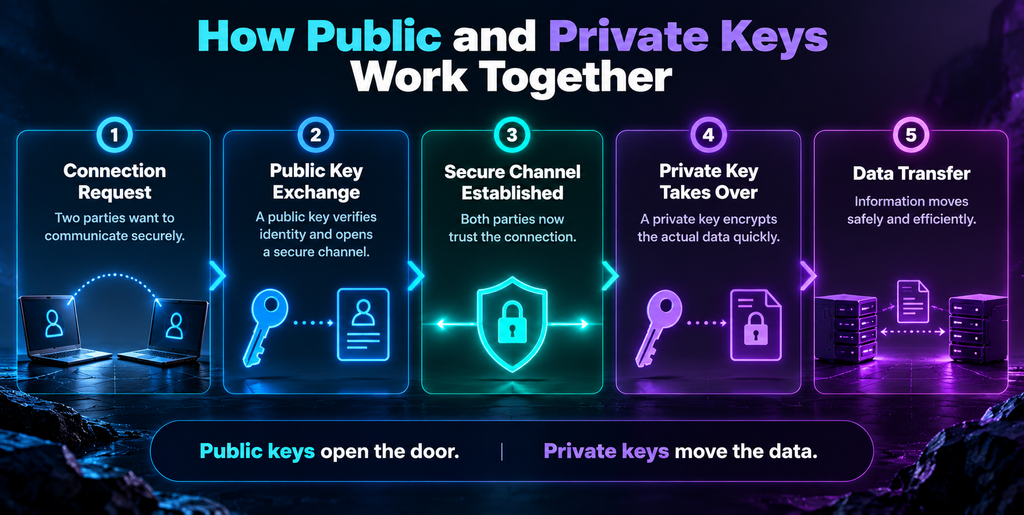
        Take the case of a confidential document that a client receives for the first time. Here public key cryptography is employed to put in place a secure channel after it has confirmed the identities of both parties. Private key methods then do the rest, encrypting the file at speed so as not to impede the transfer. It is this kind of layering that makes the combination of the two indispensable to many a modern system; one will find the same sort of thing going on behind the scenes with cloud storage or an online banking and messaging app. 

        Managing Keys Safely 

        No matter what method you put in place, you cannot overstate the importance of key management. A lost private key is gone for good, and with it goes any access to the data it encrypted. To mitigate such risk, one must limit access, put keys where they are secure, and see to it that they are rotated from time to time. There is a move among organizations to let purpose-built software does the work of these things on its own; this not only bolsters protection but also takes human error out of the equation. 

        Then there is the training of employees. It is essential that staff have no ambiguity as to how to go about dealing with sensitive keys properly. If someone is careless and puts a key over an unsecured line, they can waste months of planning. Audits on a regular basis will uncover any chinks in the armor before an attacker does. In the end, a sound combination of software and the right habits make for a far more robust defense. 

        Which Method Should You Use? 

        It is the norm for modern systems to employ a combination of the two. One will implement a public key exchange to open up a secure channel, after which the private key is called on for the data transfer proper, as it is the quicker option. In this way the hybrid model offers a good compromise between speed and robust identity verification. 

        For the most part, software applications will take care of the cryptography without any intervention. QEncrypt from MindSuite is a good example of file protection. Yet understanding the concepts at work is helpful; it clarifies what these tools do and why settings such as encryption type or key length matter. 

        Frequently Asked Questions 

        1. What is the main difference between public key and private key cryptography?  

        With public key cryptography, there are two distinct keys at work, whereas the private key variety relies on a single shared key for encryption and decryption. 

        2. Is public key cryptography more secure than private key cryptography?  

        In an open network public key cryptography will generally be the more secure option, but in a closed system where trust is not an issue, private key cryptography is still very much to be relied upon. 

        3. Can these two methods work together?  

        One will find that several systems make use of both. A secure link is put in place by the public key approach, and from there the private key is called on for the quicker transfer of data. 

        4. Why is private key cryptography faster?  

        The mathematics at work in private key cryptography is of a simpler nature, which in turn means less processing time, an advantage to be had when one has to put through large volumes of data in short order. 

        5. Do I need advanced technical skills to use encryption tools?  

        As for the rest, there is no need to concern oneself with it. Programs like QEncrypt handle key generation and management as part of their routine. Yet some familiarity with the workings of public and private keys helps the user ensure that they properly understand the settings and permissions. 

        Final Thoughts 

        There is a distinction in how public and private key cryptography go about the business of safeguarding sensitive data, even if the result is the same. One will be preferred for speed and simplicity; the other for flexibility and identity verification. It is useful for an individual or a company to have these differences in mind when deciding on the proper course of protection. With the way data threats are changing, a grasp of the fundamentals of encryption is more of an asset than ever. An awareness of how such systems work will lead to better security habits, whether for personal files or those of the firm. There are tools on hand that do not obscure the essentials, yet they make good protection available to all by making the encryption process less of a chore.  

        To be able to make sound security decisions down the road, it pays to get to know these concepts. In the final analysis, a well-considered approach to cryptography means your digital communications are safer and data storage is more robust, which is something to have whether at home or running a business. For those with sensitive information to contend with, it is also 

        Meta Title: Will Quantum Computers Break Encryption? PQC Guide 2026 

        quantum encryption

        Cybersecurity teams keep asking one question with growing urgency: will quantum computers break encryption before businesses can prepare?  

        For the time being, no, though one would be hard-pressed to say for how long, given that the clock is ticking. There are quantum machines in operation, and researchers put more stable qubits in place with each passing year. Yet RSA and elliptic curve cryptography are what secure the banking, healthcare, and government systems across the globe. In a sense, the chasm between what quantum can do and what it aspires to is the crux of any security discussion at present. And an attacker has no requirement for a functional quantum computer; patience will have to suffice.  

        We examine the actual timeline here, the new standards that are making vulnerable algorithms obsolete, and the import of post quantum cryptography on the security of your organization going forward. 

        The Ticking Qubit Clock: How Quantum Machines Threaten Your Data 

        There is a certain intractability to the task of factoring large numbers or dealing with discrete logarithms for a classical computer. The security of RSA and ECC is predicated on this very fact.  

        Put a quantum computer of adequate power to the job, and it will run through an infinity of potential solutions in a short order, rendering today’s encryption obsolete. One need not take this on faith; the mathematics are there in black and white. For any organisation with sensitive data to manage, the implications are a matter of altering one’s security calculus. 

        Shor’s Algorithm: The Math That Ends RSA’s Reign 

        It was Peter Shor who put it to the test some decades back, showing that with a quantum computer of sufficient power, one can undo public key encryption of the sort RSA, ECDSA, and Schnorr signatures are founded on, be it by way of integer factorization or discrete logarithms. Even an RSA key of 2,048 bits, which would stand up to any classical brute force attempt, is no match for what Shor’s theory dictates, provided there are enough qubits that have been error-corrected. The upshot is that the day will come when most of the public key systems in common use are rendered obsolete. 

        Why “Not Yet” Isn’t the Same as “Never” 

        One will not find in today’s quantum hardware the sort of stable, error-corrected qubits that are a prerequisite for Shor’s algorithm to be put to work on a scale that would put actual keys at risk. The machines of the moment are too noisy and can only manage shallow circuits. Yet “not yet” does not mean “never,” so there is no point in deferring plans until one has the luxury of certainty. 

        Harvest Now, Decrypt Later: The Attack Is Already Happening 

        Adversaries do not need a quantum computer in hand to be amassing encrypted data for future decryption. In fact, they are at it today; security researchers have a name for the threat model, harvest now and decrypt later, and you will find state-sponsored groups making it their way of doing business.  

        Data of a sensitive nature may be locked up for decades but is as good as exposed once a machine with the requisite quantum power comes online. So, there is present-day risk for any organization that has long-lived data in its keeping, be it defense files, medical records, or legal contracts. The very reason post-quantum cryptography is of import, even with large-scale quantum computers still some years off, is accounted for by this one threat model. 

        Mosca’s Theorem: The Risk Equation Every CISO Should Know 

        One can turn to Mosca’s theorem for a framework to deal with the risk. The IEEE has put forth security research that has the theorem factor in three things: the duration of migration, the period data needs to be kept confidential, and the projected advent of a quantum computer of cryptographic relevance.  

        Should the sum of the time to migrate and the necessary confidentiality outstrip the estimate for such a machine’s arrival, the organization is exposed. 

        NIST Draws the Battle Lines: Meet the New Cryptography Standards 

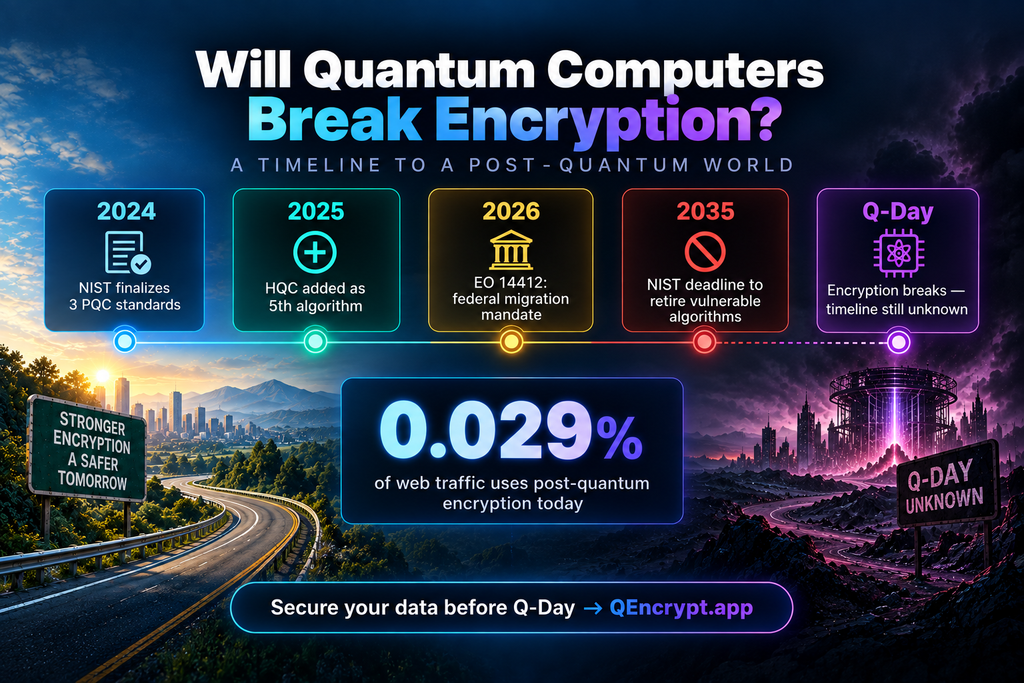
        The National Institute of Standards and Technology has put the finishing touches on ML-KEM, ML-DSA, and SLH-DSA, the first of their kind in post-quantum cryptography to be made into standards. It is a process NIST set in motion in 2015; over the years it has gone through 82 algorithms put forward by 25 nations to whittle down the candidates.  

        With these three now done, they can be used without delay in government infrastructure as well as on e-commerce sites and email systems. 

        A Fifth Contender and a Withdrawn Algorithm 

        There is more to NIST’s efforts than the three standards alone. The agency in March 2025 made HQC its fifth algorithm for post-quantum encryption, giving security teams a wider array of tools at their disposal.  

        A month after Executive Order 14412 was put in place in June 2026, all federal systems of high value were subject to firm deadlines as part of an expedited move across government to post quantum cryptography.  

        The standardization process has also proved adept at weeding out any that are not up to snuff prior to deployment. Case in point: in July 2026 Anthropic put it on record that one of its AI models had found a flaw in HAWK, a lattice-based signature algorithm being looked at, and the developers had no option but to pull it. ML-KEM and ML-DSA were not impacted by this; they are built on other mathematics and are in good standing. 

        Five Algorithms, One Mission: Kyber, McEliece, Dilithium, Falcon, and SPHINCS+ 

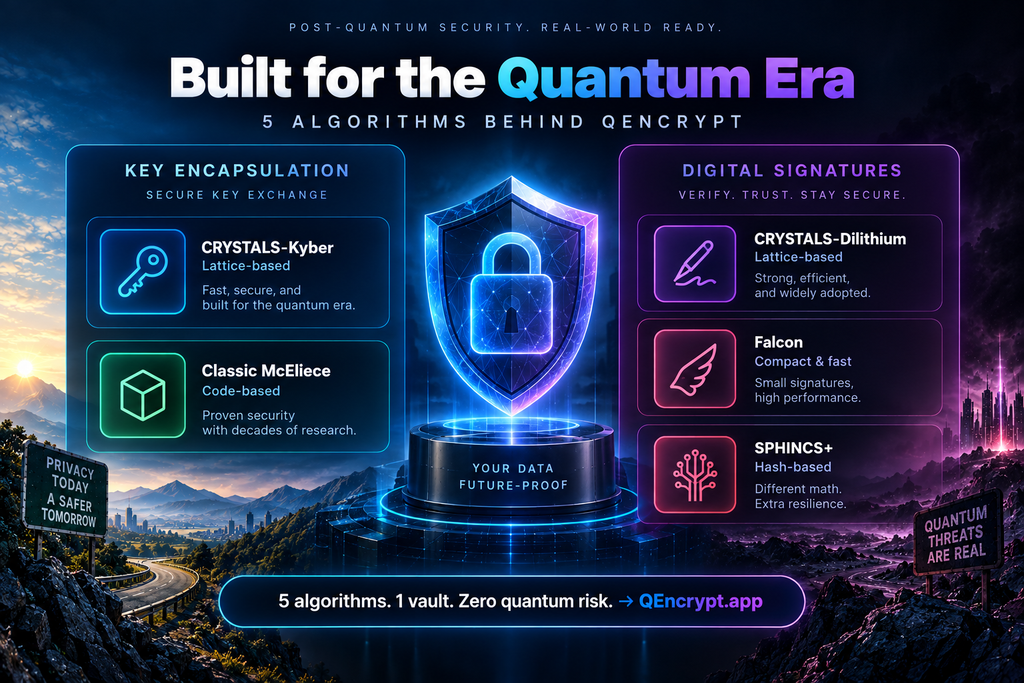
        With its sound mix of practical performance and security, lattice-based cryptography is the preeminent method for withstanding quantum encryption. CRYSTALS-Kyber, for instance, is a module-lattice problem that performs key encapsulation in place of RSA or Diffie-Hellman, both of which are vulnerable to Shor’s algorithm. Where one requires a mathematical basis of another sort there is Classic McEliece; it provides code-based key encapsulation at the cost of a sizeable public key but with a design that has been put through its paces by cryptanalysis for decades. 

        The same care must be taken with digital signatures. CRYSTALS-Dilithium is a fast, lattice-based option for signing that will see wide use at any number of security levels. Falcon is well suited to the task in mobile or IoT environments, where bandwidth is limited, as it produces compact signatures from NTRU lattices. Then there is SPHINCS+, a stateless, hash-based solution using Merkle trees. It forgoes a degree of efficiency to maintain a more conservative margin of security; one did not predicate on lattice assumptions.  

        In all, the five algorithms put real options before the security architect as opposed to a single point of failure. 

        Q-Day Countdown: When Could Encryption Actually Break? 

        There is no consensus on the figures, yet for the most part experts will tell you a device to get around current encryption is likely to be with us in ten years’ time; some researchers put it nearer 2035.  

        In any event, NIST has set 2035 as the date by which federal systems must do away with algorithms vulnerable to quantum computing, according to the transition guidance in its NIST IR 8547. One can find the origins of that schedule in the 2022 National Security Memorandum 10. 

        The Adoption Gap Nobody Talks About 

        There is a marked lack of urgency when it comes to adoption. Studies that have quantified the numbers show that post-quantum cryptography is being used in production traffic by OpenSSH and Google Chrome, but nowhere else; all told, it accounts for only about 0.029 percent of the connections measured. The chasm between available standards and their actual deployment is the industry’s most pressing vulnerability, even more so than the quantum hardware gap. 

        Who’s Already Quantum-Proofing? Apple, Google, and Cloudflare Lead the Way 

        A few of the big names in technology are well on their way to making the transition to post-quantum cryptography; one need only look at what they have done to see what is in store for the rest of the industry.  

        Apple, for instance, has put post-quantum safeguards in place with its iMessage PQ3 protocol, a combination of classical and quantum-resistant algorithms to secure messages. In a similar vein, Google and Cloudflare have put hybrid TLS into service on some of their infrastructure, using CRYSTALS-Kyber and other lattice-based approaches alongside conventional key exchange. Such early action from these companies shows there is no need to do away with all systems in an overnight fashion to be quantum resistant. 

        For the most part though, save for a select number of large platforms, you will not find this kind of widespread use. The engineering wherewithal to conduct a complete cryptographic inventory and then carry out a phased migration is beyond the means of many smaller concerns. So, the chasm between what the standards are and what gets put in place is only getting larger, while the quantum encryption menace draws nearer with every qubit record set. 

        Will Quantum Computers Break Encryption: Busting Common Myths 

        Confusion over the true timeline is a problem for some security teams, and it has a way of putting off action. There is a prevailing notion, for instance, that one is not at risk until quantum computers are in existence. The fact of the matter is data that has been harvested is left open to decryption from the instant it can be done, interception time notwithstanding. Or take the belief that migration is as easy as a software update; to do away with the cryptography in legacy systems, third-party vendor code, and hardware security modules is a matter of years in most cases. 

        Then there are those who consider post-quantum cryptography an option to be put aside until the feds set a deadline. But the private sector has no such regulatory leeway when it comes to the “harvest now, decrypt later” scenario that puts its data at risk. Security leaders would do well to sense these things to put their migration budgets where they need to be, instead of waiting for a deadline to compel them to act. 

        Your Post-Quantum Migration Checklist 

        One does not make a strategy of waiting for certainty. It is incumbent on security teams to put in place several concrete steps without delay. Start by taking stock of all systems that are RSA- or ECC-dependent. An assessment should then be made as to what data must be kept confidential for the long haul; such information is open to the harvest now, decrypt later threat of the present day.  

        Ensure applications have cryptographic agility so that an algorithm can be changed later without requiring a complete rebuild. Develop a workable migration plan and assess the support vendors are providing for NIST-standardized algorithms. And keep an eye on NIST and the industry for any new guidance, given how fast this area is and how a best practice of a few months back may well be superseded. 

        QEncrypt: Built for the Quantum Era from Day One 

        There is a cost to retrofitting encryption in the wake of a breach, not to mention the time it takes. QEncrypt has made a point of doing things another way; post-quantum cryptography is part of its architecture from the outset. With CRYSTALS-Kyber and Classic McEliece for key encapsulation, any communication encrypted by QEncrypt will stand up to classical as well as quantum attacks. On the authentication and integrity side, digital signature workflows are put through CRYSTALS-Dilithium, Falcon, and SPHINCS+, so users have the benefit of layered protection and are not reliant on one algorithm. In this manner, the quantum encryption gap is dealt with head-on, not put off as something for down the road, answering the will quantum computers break encryption question with action rather than uncertainty. 

        The day an organization must answer for its present encryption practices need not be when a cryptographically relevant quantum computer makes its appearance. Proper migration is a matter of years, and what is harvested today can be decrypted later. By putting in place infrastructure that is NIST-aligned and quantum-resistant, one is safeguarding data of the future before the threat has even come to pass.  

        Explore how QEncrypt secures your organization’s security future and start the migration conversation before Q-Day arrives, rather than after. 

        How to Speed Up Computer: Real Reasons Most People Ignore 

        There was a time when the computer would be up and running in a matter of seconds. These days it is another story: it lingers on boot, the fan works overtime and each click has a certain weight to it. The tendency is to put it down to old age and put in an order for a new machine.  

        But age is seldom the whole story. Often, you can find the cause of the drag in some unassuming issues. Memory is being siphoned off by background programs, storage has crept over its limit, or the hardware is deliberately throttling back to manage the heat. And while all this is going on, the one application you have use for is left vying with a dozen others for what little resources are left. 

        This guide explains how to speed up computer performance by treating causes instead of symptoms. Each fix below stays practical, free where possible, and safe for everyday users. 

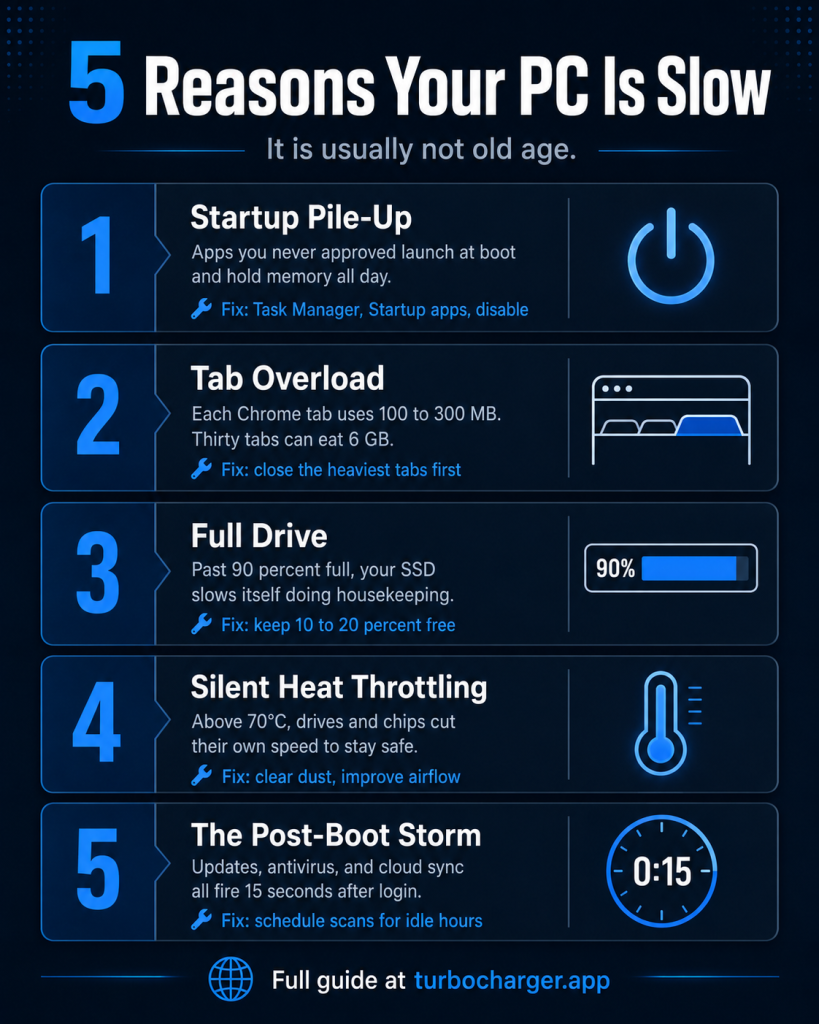
        Why Your Computer Feels Slow: Five Causes People Overlook 

        It is wise to know what you are up against before making any changes.  

        1. Startup Programs You Never Approved 

        Take the apps that install themselves to your startup list as an example. Without much fanfare, cloud clients and chat programs will put themselves in line with game launchers and update checkers. They are all vying for memory even before a window is opened. You can see them for yourself in the Startup apps tab of the Windows Task Manager.  

        Put an end to the ones that are not necessary at login and do a restart to see the difference in boot time. Anyone asking how to speed up computer startup should begin right here. 

        2. Memory Pressure from Browsers and Chat Apps 

        There is nothing on a standard desktop that will put a dent in your memory like a browser. A single tab in Chrome can take up anywhere from 100 to 300 MB, so with thirty of them open you are looking at several gigabytes being used up. Toss in Teams, Slack and Discord and an 8 GB system has no headroom left. At that point Windows is forced to swap data over to the drive, a process that is much more sluggish than working with actual RAM.  

        If one wants to see which tabs are the worst offenders, the browser’s task manager is the place to look. Put those to rest first; there is little point in shutting down the lighter ones. 

        3. Storage That Sits Too Full 

        For a solid-state drive (SSD) to function as it should, there must be some room to spare. The controller relies on these extra blocks for the odd bit of housekeeping and garbage collection. But when you push the drive past 85 or 90% full, that process is in direct competition with your requests. It is best to leave 10 to 20% of the capacity open; doing so will do more for system performance than any number of cleanup utilities. 

        4. Heat and Silent Throttling 

        To guard against the heat, processors and drives will put on the brakes. With consumer NVMe drives, one can expect throttling to set in once the temperature gets to about 70C or so. The firmware on today’s models is written to reduce speeds in a measured way; it is not something you are likely to see happen in the moment. What comes across as more apparent is a system that has been running at a clip for ten minutes and then suddenly bogs down. The situation is made worse by a build-up of dust or obstructed vents, or simply having the drive sited next to a warm graphics card. 

        5. The Post-Boot Storm 

        It is not uncommon for a host of demanding tasks to be set in motion within ten or fifteen seconds of logging on. The system will have Windows Update do its check, the antivirus will put in a scan, and cloud folders will start to sync. The result is a desktop that appears fine even as your drive is pegged at 100%. To avoid this, it is best to time your updates and scans for when you are not at your desk. 

        How to Speed Up Computer Performance Without Buying New Hardware 

        Now move from diagnosis to repair. Work in order, because each step tells you whether the next one matters. 

        Step 1: Read the Numbers First 

        1. Hit Ctrl + Shift + Esc to bring up the Performance tab.  
        2. Pay attention to three numbers in particular: a CPU reading over 80% usually indicates a process that has gone astray, while memory close to the limit means there are simply too many applications running.  
        3. Should the disk hit 100%, one can assume it is either background work or a drive on its way out. It is a useful read that will spare one from hours of aimless fiddling. 

            Step 2: Clear the Obvious Waste 

            1. Trim your startup list.  
            2. Close abandoned tabs.  
            3. Delete downloads and temporary files until the drive has enough free space.  
            4. Then clean dust from vents and fan intakes.  

                  These free fixes resolve a large share of complaints on their own. 

                  Step 3: Fix the Priority Problem That Nobody Talks About 

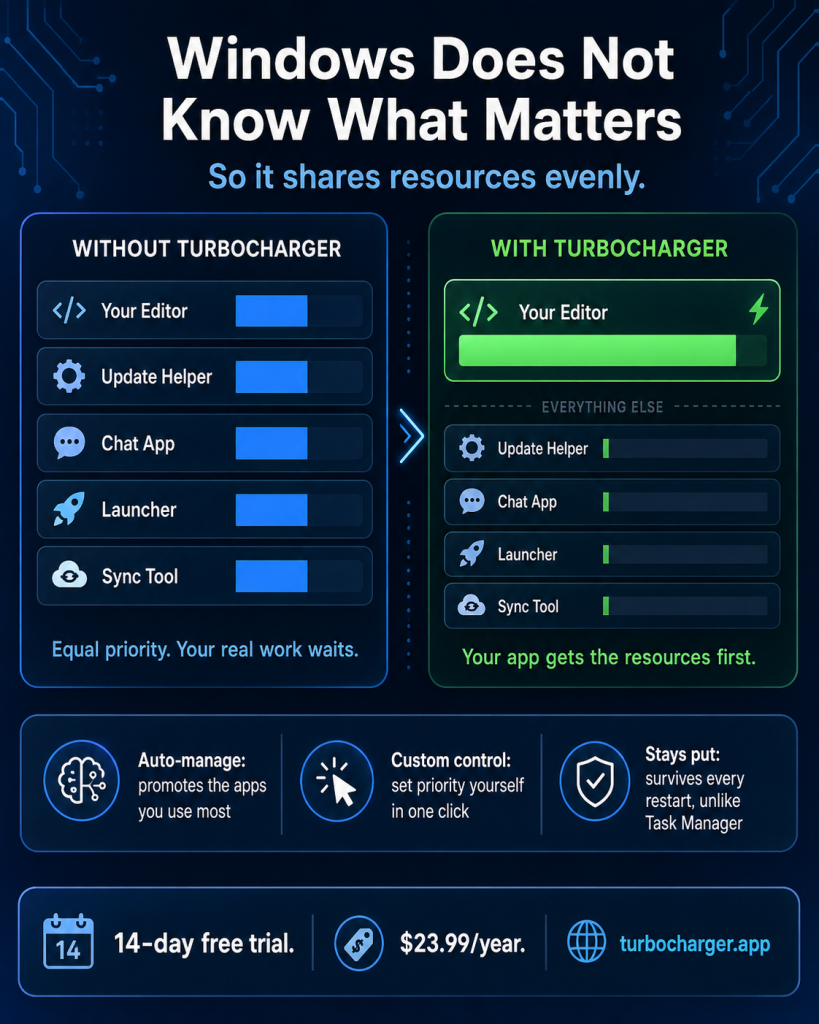
                  There is a truth to the matter that one will not find in most guides. Windows has a habit of treating your video editor no better than an update helper from some time back, and for all intents and purposes they are equals. The result is that both vie for processor time at the head of the queue, leaving the work you have in the foreground to be held up by clutter of its own making. 

                  One could go into Task Manager and set the priority by hand, but as soon as the machine is rebooted those changes are gone. Doing that every day is hardly a solution. 

                  TurboCharger is what puts an end to it. The program will automatically see to it that your favourite applications get the memory and processor they need. Should you wish to give a game or a render engine top billing, you can do so. In this way your work is not left wanting for resources and you are spared the chore of constant manual adjustment. It is proper pc optimization, not some fleeting registry hack. 

                  Step 4: Skip the Fixes That Do Not Work 

                  One must be honest about it: registry cleaners do not tend to yield any measurable improvement. And there is no point in defragmenting an SSD, as that only serves to waste write cycles. As for those RAM booster programs, they are little more than a way to make applications reload their data. If the machine is of a certain age, three hardware modifications will do far more to help. Start by putting in an SSD in place of the mechanical hard drive. Put in some extra memory should you have 8 GB or under. Then see to it that the case has better airflow. 

                  What TurboCharger Actually Does 

                  The tool solves one problem well instead of promising everything. Three features carry the work. 

                  Auto-Manage App Priority 

                  With TurboCharger, the apps you use every day are put forward while your habits are being monitored. That means your browser or editing suite no longer must vie with whatever is running in the background. 

                  Custom Manage App Priority 

                  Should you wish to take matters into your own hands, an automatic selection can be overridden. One might give a compiler top billing for the duration of a build and let it go once done. And because this is a setting that will hold up after a restart, it is more enduring than any ad hoc adjustment made in the Task Manager. 

                  A Simple Interface 

                  With the dashboard, one can see all the apps and their respective priorities at a glance. There is no need to wade into system settings or make any risky edits to change those priorities; a single click will do it. 

                  Getting set up is a matter of three steps: download and run the installer, then you are ready to assign your priorities.  

                  Who Benefits Most 

                  1. A programmer will put in the work to shield a compiler or debugger over the course of an extended build.  
                  2. For the gamer, it means staying ahead of overlays and launchers to avoid any stutter.  
                  3. Then there is the video editor, who gives render tasks the first call to expedite an export.  
                  4. On the business side, an IT manager must see that resources are properly distributed among the software that matters most.  
                  5. And when the load is on, a graphic designer makes sure those large files remain responsive. 

                          Build a Maintenance Habit That Holds 

                          Learning how to speed up computer performance solves half the problem. Keeping that speed solves the other half. 

                          A weekly reboot of the machine and a habit of closing tabs that are not in use is all that is required. Then on a monthly basis, one should go over the startup list and make sure there is adequate drive space. Come quarter’s end, it is time to check the health of the drive under Windows storage settings and give the vents a good cleaning. As for resource allocation, leave that to TurboCharger to take care of behind the scenes. 

                          Frequently Asked Questions 

                          How long does it take to speed up computer performance noticeably?  

                          An hour is more than enough for most software fixes. You will see the benefit of clearing drive space and turning off startup apps with a single restart. Hardware is another matter; while it is a longer process, the performance gains are far more substantial. 

                          Will more RAM fix everything?  

                          As for extra memory, only if you are habitually running at capacity. It will not cure a failing drive or malware, nor does it do anything to stop throttling. A look at Task Manager is in order before parting with any cash. 

                          Is changing app priority safe?  

                          TurboCharger is different in that it leaves system processes be. The program makes its adjustments to user applications, not the critical Windows services, which spares you from the kind of instability one might get by doing it manually. 

                          Does TurboCharger work on Mac?  

                          The app is for Windows exclusively, as it needs to make use of the OS’s process priority controls. 

                          Why does my computer slow down again after a few weeks?  

                          Over time drives fill up, caches refill and new installations put entries on your startup. Left to their own devices things drift. Ongoing management is the way to head that off, making automated prioritization superior to an occasional cleanup. 

                          Final Thoughts 

                          One does not often have to replace a machine for being slow; often, it simply requires the right kind of attention. Do not waste time with conjecture, put in some effort where it counts. Have a look at the figures in Task Manager first. Make sure you are clearing out your startup list and drive space and put an end to those tabs left open from hours past. A little dust in the vents is worth checking on as well. Such measures are without cost and will put an end to most complaints. 

                          But there is also the matter of structure to deal with. The way things stand, the machine has no way of telling which application is of consequence and will distribute its resources, accordingly, leaving your actual work to wait. TurboCharger puts an end to that uncertainty. It enforces your priorities, so they remain intact even after a restart.  

                          Do you want to speed up computer performance and hold the improvement?  

                          Start the 14-day free trial at Turbocharger. Then measure the results against your own daily workload, not against someone else’s benchmark. 

                          Public vs Private Key Cryptography Explained Without Jargon 

                          Encryption is a word that carries some complexity, yet the principle behind it is as straightforward as they come. Consider the routine of an online purchase or logging into your bank account, or even when you send off a private message; in each case two mathematical keys are quietly at work to put a shield around your data. You do not need a background in computer science to understand it. Once you get beyond the jargon, public and private key cryptography is quite intuitive. 

                          This guide will simplify the distinction between the two, show how they secure information, and highlight your existing dependence on them.  

                          First, What is a “Key” Anyway? 

                          Before setting the two types up for a side-by-side comparison, it is helpful to have a firm grasp on the role of a key. At its simplest, encryption is a matter of converting readable data, or plaintext, into something that looks like random noise; the key is what controls the process. Should one run the same plaintext through an algorithm with a different key, the results will be altogether distinct. 

                          Think of the key as your instructions for both locking and unlocking a message. Without the proper one, the encrypted output is pure gibberish. That is a concept worth keeping in mind as we go over the methods below. 

                          The Two Types of Encryption Keys 

                          Modern security relies on two distinct approaches to keys. They solve different problems, and understanding each one separately makes the comparison far clearer. 

                          Private Key Encryption, the Original Approach 

                          There is an oldness to symmetric encryption, also known by its other name, private key encryption. It is the older of the two and works simply: the same shared key locks a message and then unlocks it. The obvious corollary is that whoever has the key can read the data, which makes keeping it secret essential. 

                          The contents remain safe, just as a physical key secures or grants access to a lockbox, as long as copies are kept in trusted hands. The approach also has its efficiencies. Because the mathematics involved are not taxing, it is fast and handles large files or real-time traffic without trouble. 

                          There are well-documented flaws in the method, however. Before any confidential exchange can take place, the parties must come to an agreement on a key. Whether delivered by hand, by mail, or posted online, it cannot be ruled out that an eavesdropper may obtain it. A compromised key can undo the whole system. In fact, for centuries this issue of risk-free distribution was what limited secure communication to people who could get together and make the necessary arrangements face to face. 

                          Public Key Encryption Solves the Sharing Problem 

                          The advent of public key encryption in the 1970s was a turning point, thanks to the mathematicians who put forward this form of asymmetric cryptography. It put an end to the need for a single shared secret by giving every individual a pair of associated keys: one public and one private. While they are tied together mathematically, it is not feasible to derive one from the other. 

                          There is a clear division of labor between the two. The public key may be distributed without restriction, whereas the private key is kept under wraps by its owner. They are designed to work in opposition; data secured with the public key will yield to nothing but the corresponding private key. 

                          Consider an open padlock. One can give out as many as one wishes, and anyone can fasten one to a box for you. Yet only you can open them. In much the same way, a stranger can dispatch something to you in confidence without the two of you ever having met. It was that kind of innovation that enabled secure communication on the open internet. 

                          How Public and Private Keys Work Together 

                          The real power of asymmetric cryptography shows up when the two keys cooperate. They deliver privacy and proof of identity at the same time. 

                          The Encryption Process Step by Step 

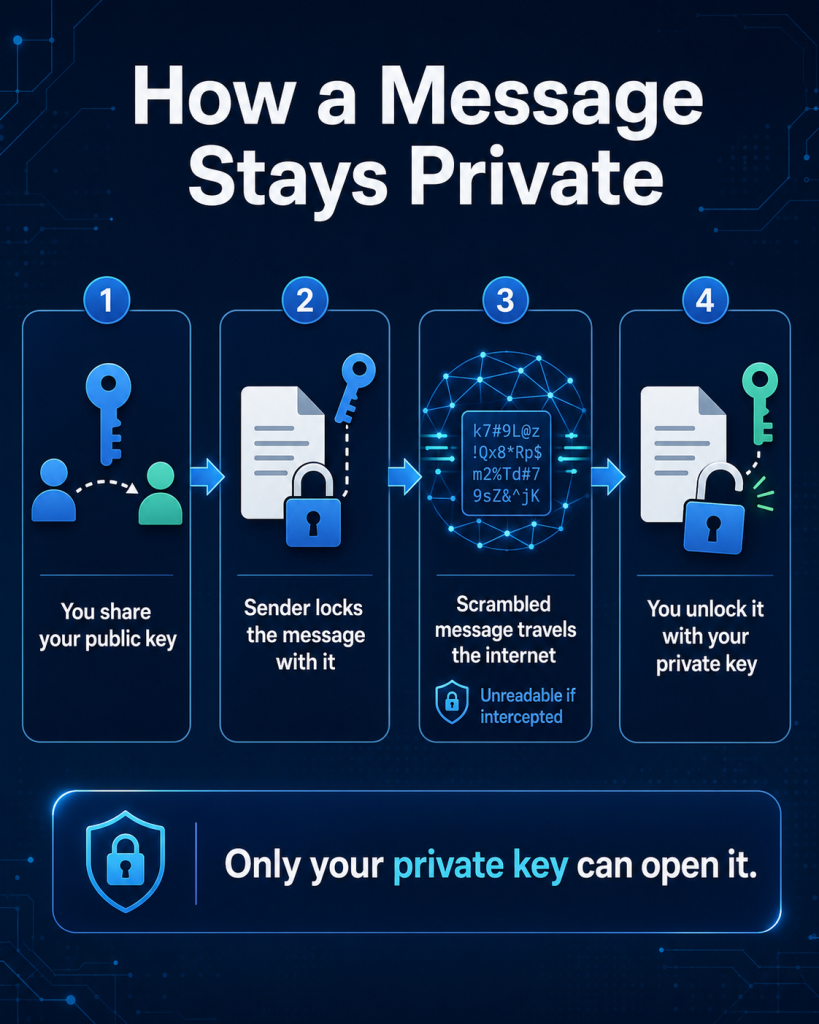
                          The process is easier to follow as a short sequence. Suppose someone wants to send you a confidential message: 

                          1. You publish your public key so anyone can find it. 
                          2. The sender uses that public key to scramble the message into ciphertext. 
                          3. The scrambled message travels across the internet, where it looks like nonsense to anyone who intercepts it. 
                          4. You receive it and use your private key to unlock the original text. 

                                Because only your private key can reverse the process, interception no longer breaks the system. An attacker may copy the message in transit, but they still cannot read it. That elegant division of labor is the reason asymmetric cryptography underpins so much of modern security. 

                                Beyond Secrecy: Proving Who You Are 

                                Confidentiality is not the only aspect of public key cryptography. There are digital signatures as well, a way of vouching for one’s identity that involves the keys changing roles. 

                                To put this into practice, you would use your private key to sign a message and leave your own mark. Anyone who wants to verify it can use the public key. A proper signature leaves the recipient in no doubt about the message’s origin or that it has not been tampered with; after all, only you have the private key, so no one else can claim authorship. 

                                It is how software updates are handled. Before a device will take on an update file, it must first examine the developer’s digital signature. That is the only way to keep an attacker from slipping in some malicious code. Ultimately, having both the public and private keys available provides a degree of privacy as well as trust. 

                                Where You Already Rely on These Keys 

                                You need not search far to come across this technology at work. In truth, it is in constant use, and one may well be oblivious to it. A few ordinary examples will show how widespread it has become. 

                                There are secure websites, for example. The padlock displayed in the browser is there because of a TLS handshake, an asymmetric cryptographic procedure that vouches for the site and puts in place a private channel. 

                                Chat apps are another example. Everyone uses them to encrypt their conversations, keeping the exchange private between the parties concerned. 

                                When it comes to cryptocurrency, possession of a digital asset is as simple as having the private key. The public address is for others to make transfers with. 

                                Email security and the protocols for logging in operate on the same principle, making use of signatures and key pairs for the authentication of the user or sender. 

                                Understanding the mechanics behind such matters is not a simple task. Given how deeply they are embedded in the day-to-day, the knowledge has worth of its own, not just as some academic formality. 

                                Public vs Private Key: A Quick Comparison 

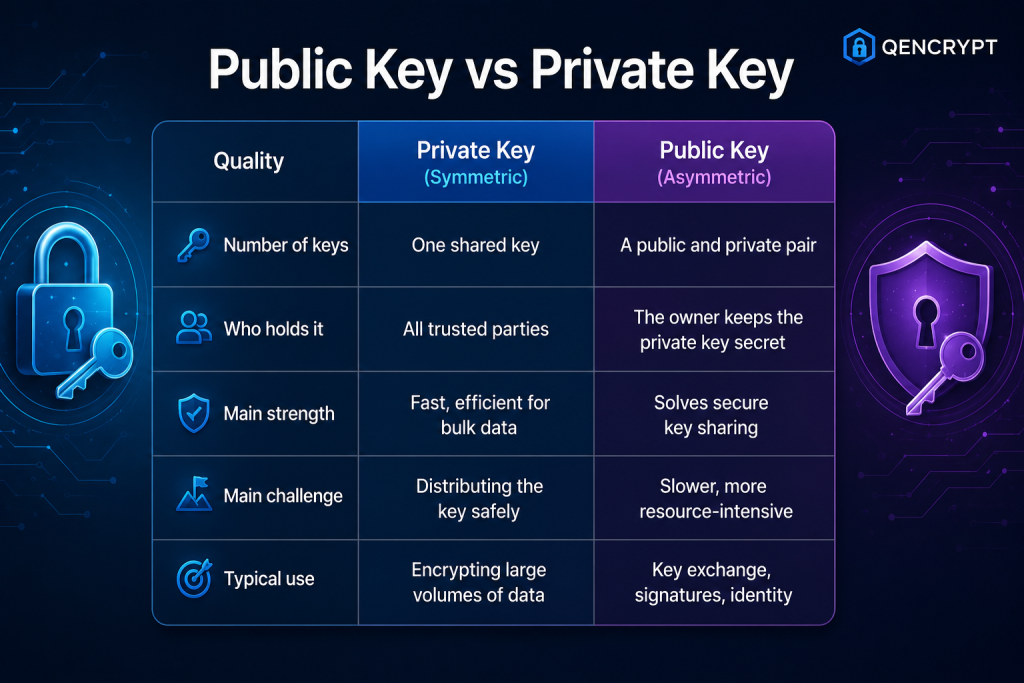
                                To clarify the distinction, here is how the two approaches compare across the most important qualities: 

                                In practice, most real systems combine both. Public-key cryptography handles the risky introduction between strangers, then hands off to fast symmetric encryption for the heavy lifting. You get the best of both methods working together. 

                                The Challenge on the Horizon 

                                There is one limitation that many introductory guides skip, and it deserves attention. The security of today’s most common public key methods, such as RSA and elliptic curve cryptography, rests on math problems that ordinary computers cannot solve quickly. 

                                Harvest Now, Decrypt Later 

                                There is a very real possibility that quantum computers will one day solve these kinds of problems much faster. It has given rise to a current preoccupation with what is termed “harvest now, decrypt later.” The concept is simple enough for an adversary: make off with your encrypted data and put it on ice until such time as quantum tech is advanced enough to break the code. For that reason, any information you cannot afford to have in the wrong hands, whether medical or financial records or intellectual property, is at risk if it is protected only by the old algorithms. 

                                The Move Toward Quantum Safe Encryption 

                                With that in mind, standards bodies have put forward quantum-resistant encryption to defend against such attacks in the future. The intent of these more recent methods is to shield long-lived data from threats that are as yet incomplete but on the horizon. When it comes to sensitive information requiring privacy for the long term, a forward-looking form of protection has become a necessity rather than an option. 

                                The Bottom Line 

                                There is no reason for encryption to be an impenetrable black box. The concept is straightforward once one grasps the dynamic of a public key to lock and a private key to unlock; from there, the whole scheme makes sense. Public keys handle the safe sharing of secrets while private keys are all about speed, and in combination they put a safeguard on virtually all your online activity. 

                                Yet the foundations of encryption are in flux, making it essential to have future-proof protection. It is only sensible to opt for tools that will serve you going forward rather than what was adequate in the past.  

                                For those seeking encryption capable of withstanding the threats of tomorrow, even in a quantum world, QEncrypt offers a look at how their modern, quantum-safe approach is put to work. 

                                [Get Started] 

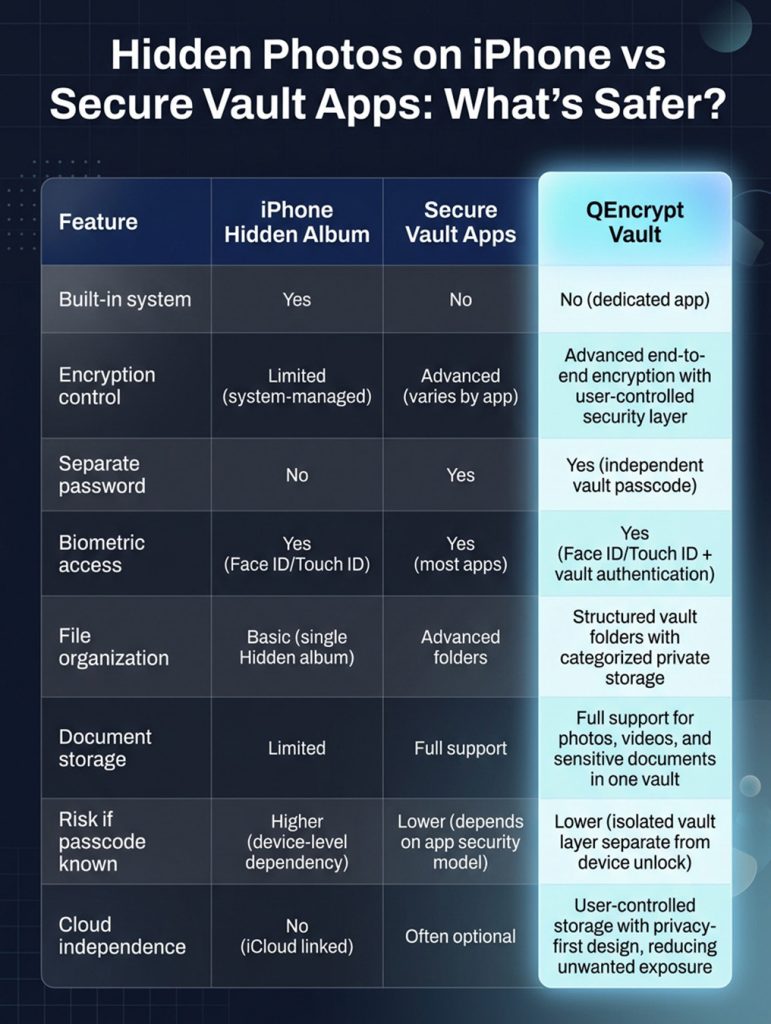
                                Hidden Photos on iPhone vs Secure Vault Apps: What’s Safer? 

                                When you weigh the price of putting encryption in place against what a data breach could cost you in financial, legal, and reputational terms, the former is usually a small matter. It is an extra layer of protection for your business records, customer details, intellectual property, or even personal files that you simply won’t get from a standard storage device. 

                                These days, with cyber threats on the move and companies having to think about a post-quantum world, secure storage is no longer optional if you want a sound cybersecurity plan.  

                                You will find most security experts don’t see encryption as something you can do without; it is a necessity for any sensitive data. And for those who want a more forward-looking form of protection, there are modern solutions like Qencrypt Vault.  

                                By making use of next-generation cryptography, they give organizations the means to fortify their defences against whatever threat may be coming down the line. 

                                Why Photo Privacy Has Become a Major Concern 

                                Smartphone privacy is no longer a niche concern. As devices become central to personal and professional life, the amount of sensitive data stored locally has increased dramatically. 

                                Growing mobile data sensitivity 

                                According to Pew Research Center, around 60% of smartphone users in the U.S. have at least one type of sensitive personal document stored on their device (such as IDs, financial info, or health records). 

                                Meanwhile, a Statista report (2025) estimates that users globally take over 1.8 trillion photos annually, with a significant portion stored on mobile devices. This massive growth increases the need for structured privacy tools beyond simple gallery management. 

                                Why hidden storage matters 

                                Users typically want to: 

                                • Protect personal identity documents 
                                • Separate private memories from shared albums 
                                • Prevent accidental exposure during phone sharing 
                                • Secure sensitive screenshots and messages 
                                • Reduce risks from device loss or theft 

                                These needs explain the popularity of both Apple’s Hidden album and third-party vault applications. 

                                How to Hide Photos on iPhone Using Apple’s Built-In System 

                                Apple integrates privacy directly into iOS via the Photos app. This is the most widely used method for basic photo hiding. 

                                Step-by-step: how to hide photos on iPhone 

                                To hide an image or video: 

                                1. Open Photos 
                                2. Select the media file 
                                3. Tap the three-dot menu 
                                4. Choose Hide 
                                5. Confirm selection 

                                        Once hidden, the item is removed from the main library and moved to a dedicated hidden album. 

                                        Face ID protection for hidden photos 

                                        With the latest iOS updates, Apple has beefed up security by putting Face ID or Touch ID in front of the Hidden album. You won’t be able to get at your hidden photos without first passing a biometric check. In fact, if you go into settings, you can have the album concealed altogether. It is a good deal more private than what you would find on an older version of iOS. 

                                        Advantages of Apple’s Hidden Album 

                                        • Seamless system integration: Because it is built directly into iOS and the Photos app, no additional installation or setup is required. It works instantly across devices using the same Apple ID and feels like a natural part of the gallery experience without requiring learning new tools. 
                                        • Strong biometric protection: Face ID and Touch ID reduce unauthorized access risk by ensuring only the device owner can open the hidden album. This adds an extra authentication layer that helps protect private media, even if someone else briefly accesses the phone. 
                                        • No extra storage apps needed: Users don’t rely on third-party services for basic hiding, which reduces exposure to external data collection risks. Everything stays within Apple’s controlled ecosystem, minimizing the need to trust additional developers or permissions. 
                                        • Free and always available: Every iPhone includes this feature by default at no extra cost. It is consistently updated through iOS upgrades, ensuring users benefit from ongoing security improvements without needing subscriptions or downloads. 

                                        Limitations of Apple’s Hidden Album 

                                        1. Same-device security dependency: The Hidden album is still tied to the device’s main security system. If someone knows the passcode, they may still gain access. 

                                        2. Limited encryption control: Apple does not allow users to independently manage encryption keys for hidden media. 

                                        3. iCloud synchronization exposure: If iCloud Photos is enabled, hidden content may sync across devices linked to the same Apple ID. 

                                        4. No advanced file organization: There are no secure folders, tagging systems, or document classification tools. 

                                        What Are Secure Vault Apps? 

                                        Secure vault apps are third-party applications designed specifically for encrypted private storage. Unlike Apple’s Hidden album, they are built with privacy as the core function rather than as a convenience feature. 

                                        These apps typically include: 

                                        • End-to-end encryption 
                                        • Independent vault passwords 
                                        • Secure media import systems 
                                        • Decoy login modes 
                                        • Cloud encryption options 
                                        • Private document storage 

                                        How Vault Apps Protect Private Photo Storage 

                                        Vault apps rely on encryption to secure content. Encryption converts readable files into unreadable code that can only be unlocked with the correct key. 

                                        Even if someone gains access to the phone storage: 

                                        • Files remain unreadable without authentication 
                                        • Data cannot be easily extracted or viewed 
                                        • Protection is independent of device security 

                                        Why encryption matters 

                                        A Verizon Data Breach Report found that over 80% of data breaches involved stolen or weak credentials rather than system hacking. 

                                        This highlights why independent encryption layers can significantly improve privacy protection. 

                                        When Apple’s Hidden Album Is Enough 

                                        Apple’s system is suitable for everyday privacy needs. 

                                        Best use cases:  

                                        • Personal media separation: Users who want to keep private selfies or casual personal images separate from shared albums. 
                                        • Temporary concealment: Screenshots or images that only need short-term hiding. 
                                        • Low-risk privacy needs: Content that is not highly sensitive, such as personal memories. 

                                        When Secure Vault Apps Are a Better Choice 

                                        Vault apps are designed for higher-risk privacy scenarios. 

                                        Ideal situations: 

                                        1. Sensitive documents: Tax files, IDs, and passports require stronger protection than basic hiding. 

                                        2. Business confidentiality: Contracts, client data, and internal documents benefit from encryption. 

                                        3. Advanced privacy needs: Users concerned about device sharing or theft risk. 

                                        4. Long-term secure storage: Vault apps provide structured organization for ongoing private data management. 

                                        Key Features to Look for in iPhone Security Apps 

                                        1. Strong encryption standards: Modern vault apps should use AES-256 encryption or equivalent industry-grade protection. 
                                        2. Independent authentication: A separate password ensures access is not tied only to device unlock methods. 
                                        3. Secure backup options: Encrypted backups reduce the risk of permanent data loss. 
                                        4. Zero-knowledge architecture: Some advanced apps ensure even developers cannot access stored data. 
                                        5. Regular security updates: Frequent updates help address vulnerabilities and maintain trust. 

                                                Common Privacy Risks Users Overlook 

                                                1. Weak device passcodes: Simple PINs remain one of the most common security weaknesses. 
                                                2. Shared Apple ID access: Family-shared accounts can unintentionally expose private content. 
                                                3. Cloud syncing exposure: Automatic syncing can increase access points for stored photos. 
                                                4. Device theft scenarios: If a phone is stolen and a passcode is compromised, hidden photos may still be accessible without stronger encryption layers. 

                                                      Security Best Practices for Photo Privacy 

                                                      • Use Face ID or Touch ID whenever possible 
                                                      • Enable two-factor authentication for Apple ID 
                                                      • Keep iOS updated regularly 
                                                      • Use strong, unique passcodes 
                                                      • Disable unnecessary cloud syncing for sensitive files 
                                                      • Store critical documents in encrypted environments 
                                                      • Avoid sharing device credentials 
                                                      • Periodically review hidden and vault content 

                                                      The Future of Photo Privacy on iPhone 

                                                      You will find Apple is putting more muscle behind its privacy controls on iOS, moving past the kind of superficial hiding to put in place system-level protections. Take the Secure Enclave, for instance: a piece of hardware on any modern iPhone that keeps biometric info like Face ID or Touch ID walled off from the rest of the operating system. In this way, an app and iOS cannot access your authentication data directly.  

                                                      Then there is the matter of on-device processing. Apple has been expanding this so that when it comes to analyzing photos for categorization or recognition, the work is done locally on the phone and not offloaded to a cloud server, which minimizes risk. 

                                                      iOS is also being stricter with its app sandboxing. Third-party apps now have less leeway to dig into your storage, photos, or system metadata. That curbs the sort of data leakage between apps, though it does put more pressure on encrypted vaults that use zero-knowledge models to do their job without interference. 

                                                      Given the scale of global breaches these days, with billions of records compromised every year, the whole approach to privacy is changing. It is all about user-controlled keys and hardware-backed encryption now. Secure photo storage is no longer something you can just opt for; it is a necessity. 

                                                      FAQs 

                                                      1. How to hide photos on iPhone easily? 
                                                      You can hide photos by selecting an image in the Photos app, tapping the three-dot menu, and choosing “Hide.” The photo is moved to the hidden album and protected by Face ID or your passcode. 

                                                      2. Are hidden photos on iPhone completely private? 
                                                      Hidden photos are protected by Face ID or passcode, but they still rely on your device’s main security system. If someone knows your passcode, they may still access them. 

                                                      3. What is the difference between hidden album and vault apps? 
                                                      The Hidden album is built into the iPhone and offers basic privacy, while vault apps use encryption and separate passwords for stronger protection. Vault apps are better for sensitive files and long-term secure storage. 

                                                      4. Can hidden photos be accessed from iCloud? 
                                                      Yes, if iCloud Photos is enabled, hidden photos may sync across your Apple devices using the same Apple ID. This makes them accessible on any trusted device linked to your account. 

                                                      5. Are vault apps safer than iPhone hidden photos? 
                                                      In most cases, yes, because vault apps use encryption and independent authentication layers. This makes them harder to access even if someone gets into your phone. 

                                                      Final Thoughts 

                                                      To understand how to hide photos on your iPhone, you first need to recognize the difference between convenient privacy and security that relies on encryption. Then there is Apple’s Hidden album, which for most people is a straightforward way to have some quick privacy without having to install anything extra. But you should be aware that, because it ties into the device’s own security, it won’t hold up in more high-risk situations. 

                                                      If you are dealing with sensitive documents or need to keep them confidential over the long term, a secure vault app is a better option. These apps provide their own authentication, structured storage, and proper encryption.  

                                                      In the end, what you go with comes down to the data in question. The built-in system from Apple will do fine for casual purposes. When you want a sturdier line of defense for your private photos, an encrypted vault is the way to go. And if you prefer an all-in-one approach, QEncrypt Vault has you covered with its secure environment for everything from videos and photos to any documents you wish to keep under lock and key. 

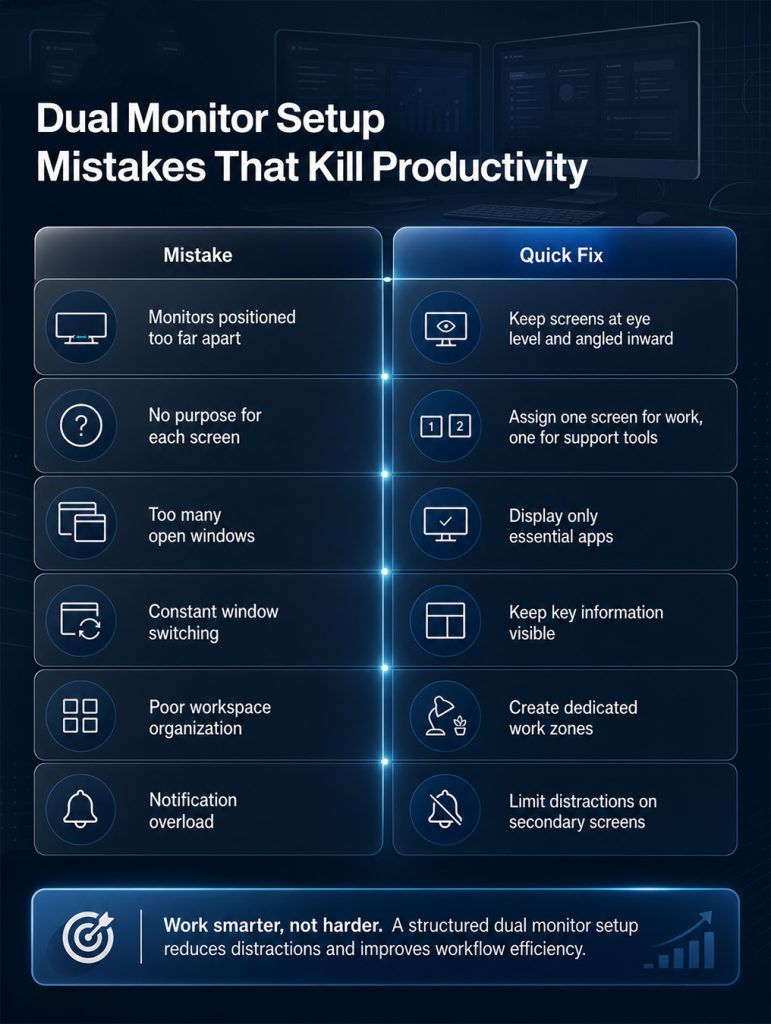
                                                      Dual Monitor Setup Mistakes That Kill Productivity (Fix Them Fast) 

                                                      There is no denying that a dual monitor arrangement can change your working habits. You have the screen space to keep track of communications, run projects, and pull up what you need to hand over without constantly switching between windows. 

                                                      Yet for all its potential, some professionals do not get the boost in output they were counting on. Inefficient organization or a cluttered display will only serve as a distraction; put the monitors in the wrong spot and you are more likely to see your efficiency drop than to enjoy a smooth workflow. 

                                                      Fortunately, it is simple to put right the errors that stifle productivity. With the proper tools and a couple of tweaks here and there, you can make your workspace a place where you can be focused and perform at your best from morning till night. 

                                                      Why a Dual Monitor Setup Improves Productivity 

                                                      There is more to a well-set-up dual monitor arrangement than just the extra screen space. It helps users organize their workflow, access information more quickly, and reduce distractions. You don’t have to minimize windows or hunt down applications; with this setup, your most important tools stay in plain view. 

                                                      Take a project manager, for instance: he can have reports open on one display and be tracking tasks on the other. A designer will have his creative assets out while he works, and a developer can put code on one side and documentation on the next. Over the course of a day these little things make a difference. 

                                                      Studies will tell you that if you can eliminate superfluous navigation, you will see task completion times go down and frustration go with it. Your staff are not wasting time looking for something; they are focused on the work that matters. Done right, having two monitors makes for a much smoother, more productive way of working. 
                                                      Common Dual Monitor Setup Mistakes That Reduce Productivity 

                                                      • Monitors Incorrectly 

                                                      Often people make the mistake of putting their monitors where they are uncomfortable to use. It is all too common for users to set screens at odd angles or place them farther apart than necessary. Before long you are straining your eyes and neck from all the extra head movement. 

                                                      Then there is the matter of ergonomics, which is key to being productive at work. When your environment is not right, you find your concentration waning as the day wears on. No matter how good your workflow is, a poorly thought-out physical space will hamper it. 

                                                      Fix It Fast 

                                                      • Position your primary monitor directly in front of you. 
                                                      • Keep the top of the screens at eye level. 
                                                      • Place secondary monitors at a comfortable angle. 
                                                      • Maintain a viewing distance of approximately an arm’s length. 
                                                      • Adjust brightness levels to reduce eye strain. 

                                                      Small ergonomic improvements often produce noticeable productivity gains. 

                                                      • Treating Both Screens the Same Way 

                                                      Professionals also make the mistake of running two monitors with no clear division of work. It is all too common for a user to have an assortment of applications open on every screen, which only serves to make things look and feel disorganized.  

                                                      When your setup is cluttered, you will struggle to find what you need. Before long, you may find yourself wasting time searching for a document or the right communication tool. 

                                                      Fix It Fast 

                                                      Create a dedicated role for each screen: 

                                                      Primary Screen 

                                                      • Active work 
                                                      • Content creation 
                                                      • Design tasks 
                                                      • Data analysis 

                                                      Secondary Screen 

                                                      • Email 
                                                      • Team communication 
                                                      • Calendars 
                                                      • Research materials 
                                                      • Project tracking 

                                                      This approach helps maintain focus and reduces mental overload. 

                                                      Dual Monitor Setup Organization Strategies That Actually Work 

                                                      An effective dual monitor setup is built around organization. Simply adding another screen will not improve productivity if information remains scattered and difficult to access. 

                                                      • Create Dedicated Work Zones 

                                                      Treat each monitor as a dedicated workspace. Instead of randomly placing applications, group similar activities together. 

                                                      For example: 

                                                      Monitor One 

                                                      • Main work tasks 
                                                      • Writing 
                                                      • Editing 
                                                      • Design projects 

                                                      Monitor Two 

                                                      • Messaging platforms 
                                                      • Task management software 
                                                      • Reference materials 
                                                      • Dashboards 

                                                      This structure minimizes distractions and makes it easier to maintain concentration. 

                                                      • Keep Important Information Visible 

                                                      One of the most significant advantages of multiple monitors is the ability to display essential information continuously. 

                                                      Consider keeping the following visible throughout the day: 

                                                      • Project timelines 
                                                      • Task lists 
                                                      • Team updates 
                                                      • Performance metrics 
                                                      • Calendar schedules 

                                                      Having instant access to important information eliminates unnecessary clicks and saves time. 

                                                      • Reduce Digital Clutter 

                                                      More screen space often encourages users to open too many windows. While multiple displays increase capacity, cluttered screens can become overwhelming. 

                                                      Instead: 

                                                      • Close unused tabs. 
                                                      • Archive completed tasks. 
                                                      • Consolidate similar applications. 
                                                      • Organize windows consistently. 

                                                      A clean workspace supports better decision-making and improved focus. 

                                                      The Hidden Cost of Constant Window Switching 

                                                      You might be surprised at how much productivity window switching costs, which most professionals don’t fully appreciate. 

                                                      Then there are the interruptions. Each one makes your brain have to reorient itself to a new task. It might not seem like much at the time, but those few seconds add up over the course of a day and significantly impact your output. 

                                                      Window switching can lead to: 

                                                      • Reduced concentration 
                                                      • Increased mental fatigue 
                                                      • More mistakes 
                                                      • Slower task completion 
                                                      • Difficulty maintaining focus 

                                                      Fix It Fast 

                                                      Use tools that always keep critical information visible. Rather than hiding information behind multiple tabs, create dedicated spaces for frequently accessed data. 

                                                      Examples include: 

                                                      • Team communication channels 
                                                      • Project dashboards 
                                                      • Notes and reminders 
                                                      • Task management boards 
                                                      • System monitoring tools 

                                                      Reducing context switching helps maintain workflow momentum and improves overall efficiency. 

                                                      Why Workspace Optimization Matters More Than Extra Screens 

                                                      You might be surprised at how much switching between windows costs in terms of productivity, a fact that most professionals don’t fully appreciate. 

                                                      Then there are the interruptions. Each one makes your brain have to reorient itself to a new task. It might not seem like much at the time, but those few seconds add up over the course of a day and significantly impact your output. 

                                                      Effective workspace optimization includes: 

                                                      • Logical screen layouts 
                                                      • Consistent application placement 
                                                      • Clear task prioritization 
                                                      • Reduced distractions 
                                                      • Improved information visibility 

                                                      When physical and digital workspaces are aligned, employees can work more efficiently and with less stress. 

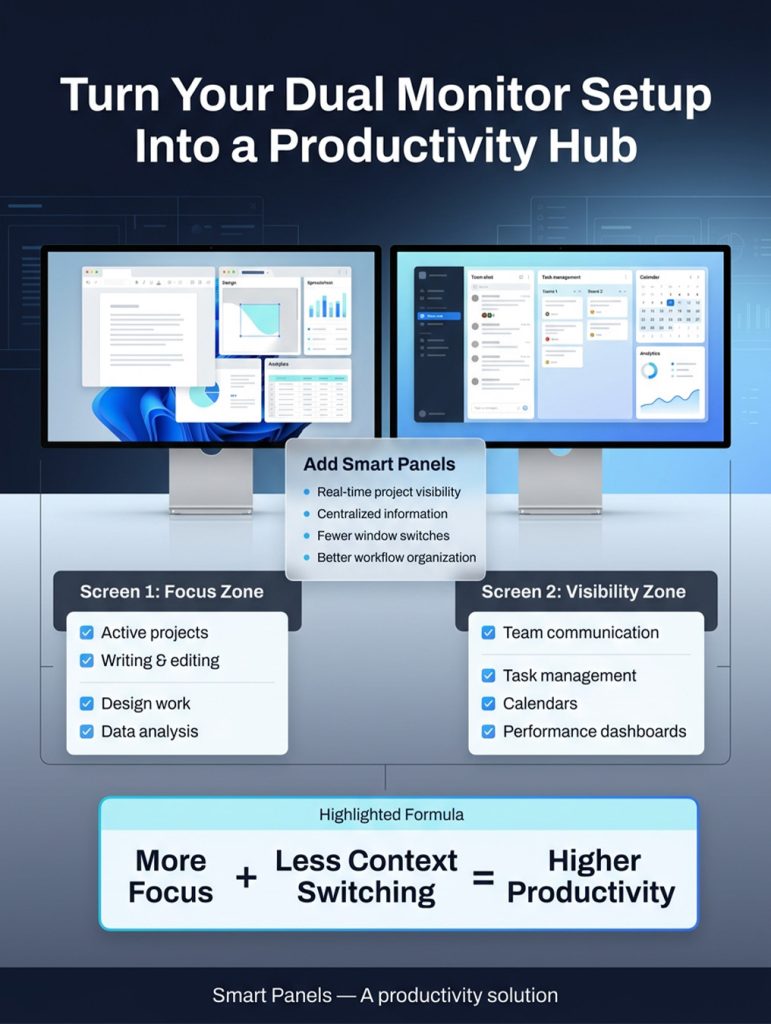
                                                      How Smart Panels Solves Common Dual Monitor Problems 

                                                      For many people, the second monitor is not what it could be. They let it devolve into just another place to park open windows and end up with more clutter than actual productivity. 

                                                      SmartPanels are the answer to that. What they do is turn your secondary screen into a proper hub for getting things done. You don’t have to keep opening and shutting down apps; the panel puts the information you want right in front of you in a way that is both orderly and at hand. 

                                                      Benefits include: 

                                                      • Real-time project visibility 
                                                      • Dedicated information dashboards 
                                                      • Faster access to key data 
                                                      • Improved organization 
                                                      • Reduced application switching 
                                                      • Better workflow management 

                                                      Rather than treating a second monitor as extra space, Smart Panels turns it into a purpose-built productivity tool. 

                                                      Smart Ways to Use Your Secondary Monitor 

                                                      A secondary monitor becomes significantly more valuable when used strategically. 

                                                      1. Project Tracking: Make sure the whole team can see where things stand at any point in the day with timelines, milestones, and progress reports. It is a simple way to keep everyone informed and save them from having to track down status updates. 
                                                      2. Team Communication: Put your communication tools on a screen of their own. This way, everyone can see the messages, but they don’t interfere with what people are working on. 
                                                      3. Performance Dashboards: For better visibility and to make decisions more quickly, have a live view of your operational data, business metrics, and other KPIs. 
                                                      4. Calendar Management: Schedules, appointments, and deadlines should be within easy reach. It’s good for planning, and it means you won’t overlook a commitment. 
                                                      5. Notes and Reminders: Set aside some panels for action items or anything else of import that you need to hand to keep the day running smoothly. 

                                                              A properly managed dual-monitor environment becomes a command center that keeps critical information within view. 

                                                              Why Software Matters More Than Screen Size 

                                                              You could argue that the size of your monitor is a big deal, but eventually it is the software, not the hardware, that tends to be the catalyst for better productivity. Even the finest monitor won’t organize your information; what matters is how well you manage your workflows on screen. 

                                                              That is the gap MindSuite’s tools are designed to fill. With the right productivity software to centralize your data and make key resources easy to access, you get more from any display in your workspace. Put some SmartPanels together with these tools and you have a work environment that is far more efficient and focused. 

                                                              Best Practices for Long-Term Productivity 

                                                              To maximize the benefits of your dual monitor setup, follow these proven strategies: 

                                                              1. Assign a clear purpose to each monitor. 
                                                              2. Keep frequently used information visible on one monitor. 
                                                              3. Reduce unnecessary notifications. 
                                                              4. Minimize window switching. 
                                                              5. Maintain a clean digital workspace. 
                                                              6. Organize applications consistently. 
                                                              7. Use dashboards to centralize information. 
                                                              8. Regularly review and improve your workflow. 

                                                                            Small adjustments can produce significant productivity improvements over time. 

                                                                            FAQs 

                                                                            1. Does a dual monitor setup really improve productivity? 

                                                                            Yes. A well-organized dual monitor setup reduces window switching, improves visibility, and helps users manage tasks more efficiently. 

                                                                            2. What is the most common dual-monitor productivity mistake? 

                                                                            Poor organization is one of the biggest issues. Many users add a second monitor but fail to create a structured workflow. 

                                                                            3. How should I arrange my monitors? 

                                                                            Your primary monitor should be directly in front of you, while the secondary monitor should sit beside it at a comfortable angle and height. 

                                                                            4. How can Smart Panels improve a multi-monitor workspace? 

                                                                            Smart Panels transforms secondary displays into dedicated productivity dashboards that keep essential information visible and organized. 

                                                                            5. Is software more important than monitor size? 

                                                                            Often, yes. Effective software and workflow management often have a greater impact on productivity than simply increasing screen size. 

                                                                            Conclusion 

                                                                            When you use a dual monitor arrangement effectively, it can boost your productivity. But all too often its value is diminished by the usual errors: putting the monitors in the wrong spot, letting the screens get cluttered, or spending too much time toggling between windows. 

                                                                            There is a way to get more out of your workspace, though. Put some effort into organization and make sure you have a clear view of what matters; set up proper work zones, and you will find that even minor adjustments can do wonders for your focus and the consistency of your workflow. 

                                                                            If you want to squeeze the most from every screen, SmartPanels is a no-nonsense option for individuals and companies alike. It turns your secondary display into an intelligent hub so your team can remain on top of things and stay productive.  

                                                                            [Explore Mindsuite Productivity Tools] 

                                                                            Caesar Cipher to Modern Encryption: How Security Evolved 

                                                                            You would be hard-pressed to find the origins of encryption in today’s world. The practice is much older than that. Even in early times, people knew you had to put some safeguards around sensitive information when war or political strife was likely. 

                                                                            Take the Caesar cipher, for instance. It is perhaps the best known of the old ways, a straightforward letter-shifting contrivance Julius Caesar used for his military correspondence. In an age before modern technology, it may have been elementary, but it put forward a compelling notion: turn plain text into something coded. 

                                                                            Naturally, things have progressed well past such simple substitution. With the shift from a handwritten letter to digital dealings, so too have the cybercriminals. Now whether you are a government, a business, or just an individual, you depend on robust encryption for your passwords, private chats, and financials.  

                                                                            The FBI has it on record in their reports that global losses from cybercrime are climbing year in and year out, which says enough about the importance of having good security these days.  

                                                                            In this blog, we will look at how we have come from the days of the Caesar decoder to the sophisticated systems that keep our data safe. 

                                                                            Understanding the Caesar Cipher 

                                                                            You could call the Caesar cipher the most venerable of encryption techniques. It is named for Julius Caesar, the Roman general who put it to use as a means of keeping his military’s confidential business from falling into enemy hands. In its day, the method was as effective as it was straightforward: you would take every letter in your communication and move it along the alphabet by a set number of places.   

                                                                            Take a shift of three as an illustration. An A is made into a D, B into an E, C into F. By those rules “HELLO” is rendered “KHOOR.” Without knowing the shift pattern, you couldn’t make sense of what was written. 

                                                                            Why the Caesar Cipher Was Revolutionary 

                                                                            You might think of the Caesar cipher as a primitive thing in light of today’s encryption, but it put forward a novel concept: that you could conceal your information by way of transformation. Prior to such a system, anyone could intercept anything put in writing.  

                                                                            What the cipher showed was that having a code could be an asset on the military or political front. In a broader sense, it was the starting point for all the encryption systems to come, the ones that have since become the backbone of modern cybersecurity. 

                                                                            The Rise of Substitution Ciphers 

                                                                            With the proliferation of communication came a rise in security problems. It did not take long for people to see that the Caesar cipher was an easy mark; an attacker could run through all the shift values quickly. Such a vulnerability put pressure on cryptographers to come up with something more sophisticated, namely the substitution cipher.  

                                                                            The decoder for this type of cryptography is of a different order. Rather than a straightforward alphabetical shift, you are dealing with a custom pattern for each letter’s replacement. You might have an A turn into a Q and a B into a T, for instance. 

                                                                            Why Substitution Ciphers Improved Security 

                                                                            With the advent of substitution ciphers, they made encryption far more complex. You had the Caesar cipher with its handful of shift options, but a substitution system would offer thousands of different arrangements. Decoding such messages by hand was no simple task. It is little wonder that governments and their military or diplomatic arms came to depend on these systems for any communication they wanted to keep confidential. 

                                                                            Encryption During Wartime 

                                                                            You could say that the First and Second World Wars were a time of swift progress for encryption. The impetus came from governments who had to put in place secure systems to shield their military operations, whether it was safeguarding plans and intelligence or keeping communication on the battlefield confidential. Over those years, cryptography made the leap from being done by hand with rather basic means to something driven by machines. 

                                                                            The Enigma Machine and Advanced Wartime Encryption 

                                                                            The German Enigma machine is perhaps the best known of all wartime encryption contraptions. It was a far cry from an ordinary substitution cipher; with its rotating parts, the Enigma would alter its patterns on a constant basis. You pressed a key and the encryption would shift with it, which is what made the task of decoding such an arduous one for the Allies. In all, the device put up millions of combinations to stymie their cryptographers. 

                                                                            It took the efforts of British mathematician Alan Turing and his people to get around those Enigma codes. What they did was instrumental in advancing the field of computational cryptography and is regarded by many as a true turning point in the Second World War. 

                                                                            The Shift from Mechanical to Digital Encryption 

                                                                            The invention of computers transformed encryption forever. Digital communication created new risks because data could move instantly across networks. 

                                                                            As businesses adopted email, online banking, and cloud systems, stronger encryption became essential. 

                                                                            The Emergence of Modern Cryptography 

                                                                            Modern cryptography uses mathematical algorithms rather than simple letter substitutions. 

                                                                            Key developments included: 

                                                                            • DES (Data Encryption Standard) 
                                                                            • RSA (Rivest–Shamir–Adleman) encryption 
                                                                            • AES (Advanced Encryption Standard) 
                                                                            • Public key cryptography 

                                                                            Unlike traditional ciphers, modern encryption can secure enormous amounts of data in seconds. 

                                                                            Understanding Public Key Encryption 

                                                                            One of the most significant challenges in traditional encryption was securely sharing secret keys. If attackers intercepted the key, they could easily decode sensitive information. 

                                                                            Public key encryption solved this problem by introducing a two-key system. 

                                                                            How Public Key Encryption Works 

                                                                            Public key cryptography uses two separate keys: 

                                                                            • A public key for encryption 
                                                                            • A private key for decryption 

                                                                            Anyone can use the public key to encrypt a message, but only the private key owner can decrypt it.  

                                                                            Why Public Key Encryption Changed the Internet 

                                                                            You could say public key encryption is the backbone of internet security as we know it today. It is what makes secure websites and digital payment networks possible, as well as online banking and encrypted messaging services. 

                                                                            Take an HTTPS site, for instance: when you are browsing one, it is public key cryptography that is securing the link between your browser and the server. Do away with it and you would find that e-commerce and online communication are not nearly as safe. Then there is the matter of digital signatures, which public key encryption underpins to ensure data is not tampered with in transit and its authenticity is vouched for. 

                                                                            AES: The Standard Behind Modern Encryption 

                                                                            AES, or Advanced Encryption Standard, is now one of the most trusted encryption methods in the world. 

                                                                            Why AES Became the Industry Standard 

                                                                            AES offers: 

                                                                            • Strong security 
                                                                            • Fast performance 
                                                                            • Resistance to brute-force attacks 
                                                                            • Scalability for enterprise systems 

                                                                            Governments, financial institutions, and technology companies use AES to protect sensitive information. 

                                                                            Encryption Basics Everyone Should Understand 

                                                                            • Plaintext and Ciphertext 

                                                                            Before you put it through encryption, your data is in plaintext, meaning it is perfectly legible. Once the process is done, you are left with ciphertext, a jumbled form of the original. The whole point of encrypting is to ensure that if an unauthorized party obtains the information, they will be unable to make any sense of it. 

                                                                            • Symmetric and Asymmetric Encryption 

                                                                            Symmetric encryption is a quick and popular way of locking down your databases or any files you have in storage, since it relies on one key to do the encrypting and decrypting. 

                                                                            Then there is asymmetric encryption, which operates with distinct public and private keys. It may not be as speedy, but for authentication and secure communication, the extra security is well worth it. 

                                                                            • The Role of Hashing 

                                                                            You will find that hashing is not the same as encryption; it takes your data and turns it into a set output that you can’t readily reverse. For this reason, a good number of websites rely on hashing to put their passwords under lock and key. 

                                                                            How Artificial Intelligence Is Changing Encryption 

                                                                            AI is now influencing both cybersecurity defense and cybercrime. 

                                                                            AI in Modern Security 

                                                                            Organizations use AI to: 

                                                                            • Detect suspicious activity 
                                                                            • Identify malware faster 
                                                                            • Monitor network behavior 
                                                                            • Automate threat response 

                                                                            AI Risks 

                                                                            At the same time, attackers use AI for: 

                                                                            • Advanced phishing attacks 
                                                                            • Password cracking 
                                                                            • Social engineering 
                                                                            • Malware automation 

                                                                            This scenario creates an ongoing race between cybersecurity professionals and cybercriminals. 

                                                                            According to cybersecurity reports, phishing remains one of the most common attack methods worldwide, making encryption and secure authentication increasingly important. 

                                                                            Quantum Computing and the Future of Encryption 

                                                                            Quantum computing will one day upend the encryption standards we rely on today. 

                                                                            The reason for this is simple: where a conventional computer works in binary, a quantum machine has the ability to run its calculations at a far greater speed. That kind of power means that down the line there could be systems capable of breaking through some of our present encryption. 

                                                                            To get ahead of such threats, researchers are at work on encryption that can stand up to quantum processing. They have their sights set on a few things: more robust mathematical safeguards, quicker secure comms, and data security that will hold up over time. You will see governments and tech firms putting considerable resources into post-quantum cryptography research to make sure they are ready. 

                                                                            Conclusion 

                                                                            You can trace the most significant developments in digital security by looking at the path from the old Caesar cipher to today’s sophisticated encryption. It is a far cry from the basic letter-shifting of yesteryear; that simple technique has come to underpin the whole of modern cybersecurity. Over the years, we have seen substitution systems and wartime contraptions give way to public key cryptography and AI-driven defenses. 

                                                                            But the threats are just as dynamic. With phishing, ransomware, data breaches, and AI-enabled cybercrime being a worldwide concern for companies, the need for robust protection has never been greater. Encryption is not the sole preserve of governments or big business anymore. You will find it safeguarding your private messages, cloud storage, online banking, and shopping. 

                                                                            Want to add more solid quantum-proof security to your digital security? 

                                                                            [learn More] 

                                                                            Symmetric vs. Asymmetric Encryption: Which One Is Safer Today? 

                                                                            It is not only the big corporations and government bodies that have to worry about data privacy these days. Anyone making use of e-commerce, messaging apps, email, cloud storage, or online banking is reliant on encryption in their day-to-day life.  

                                                                            With cyberattacks becoming more sophisticated and far reaching, companies are being forced to put more muscle into their cybersecurity and think ahead to the advent of quantum computing.  

                                                                            That sort of pressure has led to a fresh look at the old question of symmetric versus asymmetric cryptography. 

                                                                            For a business intent on keeping customer data safe, staying compliant and minimizing risk down the road, it is imperative to know what you are dealing with in terms of the strengths and limitations of these various models. 

                                                                            What Is Encryption and Why Does It Matter? 

                                                                            What encryption does is take information in plain view and turn it into a code that is unintelligible to anyone without permission. The only way to get at the data is to have the right cryptographic key to decrypt it. 

                                                                            According to IBM, the average global cost of a data breach reached $4.88 million in 2024, marking one of the highest levels ever recorded. 

                                                                            When discussing modern encryption systems, two major cryptography types dominate the conversation: 

                                                                            1. Symmetric cryptography 
                                                                            2. Asymmetric cryptography 

                                                                              Both methods secure information, but they solve different cybersecurity challenges. 

                                                                              What Is Symmetric Encryption? 

                                                                              Symmetric encryption uses one shared secret key for both encryption and decryption. The sender and recipient must possess the same key to access the protected data. 

                                                                              Because it relies on a single key, symmetric encryption processes information rapidly and efficiently. 

                                                                              Common Symmetric Encryption Algorithms 

                                                                              Several widely used symmetric algorithms include: 

                                                                              • AES (Advanced Encryption Standard) 
                                                                              • DES (Data Encryption Standard) 
                                                                              • 3DES 
                                                                              • Blowfish 
                                                                              • Twofish 
                                                                              • ChaCha20 

                                                                              Among these, AES remains the global industry standard. 

                                                                              Why Symmetric Encryption Is So Fast 

                                                                              Symmetric encryption is significantly faster than asymmetric encryption because it uses less computational power. 

                                                                              Key reasons for its speed include: 

                                                                              • Simpler mathematical operations 
                                                                              • Lower CPU usage 
                                                                              • Reduced latency 
                                                                              • Faster processing for large data volumes 

                                                                              Advantages of Symmetric Encryption 

                                                                              • Faster Data Processing: Symmetric algorithms can encrypt massive datasets quickly, making them ideal for real-time applications. 
                                                                              • Lower System Resource Usage: Organizations can secure data without requiring expensive hardware upgrades. 
                                                                              • Strong Protection Against Brute Force Attacks: AES-256 currently remains highly resistant to brute-force attacks. Experts estimate that breaking AES-256 with classical computing would take billions of years. 
                                                                              • Better for Large-Scale Encryption: Large enterprises handling extensive customer records often rely on symmetric encryption for operational efficiency. 

                                                                              Challenges of Symmetric Encryption 

                                                                              Although symmetric systems are highly efficient, they also create several challenges. 

                                                                              • Secure Key Distribution: The largest problem involves securely sharing the secret key between parties. If attackers intercept the key during transmission, the encrypted data becomes vulnerable. 
                                                                              • Scalability Issues: Managing unique keys for thousands or millions of users becomes difficult for large organizations. 
                                                                              • Limited Authentication Features: Symmetric encryption focuses on confidentiality but does not naturally verify user identity. 

                                                                              What Is Asymmetric Encryption? 

                                                                              Asymmetric encryption uses two mathematically related keys: 

                                                                              • A public key for encryption 
                                                                              • A private key for decryption 

                                                                              Unlike symmetric encryption, users never need to share the private key publicly. 

                                                                              This approach improves trust and secure communication across open networks. 

                                                                              Common Asymmetric Encryption Algorithms 

                                                                              Popular asymmetric algorithms include: 

                                                                              • RSA 
                                                                              • ECC (Elliptic Curve Cryptography) 
                                                                              • Diffie-Hellman 
                                                                              • ElGamal  

                                                                              Advantages of Asymmetric Encryption 

                                                                              • Safer Key Exchange: Public keys can be shared openly without exposing private keys. This significantly reduces the risk of intercepted credentials. 
                                                                              • Digital Signature Support: Asymmetric cryptography enables digital signatures that verify authenticity and integrity. 
                                                                              • Improved Scalability: Organizations can manage large user networks more effectively without maintaining countless shared keys. 
                                                                              • Better Authentication: Asymmetric encryption helps verify that users and systems are legitimate. 

                                                                              Challenges of Asymmetric Encryption 

                                                                              Despite its advantages, asymmetric encryption has limitations. 

                                                                              • Slower Performance: Complex mathematical calculations require significantly more processing power. 
                                                                              • Higher Resource Consumption: Servers handling thousands of encrypted requests may experience performance strain. 
                                                                              • Greater Quantum Vulnerability: Most current asymmetric algorithms could eventually become vulnerable to quantum computing attacks. 

                                                                              Symmetric Cryptography vs Asymmetric Cryptography: Key Differences 

                                                                              Understanding the differences between these two systems helps businesses choose the right security methods for their needs. 

                                                                              This encryption comparison highlights why most organizations use both systems together rather than choosing only one. 

                                                                              The Quantum Computing Challenge 

                                                                              Quantum computing represents one of the biggest future threats to current encryption systems. 

                                                                              Traditional computers process information sequentially. Quantum computers, however, can perform certain calculations exponentially faster. 

                                                                              This creates major concerns for existing cryptographic algorithms. 

                                                                              Why Quantum Computing Threatens Asymmetric Encryption 

                                                                              You will find that most asymmetric systems rely on mathematical conundrums that a classical computer cannot solve. But with a quantum system executing Shor’s algorithm, you could see the end of RSA, ECC and Diffie-Hellman. 

                                                                              That in turn puts at risk everything from your digital signatures and secure web sites to the financial infrastructure and government channels of communication. The scale of the problem is such that the World Economic Forum has put the number of digital devices that will need post-quantum security overhauls at close to 20 billion. 

                                                                              Why Symmetric Encryption Is More Quantum Resistant 

                                                                              When it comes to quantum threats, symmetric encryption is not as exposed. Grover’s algorithm can certainly erode the strength of a key, yet you are still very well protected with a sufficiently large one. Take AES-128 for instance; under that kind of attack, it is tantamount to a 64-bit key. An AES-256, on the other hand, offers formidable security. That is why you will find most cybersecurity professionals advising an upsize of your symmetric keys in their plans for quantum readiness. 

                                                                              The Rise of Post-Quantum Cryptography 

                                                                              To prepare for future threats, organizations are rapidly adopting post-quantum cryptography (PQC). 

                                                                              PQC algorithms are designed to resist attacks from both classical and quantum computers. 

                                                                              In 2024, NIST finalized several major post-quantum cryptographic standards to support global cybersecurity migration. 

                                                                              Key Post-Quantum Technologies Changing Cybersecurity 

                                                                              Several advanced technologies are now shaping the future of encryption. 

                                                                              • CRYSTALS-KYBER 

                                                                              CRYSTALS-KYBER is designed for secure key exchange in post-quantum environments. 

                                                                              Benefits include: 

                                                                              • Strong quantum resistance 
                                                                              • Faster performance 
                                                                              • Lower bandwidth requirements 
                                                                              • Enterprise scalability 

                                                                              NIST selected KYBER as one of its primary post-quantum standards. 

                                                                              • CLASSIC McELIECE 

                                                                              Classic McEliece is known for extremely strong security and long-term reliability. 

                                                                              Key strengths include: 

                                                                              • Decades of academic research 
                                                                              • High resistance against known attacks 
                                                                              • Strong stability for secure communication systems 
                                                                              • CRYSTALS-DILITHIUM 

                                                                              Dilithium provides secure digital signatures for post-quantum systems. 

                                                                              Common use cases include: 

                                                                              • Software authentication 
                                                                              • Secure document verification 
                                                                              • Enterprise identity systems 
                                                                              • FALCON 

                                                                              FALCON focuses on smaller signature sizes and high efficiency. 

                                                                              This makes it useful for: 

                                                                              • Mobile applications 
                                                                              • IoT devices 
                                                                              • Enterprise-scale deployments 
                                                                              • SPHINCS+ 

                                                                              SPHINCS+ uses hash-based cryptography instead of traditional mathematical structures. 

                                                                              Advantages include: 

                                                                              • Strong security guarantees 
                                                                              • Reduced dependence on complex algebraic systems 
                                                                              • Long-term reliability 

                                                                              Which Encryption Method Is Safer Today? 

                                                                              The answer depends on the situation. 

                                                                              Symmetric Encryption Is Better For: 

                                                                              • Fast encryption 
                                                                              • Large data protection 
                                                                              • Cloud storage 
                                                                              • Enterprise databases 
                                                                              • Real-time communication 

                                                                              Asymmetric Encryption Is Better For: 

                                                                              • Identity verification 
                                                                              • Secure internet communication 
                                                                              • Key exchange 
                                                                              • Authentication systems 

                                                                              The Real Winner: Combined Security 

                                                                              Rather than replacing one another, both encryption models work together to secure modern infrastructure. 

                                                                              The strongest cybersecurity strategies now combine: 

                                                                              • Symmetric encryption 
                                                                              • Asymmetric encryption 
                                                                              • Post-quantum cryptography 

                                                                              Final Thoughts 

                                                                              What was once a matter of technical preference in the debate between symmetric and asymmetric cryptography has given way to something more consequential. Today it is a cybersecurity imperative with global ramifications for everyone from individuals to governments, financial institutions, and businesses. 

                                                                              There is no denying the value of either approach. Symmetric encryption is still unmatched for its speed and scalability, not to mention how well it stands up to new quantum threats. At the same time, you cannot do without asymmetric encryption if you want to ensure digital trust and proper authentication over the internet. Yet the specter of quantum computing is hastening a move to post-quantum security. 

                                                                              Qencrypt is one platform putting advanced post-quantum tech at the disposal of organizations so they can plan. Their suite includes CRYSTALS-KYBER, FALCON, SPHINCS+, CLASSIC McELIECE and CRYSTALS-DILITHIUM. As standards change, making a proactive investment in security that can resist quantum attacks will be key to safeguarding your most sensitive data for the foreseeable future. 

                                                                              [Get 14-Day Free Trial] 

                                                                              Performance Optimization Myths That Are Slowing Down Your PC

                                                                              When a computer gets slow, most of us think something is seriously going to break or that we’ll have to spend a lot of money on new parts. So, many of us look for fast solutions or advice on the internet. But unfortunately, a lot of that advice isn’t right.  

                                                                              In fact, many things people commonly believe will speed up your computer will actually slow it down.  

                                                                              To really get your computer working at its best and keep it that way, you have to understand how computers today are put together. A lot of the time when things slow down, it’s not because of something being broken in the computer itself, but because of a lot of extra programs, things running in the background, or old ways of fixing problems.  

                                                                              This guide will tell you what’s wrong with the most common ideas about making your computer faster and explain what does work. You’ll find out a smarter way to tune up your computer’s performance and avoid messing things up for no reason.

                                                                              Myth 1: More RAM Automatically Makes Your PC Faster 

                                                                              Many of us believe that if our computer is slow, just upgrading RAM will fix it immediately. But RAM is only useful if your computer is already struggling with having enough.  

                                                                              Hardware tests demonstrate that if you have enough RAM for what you are doing, getting more won’t make any difference. So, a computer with 16 gigabytes of RAM won’t be faster than one with 8 gigabytes if you’re only using 6 gigabytes for your everyday work, browsing, or other things. 

                                                                              Reality check: 

                                                                              • RAM helps multitasking, not raw speed 
                                                                              • CPU and storage often matter more 
                                                                              • Poor software tuning can slow down even high-RAM systems 

                                                                              Myth 2: Reinstalling Windows Is the Best Optimization Method 

                                                                              You must have heard that resetting your computer’s operating system will definitely speed things up. It might help for a little while, but it won’t fix the problem for good.  

                                                                              What’s really going on is that those performance problems will likely come back after you’ve reinstalled, because the things making it slow in the first place includes programs starting up automatically, applications working in the background, and settings that aren’t right are still there. 

                                                                              Better approach: 

                                                                              • Remove unnecessary startup programs 
                                                                              • Clean temporary files regularly 
                                                                              • Monitor background processes instead of wiping the system repeatedly 

                                                                              Myth 3: PC Hardware Always Gets Slower With Age 

                                                                              We often think computers get slower over time because the parts inside them get old and worn. But that’s usually not the case. Current computer processors (CPUs), solid state drives (SSDs) and graphics cards (GPUs) are built to work well for lots of years with how most of us use them. It’s what your computer does that shifts; you get more program updates, programs become more demanding, and in general, you ask your system to do more. 

                                                                              Most performance degradation is linked to: 

                                                                              • Software bloat 
                                                                              • Background services 
                                                                              • Storage fragmentation or low disk space 

                                                                              This is why performance tuning often restores speed without replacing hardware. 

                                                                              Myth 4: Antivirus Alone Will Keep Your PC Fast 

                                                                              Having security software is vital, but it won’t make your computer run better. Lots of people think that just by having antivirus protection running, their machine will be both safe and quick.  

                                                                              However, something being slow has many potential reasons, and it’s not typically the antivirus itself that’s the main problem when a computer gets sluggish. Security and improving performance are different things. 

                                                                              However, even a virus-free PC can slow down due to: 

                                                                              • Excess startup programs 
                                                                              • Resource-heavy apps 
                                                                              • Browser tab overload 

                                                                              Myth 5: Cleaning the Registry Boosts Performance 

                                                                              We often see registry cleaners as vitally important for speeding up your computer, yet recent tests don’t show they actually make much, if any, difference in how fast things run. 

                                                                              Deleting things from the registry almost never changes speed because Windows doesn’t use the registry for doing things as it does them, unlike older computers. 

                                                                              Reality: 

                                                                              • Registry cleaning has minimal impact 
                                                                              • Risk of system instability exists 
                                                                              • Focus on real bottlenecks instead (RAM, CPU, disk usage) 

                                                                              Myth 6: Closing Background Apps Always Improves Speed 

                                                                              While it seems logical, aggressively closing background apps is not always helpful. Modern operating systems are designed to manage memory efficiently. 

                                                                              Shutting down essential services can actually slow things down because: 

                                                                              • Apps reload when reopened 
                                                                              • System services restart automatically 
                                                                              • Memory caching benefits are lost 

                                                                              A smarter approach is selective optimization, closing only heavy or unnecessary apps rather than everything. 

                                                                              Myth 7: Performance Optimization Requires Expensive Tools 

                                                                              Many of us think that buying fancy programs to get your computer running better. But actually, most of the speed boost you’ll see comes from fairly easy things you do to your system, for example, controlling which programs automatically start when you turn on your computer, deleting files you don’t use to free up space, and getting the newest versions of your computer’s drivers. 

                                                                              In fact, research that wasn’t done by companies selling something shows you can improve your computer’s performance by as much as 25% just by setting things up correctly. You don’t even have to get new parts for your computer.

                                                                              Why Most Myths Still Spread 

                                                                              • Quick Fixes Appear Effective 

                                                                              Performance improvement ideas that don’t really work stick around not because they do work, but because they seem to. When a computer starts running slowly, we naturally look for quick, obvious things to do. Removing files, shutting down programs or reinstalling software makes it appear better right away, but often doesn’t fix what’s truly causing the problem. This leads to a mistaken belief that you’ve improved performance for good. 

                                                                              • Many Myths Come From Outdated Advices 

                                                                              A lot of these ideas are also based on old advice. Many of the common tips you’ll find online used to be useful for older computer systems which had much more limited hardware. Cleaning the registry or trying to manage your computer’s memory by hand were more helpful in early editions of Windows, but now your computer does those things on its own.  

                                                                              • People Prefer Simple Solutions 

                                                                              How people search for solutions is important too. Research by Pew Research into how people use the internet shows over 70 percent of people would rather have a fast solution to a device problem, rather than a complicated, technical explanation. This means simple advice is favored over actually making the system work better.  

                                                                              • Social Media Increases Misinformation 

                                                                              Social media and online discussions spread incorrect information even faster. A single “speed up your computer” trick that goes viral can be seen by millions, even if it’s completely incorrect. What’s more, many of these myths continue because they are repeated by people who aren’t experts, which gives them a false appearance of being trustworthy. \


                                                                              How TurboCharger Helps Boost Performance 

                                                                              Smart programs are making it easier to get your computer to run at its best by simplifying management. MindSuite offers TurboCharger, one of these, and it’s meant to find and fix typical computer slowdowns for people who aren’t computer experts.  

                                                                              Instead of guessing at fixes one by one, these kinds of programs make improving performance more of a step-by-step process using a careful look at your system and what it suggests. 

                                                                              Key ways it supports performance optimization: 

                                                                              1. System Analysis: Helps identify processes and applications that may be slowing down performance  
                                                                              2. Startup Optimization Suggestions: Highlights unnecessary startup programs that affect boot speed  
                                                                              3. Background Resource Insights: Provides visibility into apps consuming excessive CPU or memory  
                                                                              4. Storage Efficiency Guidance: Helps users understand what is taking up space and how to manage it  
                                                                              5. Performance Monitoring Support: Offers ongoing insights into system behavior over time  

                                                                                      It doesn’t substitute for carefully improving things yourself, but rather works with what you’d normally do to provide you more information about your system. So, if you’d like to understand what’s slowing things down without having to check each running application individually, this is a good way to do it. 

                                                                                      Conclusion 

                                                                                      Lots of ideas about making your computer faster are based on old advice, or just because people don’t quite understand how computers today actually do their thing. Things like completely reinstalling Windows, getting more RAM, or using registry cleaners might appear to help, but when you really test them, they almost never fix what’s slowing your computer down for good.  

                                                                                      More often than not, a sluggish computer isn’t damaged; it’s just trying to do too much with lots of programs that start automatically, stuff running in the background, and settings that aren’t working as well as they could.  

                                                                                      Truly getting performance improved means finding the real causes of the problem by controlling what starts up with your computer, looking after your storage (your hard drive or SSD), and keeping your drivers updated. Rather than believing common ideas or trying fixes at random, you’d do much better to steadily improve your system in ways that give you a lasting, reliable speed boost. 

                                                                                      Is your PC lagging? It’s time to give it a performance boost. 

                                                                                      [Fix My PC Speed]