How to Lock Apps on iPhone & Stop Hackers in 2026 

Most of us have a lot more personal stuff on our iPhones than we think. Banking details, passwords you’ve saved, private pictures, and work email, your phone is pretty much a digital safe for how you live.  

And because of this, criminals online are aiming at phone users more, using things like phishing attacks, dodgy apps, fake Wi-Fi, and getting into your accounts. Verizon’s findings show that breaches in security are still happening mostly because of mistakes people make and passwords that have been stolen, so even the newest and most clever phones need to be actively secured.  

Apple is constantly improving privacy on the iPhone with each new iOS version gives you even more power over locking apps, hiding apps, and safeguarding your most important information.  

Whether you want to learn how to lock apps on iPhone, improve app privacy on iPhone, or secure hidden photos on iPhone, this guide covers the most effective ways to protect your device from hackers in 2026 while keeping your personal data safer online. 

Why iPhone Security Matters More Than Ever 

Lots of Apple users assume that iPhones are impossible to hack, because the company is known for being very good at security. iPhones are usually more secure than a lot of other phones, but hackers aren’t trying as much to break into iOS itself anymore.  

Instead, they’re having more success by taking advantage of how people use their phones, things like passwords that are too easy to guess, phishing scams, and not using safe Wi-Fi.  

According to a Statista report, smartphone users worldwide surpassed 6.9 billion, making mobile devices one of the largest cyberattack targets in history. 

Some of the most common iPhone-related threats include: 

  • Phishing text messages designed to steal Apple ID credentials 
  • Fake banking or delivery service websites 
  • Public Wi-Fi attacks targeting unsecured networks 
  • Unauthorized access to apps after device theft 
  • Spyware hidden inside suspicious apps 

How to Lock Apps on iPhone 

With iOS 26, a privacy feature many iPhone owners have been asking for is here at last. You can now lock specific apps on your Home Screen with Face ID, Touch ID, or a standard passcode.  

Apple says this locking stops people you don’t want to from getting into apps or seeing confidential details in your notifications. 

App Privacy iPhone: Steps to Lock Apps on Your Phone 

  1. Press and hold the app icon 
  2. Tap Require Face ID 
  3. Confirm biometric authentication 
  4. The app will now require Face ID before opening 

How to Hide Apps on iPhone 

Besides app locking, Apple also introduced the ability to completely hide apps from the main Home Screen and App Library visibility. 

This feature helps users add another privacy layer when sharing their device with family members, coworkers, or friends. 

To Hide an App 

  1. Long-press the app 
  2. Select Require Face ID 
  3. Tap Hide and Require Face ID 

The app moves into a hidden folder within the App Library. Notifications, search indexing, and previews related to the hidden app become restricted automatically.

Protect Hidden Photos on iPhone 

People often have very private things in their photo collections, and don’t think to lock them up. This can cause a lot of trouble for your privacy if someone gets into your phone or device.  

Apple has improved privacy for photos by letting you use Face ID to lock your hidden albums and the folder for items you’ve recently deleted. 

How to Secure Hidden Photos on iPhone 

  1. Open the Photos app 
  2. Move sensitive photos into the Hidden Album 
  3. Go to Settings and tap on Photos 
  4. Enable Use Face ID 

If you turn this on, nobody can get to your secret photos without your face being recognized.  

Turn On Stolen Device Protection 

Phone theft continues increasing in many major US cities, and attackers often attempt to gain access to Apple IDs immediately after stealing devices. 

Apple introduced Stolen Device Protection to reduce those risks by adding additional biometric requirements and security delays for critical account actions. 

Once activated, attackers cannot easily: 

  • Change Apple ID passwords 
  • Disable Find My iPhone 
  • Access stored passwords 
  • Remove Face ID settings 
  • Modify account recovery information 
  • Turn off stolen device tracking 

According to Apple, the feature is specifically designed to protect users in situations where someone may have observed their passcode before stealing the device.

Use Stronger Password Habits 

Lots of accounts are broken into globally because of passwords that are too easy to guess. A Google survey showed almost 65% of people use the same password everywhere, even though they know it’s risky.  

Instead, make a different password for each account, use two-factor authentication if an app or site offers it, and keep your usernames and passwords in a password manager you trust. Biometric logins are a good idea too, as are passwords created randomly. 

Be Careful with Public Wi-Fi 

It’s still really simple for hackers to get your information by using public Wi-Fi. They frequently set up bogus hotspots (that look like the real thing) in places like airports, hotels, malls, and coffee shops to get you to join them.  

 After you’re on one of these, a criminal online might watch what you’re doing online, take your usernames and passwords, or send you to a copy of a website that isn’t the true site.

Keep iOS Updated 

Keeping your software up to date is effortless, and it’s one of the best things you can do for security. Apple regularly fixes security holes that have been found, ideally before many people have a chance to be harmed by them. 

Security experts will tell you to update right away, since phones and computers that haven’t been updated are much easier to be attacked by threats that are already out there.  

Use Lockdown Mode for Maximum Protection 

Apple’s Lockdown Mode is the most secure way to protect your phone, and it’s for people who are at very high risk of someone trying to get into their data. It does this by limiting what your phone can do, which in turn lowers the number of ways a sophisticated (and likely expensive) spy program or hacker can get to you.  

To turn it on, go to Settings, then Privacy & Security and finally Lockdown Mode. 

Why Encryption Matters for iPhone Privacy 

Encryption turns information into a ciphered form that people who shouldn’t see it can’t get to. It’s still a really good way to keep digital conversations, personal files and things you keep in the cloud safe.  

Security professionals are currently concentrating on encryption that will work after the arrival of quantum computers, because the usual ways of encrypting data will likely be broken by advanced quantum computers.  

In fact, the US National Institute of Standards and Technology (NIST) has started to create official standards for these ‘post-quantum’ encryption methods, so we’re ready for the security problems of the future. 

Advanced Mobile Security with Qencrypt 

If you’re looking for a lot more privacy than your phone’s usual security gives you, QEncrypt offers secure messaging using very modern encryption that’s built with “post-quantum cryptography.”  

Because the dangers of online attacks are always getting more sophisticated, and experts know that in the future quantum computing will be a major risk, we need encryption that will stay secure. This is all important for keeping personal and business information private.  

QEncrypt uses a bunch of sophisticated encryption systems: CRYSTALS-KYBER and Classic McEliece to safely wrap up your encryption keys and CRYSTALS-Dilithium, FALCON, and SPHINCS+ for safe digital signatures and confirming who you are. All of these are being developed as new, quantum-resistant cybersecurity standards to defend private exchanges of information from the next generation of extremely powerful computers.  

QEncrypt isn’t like most security programs which are just about passwords or locking down your phone itself. Instead, it focuses on encrypting what you send, and making sure your online identity is much more secure.  

Final Thoughts 

Your iPhone has good security built in, but a lot of people don’t get all of it set up. If you learn to lock apps on your iPhone, hide and secure your photos, control what apps are allowed to do, and turn on the more thorough privacy settings, you’ll be a lot safer from hackers and having your information stolen.  

Often, the easiest changes are the ones that help the most. Using Face ID to lock apps with private information, turning on Stolen Device Protection, not clicking on links that look weird, and making sure your iPhone’s iOS is the newest version will all make your phone more secure. 

At the same time, good encryption programs and current iPhone security apps can give you extra security for your personal files, your private chats and for the information you have on the cloud.  

Now you have learned how to lock apps on iPhone, but if you want even more encryption for privacy and a system based on post-quantum cryptography, you could look at Qencrypt on the App Store.  

[Secure Your Phone]  

Harnessing the Power of AI for Seamless Content Automation

AI Content Write Smarter

Today’s content goes quickly. Faster than most teams can keep up with.

You need to compose emails, blogs, landing pages, product descriptions and internal documents. All at once. All the time. All of this without slowing down.

That’s where AI content tools come in.

But here’s the fact that most folks don’t see:
AI by itself doesn’t fix the problem. It just moves it.

The true benefit comes from how you employ AI in your work.

That’s where products like SmartText really make a difference.

The Real Problem With Content Creation Today

Most teams are stuck in one of two extremes:

  • Manual writing
    Slow, inconsistent, hard to scale
  • Generic AI tools
    Fast, but disconnected from your workflow

Neither works long-term. Manual writing drains time. Generic AI tools create content that still needs heavy editing, switching between tabs, and constant rewriting.

The result?

  • Broken workflows
  • Inconsistent messaging
  • Lost time in editing instead of creating

What you actually need is not just AI.
You need AI integrated into how you already work.

What Modern AI Writing Should Actually Do

AI writing tools have come a long way since they could just make plain text.

These days, they can:

  • Make things clearer and more organized
  • Change the tone based on who is listening
  • Make content from little input
  • Cut down on writing jobs that are the same over and over.
  • Keep outputs the same across the board

But most tools still work on their own.

You make content in one spot.
Change it in a different place.
Put it in a different format.

That friction builds up.

The Shift From “Writing Tools” to “Workflow Tools”

The biggest shift happening right now is this:

AI is moving from being a tool you use occasionally to something that becomes part of your daily workflow.

Instead of asking:

“Can AI write this for me?”

The better question is:

“How can AI help me write faster, better and more consistently without breaking my flow?”

That’s the gap most tools still fail to solve. And that’s where SmartText fits differently.\

How SmartText Actually Helps

Unlike standalone AI writers, SmartText is built around productivity, not just generation.

It doesn’t try to replace how you work. It enhances it.

Here’s what that looks like in practice:

1. Write Without Breaking Flow

No switching between tools. No copying and pasting.

You stay in your writing environment while SmartText assists in real time.

2. Instant Refinement

Instead of rewriting entire drafts, you can:

  • Improve clarity
  • Adjust tone
  • Fix structure
  • Refine messaging

3. Consistency Across Content

Whether you’re writing:

  • Emails
  • Blogs
  • Product pages
  • Internal documents

SmartText helps maintain a consistent voice.

4. Faster Output Without Losing Quality

You don’t just write faster. You write better on the first pass.

That’s the real productivity gain.

AI Powered Writing

Where SmartText Makes the Biggest Impact

AI writing is most important when there is a lot of it and it is consistent.

Groups of Marketers:

  • Make campaigns, emails, and landing pages speedier while keeping the message consistent.

Founders and Operators:

  • Write clearly without spending hours on tone and organization.

Technical Teams and Developers:

  • Write down steps, make explanations, and share ideas more effectively.

Groups of Content

  • Increase productivity without lowering quality.

What do they all have in common? Everyone saves time. Everyone’s writing gets better.

AI + Human Writing: The Right Balance

There’s always a concern with AI: “Will this replace human creativity?”

The answer is no.

AI handles:

  • Structure
  • Clarity
  • Repetition
  • Formatting

You handle:

  • Ideas
  • Intent
  • Strategy
  • Creativity

The best results come from combining both.

SmartText is designed around that balance. Not replacing your thinking, but amplifying it.

The Hidden Cost of Not Fixing Your Writing Workflow

Most teams underestimate how much time they lose on writing.

Think about this:

  • Rewriting the same email 3 times
  • Editing tone across different documents
  • Fixing clarity after feedback
  • Switching between tools constantly

It doesn’t feel like much in the moment.

But over time, it adds up to:

  • Hours lost every week
  • Slower execution
  • Inconsistent communication

Fixing your writing workflow is not a “nice to have”

What Happens When You Get It Right

When writing flows and fits together:

  • You send content out faster
  • Your messages get clearer
  • Your team works better together
  • Your output grows without getting tired

That’s when AI really starts to be useful.

Not as a new thing. But as a main aspect of how you work.

Why SmartText Is Built for This Shift

Most AI tools are built to impress. SmartText is built to be used daily.

That’s a big difference.

It focuses on:

  • Practical use cases
  • Real workflows
  • Everyday writing needs

No complexity. No unnecessary features.

Just a tool that helps you write better, faster and more consistently.

Getting Started:

If you’re already using AI tools but still sense friction, that’s your sign.

AI isn’t the problem. It’s How it fits into your daily routine.

That’s what SmartText is made to do.

Start with a tiny amount:

  • Send emails with it
  • Give it a shot on your next blog.
  • Make existing content better

You will see the change right away.

Conclusion:

AI is not taking the place of writing. It’s changing the way people write.

The teams that triumph will not be the ones that utilize AI every now and then.
They will be the ones who use it every day.

SmartText is made for exactly that change.

Unlocking Real Performance: Why Your PC Feels Slow (And What Actually Fixes It)

Stop System Lag - TurboCharger

Your PC Isn’t Slow, It’s Mismanaged

  • Your computer being sluggish isn’t necessarily down to the actual components inside.
  • More often than not, systems are running poorly because they’re doing things with their power in a not-very-smart order.
  • Apps running in the background, programs starting up automatically with Windows and processes you don’t even realize are happening all steadily use up your computer’s processing power and memory.
  • This leads to delays when you do something, a struggle to have many things open at once and the computer simply not feeling as quick to react to you.

Improving your computer’s speed is about managing how it shares its abilities and isn’t just a matter of getting new hardware.

Understanding Performance Optimization

Optimizing your PC is about balancing:

  • Speed
  • Memory Usage
  • Power Consumption

Every improvement comes with trade-offs:

  • Faster performance may use more memory
  • Lower power usage may reduce speed

Common issues:

  • Too many apps running at once
  • Too many browser tabs
  • Background processes consuming resources

Real optimization means prioritizing what matters most for your workflow.

Why RAM Still Matters

  • Right now, RAM is in charge of all the things your computer is doing.
  • The more you ask it to do at once, the more RAM you’ll need.
  • If you have more RAM, you’ll be able to do lots of things at the same time with no slowdown, switch between programs quickly and your computer generally will feel much more lively.
  • However, you should always find out the most RAM your computer is designed to handle. Adding more RAM is good, but it won’t work if you exceed that limit.

And RAM is useful, but it won’t fix it if programs aren’t using the computer’s power efficiently.

The Real Problem: Background Apps Stealing Performance

  • Many apps run silently in the background
  • They Consume: CPU, memory & system priority
  • Common culprits: Startup programs, Auto-launch apps & Idle background processes
  • Impact: Slower boot times, Reduced system speed & Lag during important tasks

Your PC slows down because the wrong apps get priority.

Stop System Lag Now

Fixing Startup Overload

Too many startup apps = slow system from the moment it turns on

How to fix:

  • Open Task Manager (Ctrl + Shift + Esc)
  • Go to the Startup tab
  • Disable unnecessary app

Result:

  • Faster boot time
  • Lower memory usage
  • Better performance from the start

Less clutter means more power for what matters.

Clearing Cache for Better Speed

  • Cache files help speed things up temporarily
  • But over time, they: File Storage, slow down system response

What to do:

  • Use Disk Cleanup or Storage Settings
  • Remove: Temporary files, System cache & Browser cache

Benefits:

Frees up space, Improves responsiveness & Reduces system lag

Advanced Control: Managing Your System Like a Pro

  • Task Manager isn’t just for closing apps

You can:

Monitor: CPU usage, Memory usage & Disk activity

Adjust process priority: Give more power to important apps & Reduce priority of background apps

Why Manual Optimization Isn’t Enough

Looking after which programs start when your computer does, what programs are running, and how they’re all given importance…well, it’s a continuing job that needs your attention and really eats up your time.

And your system isn’t static. New applications get installed, things running in the background will begin again, and how much power those things use goes up and down.

So, dealing with startup applications, processes, and priorities by hand…requires both time and continual work. Systems are forever shifting: applications get installed, processes in the background are restarted, and the amount of system resources used changes.

TurboCharger, and similar programs, keeps your computer running at its best by giving priority to the things you are using and quietly lessening what all the other, less important programs are doing. You don’t need to keep fiddling with settings; it does this optimization for you, by itself.

Combine Everything for Maximum Performance

To get your computer working as well as possible, you should consider getting more RAM if you require it, shut down programs that open automatically at the beginning (and you don’t actually use), frequently get rid of the files your computer has stored for quick access (the cache), keep an eye on how your system is doing, and manage how your computer uses things like processing power. Doing all of these things at once will give you a computer that’s quick, won’t break down, and reacts to what you do without delays.

Conclusion: Performance Is About Control, Not Just Hardware

Simply having quicker computer parts isn’t what makes a computer run at a better speed. It’s more about how well your computer uses the stuff it already includes. Most of the times things get slow for these reasons: resources aren’t being used in the best way, apps running in the background are doing more than they should, and the things you’re actively trying to do aren’t getting the power they need. TurboCharger will make sure your computer’s resources go to what you are doing, giving you a steady performance and stopping you from needing to endlessly change configurations.

Navigating the Future of Security with Post-Quantum Cryptography

Future Ready Security -Qencrypt

Because quantum encryption is constantly getting better, the usual ways we keep things secret online have some really serious flaws. This piece looks at how post-quantum cryptography (or PQC) and encryption that can withstand quantum computers are being created to protect our information from the dangers quantum computing will bring. Along with the new standards set by NIST for PQC, we’ll go over methods of lattice cryptography, and quantum-safe protective technologies that are building a strong and secure digital world.

Understanding Post-Quantum Cryptography

Because quantum computers are likely to become the most powerful computing option, we really need to get a grip on post-quantum cryptography. These newer computers, with their unbelievably high ability to compute, are a very real danger to the security systems we currently rely on. To illustrate, Shor’s algorithm can break down very large numbers into their factors far, far faster than the ways we do it now, and this puts popular encryption methods like RSA and ECC at risk. Grover’s algorithm isn’t quite as dramatic, but it does cut the effectiveness of symmetric encryption in half. Experts predict “Q-Day” which is when quantum computers will be able to easily break our existing encryption, and this underlines how quickly we need new ways to defend ourselves.

Preparing for Quantum Security: Building Resilient Algorithms for the Future

The heart of post-quantum cryptography is concentrating on algorithms that are built to withstand attacks from quantum computers. These algorithms rely on complex mathematical problems that even quantum machines can’t solve, and they’re meant to protect private information from these future weaknesses. Switching to encryption that can survive a quantum attack isn’t just a good precaution, it’s a vital step forward for cybersecurity. Preparing for Q-Day isn’t only about creating algorithms that will hold up, but also ensuring they can be used with the systems we have now, so our information stays safe as quantum computing gets more sophisticated. We need to be proactive and do something now, or we will compromise the safety and accuracy of data for a very long time in the future with quantum computers.

Exploring Quantum-Resistant Algorithms

Looking at ways to protect ourselves from the cybersecurity dangers of quantum technology is a very interesting area of research, and it’s called post-quantum cryptography. Standard encryption methods could be broken by quantum computing, but these new algorithms use very complicated math that even quantum computers would have a tremendously hard time with. This means your private information will be safe now and in the future.

The Rise of Post-Quantum Cryptography

These post-quantum algorithms are really quite different from how encryption is usually done. Traditional encryption relies on how difficult it is to factor large numbers or to solve discrete log problems, and quantum computers are good at those. Instead, post-quantum security uses different mathematical ideas, like lattice cryptography, methods based on hashes and schemes based on codes. These in turn depend on complicated problems to solve, things like the Shortest Vector Problem (SVP) or the LWE cryptographic challenge, and these are designed to withstand cyberattacks using quantum computers.

Key Differences from Classical Encryption Techniques

Lots of different types of encryption ‘building blocks’ are being designed within this field. Digital signatures confirm data hasn’in been altered and that it’s really from who it says it is, while key encapsulation mechanisms keep your encryption keys secret. In fact, creating encryption that works with quantum computers isn’t just about defending ourselves; it’s about planning ahead to make sure sensitive information is secure as technology changes.

Embracing Quantum-Safe Encryption

Because we live in a very digital world, using post-quantum cryptography is now a necessity. Quantum computers are coming, and they will break most of the usual security systems we rely on. So, organizations are using post-quantum cryptography to make their protection much stronger. They are focusing on ways of encrypting things, using post-quantum cryptography in those methods, to keep information both secret and complete.

NIST’s Role in Advancing Post-Quantum Cryptography

  • NIST holds a crucial position in defining the future of digital security by advancing post-quantum cryptography.
  • Acknowledging the risks that quantum cryptography advancements pose to existing cryptographic infrastructures, NIST launched an extensive NIST PQC standards initiative.

The NIST PQC Standards Initiative

  • This multi-stage process began with a global call to cryptography experts to propose candidate quantum-resistant encryption algorithms.
  • Several evaluation rounds followed, subjecting numerous submissions to stringent analysis before selecting a set of finalists.

The Finalists: Pioneering Quantum-Resistant Cryptography

  • The selected finalists showcase the forefront of cryptographic progress, engineered to endure quantum-enabled cybersecurity risks that threaten current encryption methods.
  • The NIST quantum-resistant cryptography standards are expected to steer worldwide cryptographic infrastructures toward more fortified systems.

The Path to Implementing Post-Quantum Cryptography

  • By defining these protocols, NIST not only facilitates the broad implementation of quantum-safe security solutions but also lays the groundwork for a smooth transition to post-quantum cryptography.
  • This shift is vital for protecting sensitive information across sectors, ensuring security measures remain effective against emerging threats.
Qencrypt Security

The Role of Lattice-Based Cryptography

Because quantum computers will likely break many of the ways we currently keep things secure, lattice cryptography is really important for creating security that will hold up in the future. What makes this type of cryptography work are complicated mathematical structures called lattices. The LWE problem, a difficult puzzle within that system, is a key to how well it protects information. Lattice cryptography is special because it will defend against attacks from both quantum computers and the usual kinds of hacking, and it’s going to be a necessary part of security for the future.

Lattice-Based Cryptography: Defending Against Quantum Threats with Mathematical Complexity

The LWE problem and similar ones are hard to solve because of complicated math related to lattices, and this is true even if you use very powerful quantum computers. Because of these complicated problems, lattice-based cryptography (a way of securing data) stays strong, which is different from other types of encryption that quantum computing will break. Essentially, this means your information will continue to be protected from being unlocked by any new, faster computer that gets invented.

Lattice-Driven Cryptography: Empowering Secure and Efficient Operations in a Quantum-Ready World

Lattice cryptography is flexible and works with many different methods, including fully homomorphic encryption. This allows you to actually do things with data while it’s encrypted, you don’t have to unlock it first. Because of this, these systems are much more secure and also do a better job of being useful in fast-changing areas of technology and in all sorts of businesses. As quantum computers get better and start to be able to break current encryption, lattice cryptography is looking more and more like the basic way we’ll protect important details.

Anticipating Quantum Computing Threats

Quantum computing is about to dramatically change technology, yet at the same time it creates big problems for the way we currently keep things secret. Instead of using bits like regular computers, quantum computers use qubits that are entangled and can be in multiple states at once, and because of this, they can solve really complicated issues very quickly. Most worrying is that they could easily break many of the encryptions we use all the time, including RSA and ECC (Elliptic Curve Cryptography). These rely on how difficult it is to find the factors of a really big number or to solve problems with discrete logarithms; a quantum computer with Shor’s algorithm can do these with no difficulty. Given that so much of online security today is built on these encryption methods, the fact that quantum computers can compromise them means we absolutely have to start updating things now.

Advancing Post-Quantum Cryptography: Building Resilient Algorithms to Protect Data Privacy in the Quantum Age

Because of this, the world of cryptography is quickly increasing work on post-quantum cryptography (ways of keeping things secret that will work when quantum computers are around). This means creating new algorithms designed to withstand security problems created by quantum computers, and in doing so, continuing to protect data’s privacy and safety from these new threats. The methods used are all over the map, including cryptography based on coding and cryptography based on hashing, and offering multiple layers of protection so that if one system falls apart, others are still effective. To get these post-quantum cryptography systems in place successfully, we need a lot of flexibility in cryptography, and experts are being pushed to combine the newest ideas with actual use of the systems to really protect important data against weaknesses that quantum computers will eventually exploit.

Conclusion:

Post-quantum cryptography is a smart way to protect information as quantum computers become more and more of a reality. If companies follow the post-quantum cryptography instructions from NIST and start using encryption that quantum computers can’t break, they’ll make their online communications safer. And as we get further into the time of quantum computing, focusing on cryptographic systems that are based on lattices, with encryption that’s secure against quantum attacks, will give us strong defense against the cybersecurity problems quantum technology will cause.

How to Reopen Closed Tabs and Restore Workspaces Instantly

How to Reopen Closed Tabs - SmartPanels

Learn how to reopen closed tabs and restore your entire workspace instantly using SmartPanels productivity software and advanced desktop workspace management tools.

Why Accidentally Closing Tabs Hurts Productivity

For people who do their work on computers daily, one of the most usual things to get in the way of getting things done is accidentally shutting browser windows. No matter if you happen to be looking for details, dealing with a number of tasks, or using a few screens, having vital windows disappear is able to stop what you are doing, and throw away time you could have used. Therefore, it’s really important to find out the way to get back tabs you’ve shut without meaning to, so you can keep working well and not be bothered for no reason.

Modern Workflows Involve More Than Just Browser Tabs

These days, jobs aren’t limited to what you can fit in browser windows; people who work now usually have lots of windows, programs, and monitors they’re using at the same time. While getting one tab back can be useful for a bit, getting a whole workspace back demands a better method.

How SmartPanels Helps Restore Tabs and Workspaces

It’s at this point that the SmartPanels efficiency program is really useful. SmartPanels allows people to get back, not just browser windows they’d shut, but complete work area arrangements through programs and screens. Providing sophisticated desktop tidy-up software, and strong work area control features, SmartPanels makes certain your working method can be brought back right away.

Why Accidentally Closing Tabs Disrupts Modern Workflows

Digital workspaces have become increasingly complex. Professionals frequently work with dozens of tabs, applications and tools at the same time. Accidentally closing a tab can break focus and slow down progress.

Common situations where users lose tabs include:

  • Closing the wrong browser window by mistake
  • System restarts or crashes
  • Browser updates that reset open sessions
  • Switching between tasks and losing context
  • Managing multiple monitors with different applications open

While browsers provide basic recovery options, they often fail to restore your complete working environment. This is where advanced workspace management apps provide a much more reliable solution.

Why Reopening Tabs Alone Is Not Enough for Productivity

Currently, tabs aren’t the whole of how people work; most experts use a number of programs at the same time – things like:

  • Browser tabs for research
  • Documentation programs
  • Messaging apps
  • Project-tracking software
  • Design or coding platforms.

It’s annoying to close a tab, but much worse to have the whole arrangement of what you’re doing lost.

For instance:

  • Windows may move between monitors
  • Applications may reopen in different locations
  • Workspace layouts may disappear
  • Productivity tools may require manual setup again

So a lot of experts are now using multi-screen tools for better work, and window-arranging programs for Windows which bring back the complete workspace immediately.

How SmartPanels Helps You Reopen Closed Tabs and Restore Workspaces

SmartPanels is a powerful workspace management app designed to simplify complex desktop environments. Instead of manually reopening tabs and rearranging windows, SmartPanels allows you to restore entire workspaces with a single action.

With SmartPanels productivity software, users can:

  • Save and restore window layouts instantly
  • Recover browser tabs and applications together
  • Manage multi-screen setups efficiently
  • Create reusable workspace profiles
  • Switch between workflows quickly

This transforms how professionals handle interruptions, crashes, or accidental closures.

Instead of worrying about how to reopen closed tabs, SmartPanels allows you to restore your entire digital workspace instantly.

Key Features That Make SmartPanels a Powerful Productivity Tool

Save and Restore Window Layouts

SmartPanels allows users to save and restore window layouts, ensuring that your workspace always returns exactly the way you left it.

Multi-Monitor Workspace Management

For users working across multiple screens, SmartPanels acts as a powerful multi-screen workflow manager, keeping windows organized across displays.

Smart Workspace Profiles

Create dedicated workspaces for different tasks such as:

  • Development environments
  • Research sessions
  • Design workflows
  • Meeting setups
  • Daily productivity tasks

Each workspace can be restored instantly.

Advanced Desktop Organization Software:

SmartPanels functions as an advanced desktop organization software, reducing clutter and helping users maintain a clean, structured digital environment.

Efficient Window Management Tool for Windows

Unlike traditional task management tools, SmartPanels provides a complete window management tool for Windows, giving users full control over how applications open and behave.

How Professionals Use SmartPanels to Improve Productivity

SmartPanels benefits many types of professionals who rely on complex digital workspaces.

Developers:

Programmers will usually have code editors, documentation, terminals and testing applications open at the same time. SmartPanels lets them get their complete development setup back, immediately.

Designers:

Graphic designers and similar people employ several creative programs, and also need to refer to things. Having a workspace which is saved means every window comes back to the place it should be.

Researchers:

Academics are in the habit of having many browser windows and documents open. SmartPanels means that important details aren’t lost when something breaks in unexpectedly

Remote Teams:

Remote professionals rely on communication tools, project dashboards and collaborative platforms. SmartPanels helps maintain consistent workspace setups across multiple tasks.

Why Workspace Management Software Is the Future of Productivity

The complexity of modern workflows means users need more than simple browser shortcuts. Advanced virtual workspace software and multi-monitor productivity tools are becoming essential for maintaining efficiency.

Benefits of workspace management tools include:

  • Reduced setup time when switching tasks
  • Faster recovery after crashes or restarts
  • Better organization across multiple monitors
  • Improved focus and workflow continuity

SmartPanels delivers all these benefits through an intuitive system that simplifies digital workspace management.

Workspace Management

Why SmartPanels Is the Best Tool to Restore Closed Tabs and Workspaces

SmartPanels goes beyond traditional tab recovery by offering a complete productivity solution. Instead of just restoring browser history, it rebuilds your entire digital workspace.

With features like:

  • save and restore window layouts
  • multi-screen workflow management
  • desktop organization software
  • window management tools for Windows

SmartPanels ensures that your workspace remains stable, organized, and easy to recover.

This makes it the ideal solution for professionals who want more control over their workflow.

Conclusion:

Knowing the way to get back tabs you’ve shut is useful, though what people need to be productive now goes beyond just those sorts of browser tricks. The professionals of today are dealing with involved digital spaces, ones that have lots of programs, displays and ways of getting things done.

SmartPanels gives a good answer to this by letting people get all of their work areas back in an instant. Being a full workspace handling program, and a tool for getting more out of having several screens, it assists people in remaining neat, being able to get back on track fast if something stops them, and keeping things running smoothly.

Anyone who would like to raise their output and deal with their workspace in a more useful fashion, SMARTPANELS.APP presents a more clever method to work.

Quantum Encryption: The Future of Secure Digital Protection 

Quantum Encryption: The Future of Secure Digital Protection

Because of the increasing danger of cyberattacks, we plainly need a newer, better kind of data security – one that will last. Freelancers and huge international companies – both of them depend on digital apps, cloud services and storing things online – all feel this way.

With quantum computing developing very quickly, the basic ideas behind the usual security we’ve used are in danger; data that was coded and that we thought safe for ages could be broken in minutes.

Not hundreds of years, so building new kinds of protection is really important. This change in quantum physics has caused a worldwide race to invent and improve a new age of coding.

This piece explores why quantum coding is going to be a necessary part of security, and how quantum-safe methods work with MindSuite to give the strength of large-company data security to things people actually do.

Why Quantum Encryption Matters More Than Ever

Regarding cyber security dangers, we have a worsening issue which nearly all setups struggle to deal with; ransomware incidents, information leaks, having one’s identity stolen, and the pilfering of things people have invented are now usual.

Quantum Computing Is No Longer Theoretical

Commonly termed ‘cyber-attacks’, these are changing – with criminals presently using automatic methods, artificial intelligence, and extensive collection, to obtain secret information, even where it is not possible for them to decode it right now.

Cyberattacks Are Becoming More Advanced

Commonly termed ‘cyber-attacks’, these are changing – with criminals presently using automatic methods, artificial intelligence, and extensive collection, to obtain secret information, even where it is not possible for them to decode it right now.

Traditional Encryption Is at Risk

The encryption we normally use is beginning to look as though it won’t be good for much longer. Because the encryption systems we have now depend on how difficult certain maths problems are, quantum computers will be able to break them – making standard encryption no good.

The Evolution Begins with Quantum Encryption

However, the following type of encryption is coming into use; this is quantum encryption – or quantum-safe encryption – which has been made to withstand both normal and quantum attempts to crack it.

Understanding Quantum Encryption in Simple Terms

Data protection is hugely important; and quantum encryption is set to really alter how we transmit private information worldwide. Newly arriving in the security field, encryption which is quantum-safe is now the level all of us are operating at.

What Is Quantum Encryption?

Quantum encryption uses a complex form of math that’s virtually uncrackable by quantum computers, which is basically its job: safeguarding our data today against the potential threats of tomorrow’s quantum computers.

Quantum-Safe Vs Quantum-Generated

There exist two kinds of quantum encryption: quantum-safe and quantum-generated.

Lattice-Based Cryptography

Lattice-based cryptography is another thing people talk about; it’s one of the current new global benchmarks, and works via many-layered networks which are able to baffle quantum computers.

Why Old Encryption Breaks

RSA and ECC – the best, although still traditional, ways of doing things at the moment – will not survive the quantum risks coming up.

The Rising Threat: How Quantum Computers Break Today’s Encryption

It’s difficult to really grasp how quickly the danger from quantum computing is increasing, but, in essence, the encryption we rely on today could very well become ineffective.

Shor’s Algorithm

Shor’s algorithm is a quantum algorithm which, really, breaks the hard mathematics RSA and ECC depend on – by swiftly factoring very large numbers, something standard computers could not manage in billions of years.

Harvest Now, Decrypt Later

It is common knowledge that as soon as a quantum computer gets good enough, it’s going to be able to dismantle encryption which was, up to then, thought to be safe, in minutes or seconds.

Industries at highest risk

Certain industries are being put at the highest risk of cyber-attacks.

  • Banking and Fintech
  • Healthcare and Medical Research
  • Software Companies, Governments
  • Enterprise Cloud Platforms.

These industries have years, even decades, of high-stakes data that will need to be kept secure, and that’s why future-proof encryption has become a priority.

How Quantum Encryption Protects Your Data

Quantum encryption addresses a really important issue – making certain your information isn’t accessed by today’s hackers, or by the quantum-based ones we’ll have in future.

Post-Quantum Safeguards

These ways of encrypting are made so they can deal with the kind of computing ability quantum systems possess.

Hybrid Encryption Models

Today’s systems use a combination of:

  • AES-256 (the leading encryption standard today)
  • Lattice-based algorithms (quantum-resistant)

Together, they ensure strong protection against both classical and quantum attackers.

Long-Term Protection

Files which are encrypted at present will stay protected, even should quantum computers appear in the future.

A Coming Mandatory Standard

Governments and industry leaders are already preparing to enforce a mandate that will require quantum-safe encryption across all sectors.

Quantum Safe Encryption

Benefits of Quantum Encryption for Individuals, Teams & Enterprises

Anyone can see how quantum encryption helps safeguard your intellectual property and data – it isn’t simply a matter of technology.

Protect Your Files, Intellectual Property, and Cloud Data

It ensures your blueprints, agreements, and really any confidential thing, remains secure from people attempting to view it, and it makes workspaces in the cloud a great deal more secure.

Supports Compliance Readiness

Regulations that are soon to be introduced will demand the application of techniques which are secure against quantum computers, and businesses which use these at this point will be prepared.

Prevents Future Decryption of Stolen Data

If you are worried about the unauthorisation of access to data which has been stolen, proper data security for businesses stops that from happening – it renders data impossible to read for a long period of time.

Ideal For Remote Workers and Freelancers

As people who work remotely and those who are self-employed usually use a lot of different machines and internet connections, the ability to work with files that are both easy to carry and kept safe is really useful to them.

Practical Real-World Uses of Quantum Encryption

Regarding quantum encryption, this isn’t just for governments; it is a security option available to all who need it.

The uses of quantum encryption are many – safe keeping of documents, whether they’re your own or for a company, and defence of financial, medical and artistic work, and research papers.

Quantum-proof encryption will guard private electronic mail, items sent with emails, and data moved from place to place, as well as making sure data goes safely between programs which are on the same property, as far as it can.

How MindSuite Integrates Quantum Encryption Into Everyday Productivity

Without the tiresome business of downloading, setting up, or having issues with how things work together, the MindSuite Professional Software Bundle gets you a complete package of productivity and security in one. SmartPanels, SmartNotes, SmartText, TurboCharger, and – the strong one – QEncrypt, all move between each other smoothly, so your work is less difficult, and your data is safe from hackers because of its quantum-resistant encryption. The days of needing to purchase applications one by one and spend even more are finished; the bundle provides every top-level function for a lot less money, and saves a great deal of time and money overall, offering a very effective, modern experience made for professionals who are always occupied.

Why Early Adoption of Quantum Encryption Gives You a Huge Advantage

As the time when quantum computing becomes a reality gets closer and closer, the companies which manage to be ready for it initially will not have to go through a huge, difficult changeover.

Being among the first to offer encryption which is safe from quantum computers will save them from the expense of a rushed replacement, and any information protected by encryption now will stay protected for many years.

We can be reasonably certain that, before any rules are actually set, future cybersecurity laws will require encryption to be quantum-safe.

Also, being first to the market isn’t only a good financial move; it’s a definite way to protect a business from what could be a disastrous mixture of penalties, security failings, and damage to its name.

Conclusion:

Concerning what cybersecurity will be like in the future, quantum encryption is now what everyone expects. With quantum computing not far away, the usual ways of encrypting things will become useless and data will be at risk of being seen.

MindSuite understands this change is required. They are meeting the quantum problem which is coming, by putting quantum-safe encryption in their work platform and they’ve made QEncrypt the important part of their system – in order that people who use it often, companies and groups, can keep safe their own files, reminders and work areas with the best encryption available at this moment in time.

Being ready for what’s going to happen is vital to doing well, and MindSuite is helping you with that, using its quantum-safe equipment, so you will be safe for a great many years.

SmartNotes App: Rethinking Note-Taking with AI for Smarter Workflows

Boost Your Note Taking

With our best thoughts, it isn’t that we forget them – we simply can’t get to them. They become hidden in files, held in lengthy pieces of writing, spread among different programs, or are quickly jotted down and then left alone.

It’s common knowledge that the actual problem in the modern world is not writing things down, but remembering the correct thought when it’s needed; this is something all of us understand.

A ground-breaking SmartNotes application is altering how we deal with our ideas and recollections. Using a completely new method, the app doesn’t see notes as unchanging text documents; it gives them the condition of active knowledge, and realises people don’t think in straight lines – but in cycles, links and interwoven thinking. SmartNotes completely changes the usual job of making notes from being just a place to keep things, to being like a vibrant brain.

Why Traditional Notes Apps Fail Human Memory

When traditional note-taking apps were first made, they didn’t account for the modern world we live in. They thought that users would meticulously label, sort, and remember where all their notes are, but we know that isn’t true.

Traditional note-taking apps fall apart because of the following:

  • They cut up information into tiny pieces
  • Expect us to create lots of manual folders
  • Use almost perfect keywords to search for our past notes

But they can’t get the subtleties of what we mean and where we were when we wrote those notes.

Coming from the way humans think, we don’t file things away in neat little folders; we understand ideas by connecting them to other ideas, their importance, and the surroundings they were in. It’s this disconnection between how we think and how software is designed that led to the creation of the intelligent note-taking app.

The SmartNotes App as a “Second Brain”

When you’re trying out a smart notes application, what you want is something which doesn’t simply keep what you type – but is clever enough to understand the links between your ideas.

Often described as a second brain, a proper smart notes application can show relationships between concepts as your brain does. Your notes aren’t on their own, but joined up, and are put in order by the sense you meant them to have. Earlier thoughts come back when you want to recall them; one of the main things that makes smart notes so useful and our memories less likely to be wrong.

Our SmartNotes app doesn’t just get more and more full of knowledge, it – and this may surprise you – builds up, over a period of time, into better, stronger ideas and structures.

The awful thought of a person who really likes to learn having to search through all sorts of random ideas isn’t going to happen here. SmartNotes does the opposite, and will give you the correct information when you require it.

From Capturing Thoughts to Retrieving Insight

Most individuals assume taking notes is simply getting ideas down on paper – although, really, the difficulty lies in finding them again, and this is what stops people getting things done.

Frequently, one will have an idea, yet be unable to recall where they made the note; a regular notes application is no use in this case, but a clever one alters everything. A smart notes app, because of its organised structure and understanding of what things mean, shows you relevant points without you having to search endlessly.

Our SmartNotes application lets you look for connections, spot trends, and grasp the overall subject, so turning what were once ordinary, uninteresting, and unhelpful notes into something useful and which actively assists you.

How the Smart Notes App Fits into Real Workflows

Using SmartNotes isn’t a solo thing – the app is really intended to connect pieces of what you do.

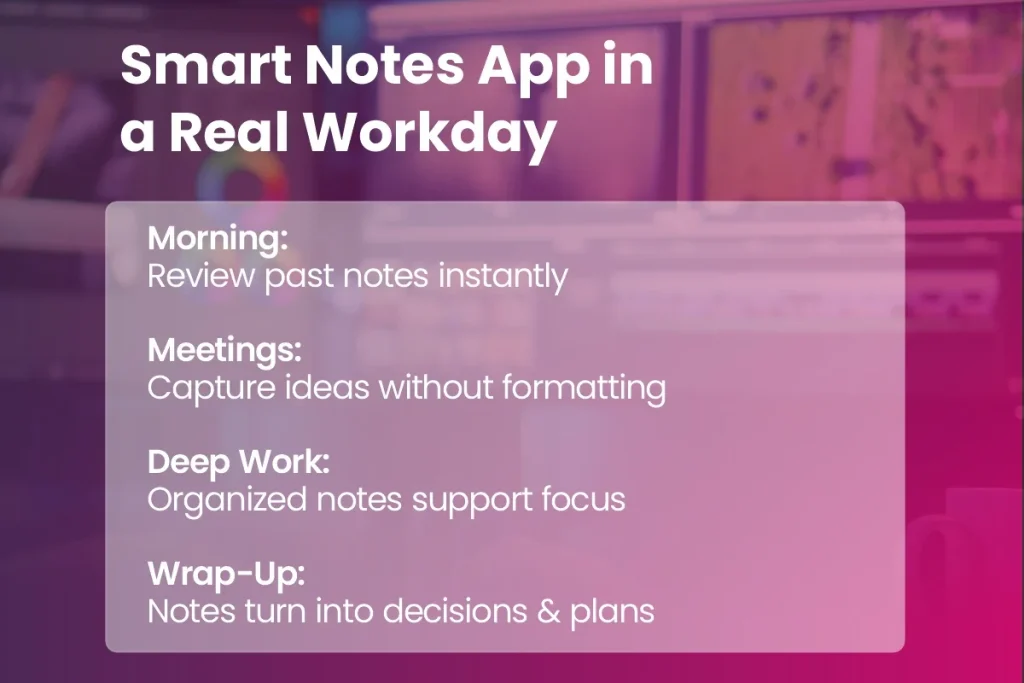
Before Meetings

Older notes give you the context to begin with when you enter a meeting, meaning you won’t be starting from zero.

During The Meeting

You are able to jot down all thoughts as they happen, and not be concerned with arrangement, as the app handles that side of things.

After Meetings

As people who use it know, notes change into useful things to look at after the meeting, and are a simple method to remember what was resolved, what people thought, and what needs doing.

Long-Term Knowledge

With the passage of time, the notes become a full, findable store of information – the reason why a lot of people say SmartNotes feels like it acts as an addition to the user’s brain, and not a thing apart.

Smart Notes App in a Real WorkDay

Who the Smart Notes App Is Really Built For

This is intended for pretty much anyone who deals with many involved bits of data and thoughts, and often goes from one way of thinking to another. We thought, whilst we were making the Smart Notes application, that it wasn’t aimed at a single type of person.

From a useful point of view, it is, at its heart, a very good thing for:

  • Pupils working through schoolwork.
  • Those who have meetings, dates for the diary, and a large amount of paperwork to control.
  • People who write, and who require to watch over concepts, beginnings, and what they’ve looked at.
  • Groups of people who collaborate, and who need to develop a collective store of what is known.

SmartNotes Inside MindSuite: When Notes Become Part of a System

The capabilities of SmartNotes are given a major boost when running within the MindSuite Software Bundle.

  • SmartNotes starts to work hand-in-hand with SmartWindows for workspace control.
  • SmartText for lightning-fast writing.
  • FastWindows for a boost in performance.
  • QEncrypt for secure storage.

MindSuite software makes SmartNotes a central part of a complete system to get things done – bringing together thoughts, to-do’s, what your computer is doing, security, and it all works as a really good, unified set. You won’t have to move from application to application anymore, and with it all in a single location you will be able to make your process more efficient, not waste time, and lessen the amount of stuff in your head you have to think about.

Why a Smart Notes App Makes More Sense Than Another App

Today’s professionals aren’t short on tools – they’ve got too many. Each new application they set up adds to the trouble, the amount of thought needed, and the endless changing between things they are doing.

It’s common knowledge that a good notes program can fix this, however it isn’t very helpful by itself. Notes aren’t generally put to use when alone; instead, they help with jobs, meetings, composition, arrangement, and choices – and MindSuite understands that, putting SmartNotes into a smooth, unified setup. Instead of managing several programs, people who use MindSuite receive the sharpness of a process.

Final Thoughts

When we think about what productivity will be like going forward, it isn’t about getting any more information, it is instead about being able to get to the correct knowledge when you require it. A clever notes application brings making notes up to date for this century, and mirrors the manner in which you think, and do your job.

SmartNotes – when used along with the MindSuite setup – alters the method we are able to arrange and pull up knowledge, with very little effort. Arriving quickly on the scene, this is not simply a location for keeping ideas; it is a planning system for anyone who is tired of usual note-taking, and who wishes to vastly improve their work.

Looking for a Smart Note Taking App?

If you’re ready to move beyond traditional note-taking and start working with your ideas instead of chasing them, SmartNotes within MindSuite is for you.

TurboCharger: Unleashing System Efficiency with Essential Performance Optimization Strategies

Boost Your PC Performance in 30 Sec with TurboCharger

Today’s digital world needs systems which run well and allow people to get a lot done – and this is very much about making those systems as efficient as they can be. This piece looks at many parts of getting a system to perform at its best, and at the different ways of improving how a system works. Look at our full guide for the main methods and techniques for system improvement, which give systems their maximum potential and help with planned development.

Understanding System Performance Optimization

Improving how a system works is a careful area of study which is about making software do more work. In computing, it means altering a system to make it faster and handle its resources better. How much faster programs run and how little memory they use are really important – these things affect how quickly, and how well, programs work. It’s important to deal with these, as slow work, or using too much RAM, frequently makes systems slow and users unhappy. However, getting that kind of success usually means some things are given up. A typical instance is the trade-off between memory and speed; getting more speed may need more memory, and vice versa.

If a programmer chooses to put in a cache to lessen delays in getting data, this is an illustration. Although this does make access quicker, it needs more memory – which plainly shows how working to make things better aims at certain qualities like speed, and not at being best in all ways. Aiming at optimisation in this way makes certain systems satisfy what users want and are also careful about using resources. By paying attention to these key things, and understanding the trade-offs which are part of it, software designers can find a good balance, so systems remain strong and perform well all the time.

Identifying and Resolving Bottlenecks

Improving how a system works is a careful area of study which is about making software do more work. In computing, it means altering a system to make it faster and handle its resources better. How much faster programs run and how little memory they use are really important – these things affect how quickly, and how well, programs work. It’s important to deal with these, as slow work, or using too much RAM, frequently makes systems slow and users unhappy. However, getting that kind of success usually means some things are given up. A typical instance is the trade-off between memory and speed; getting more speed may need more memory, and vice versa.

If a programmer chooses to put in a cache to lessen delays in getting data, this is an illustration. Although this does make access quicker, it needs more memory – which plainly shows how working to make things better aims at certain qualities like speed, and not at being best in all ways. Aiming at optimisation in this way makes certain systems satisfy what users want and are also careful about using resources. By paying attention to these key things, and understanding the trade-offs which are part of it, software designers can find a good balance, so systems remain strong and perform well all the time.

Strategies for Performance Tuning

Ways to improve how a system works are really important for making it respond faster and work generally better. A basic thing to do is use caching – to make things quicker, this cuts down on how long it takes to get data, by storing data people use a lot in a place for short-term keeping. Using a cache like this makes getting to information a lot faster, and so helps the system work much more efficiently. Web browsers and database systems are good examples, as they cache requests and pages to give users a clearly faster experience.

Also very important is distributed computing; this deals with managing bigger workloads by splitting jobs between several computers. This distributed computing benefit doesn’t just share work around, but uses the total processing power of connected machines. Well-known websites which get a lot of traffic – social media sites, for instance – depend on what distributed computing offers to keep things running smoothly by spreading data demands out.

Leading these techniques for getting more out of things are self-tuning systems. These databases which manage themselves change how they operate while they are operating, to meet goals for performance. As an example, database platforms which optimise themselves all the time watch for changes in the work they’re doing and adjust settings with very little from people. This adjustment of performance in real time makes sure that the system is as good as it can be in all sorts of situations – a big step towards systems managing themselves. These methods all together show how much skill is involved in making systems better and making certain that they work well, no matter where they’re being used.

Performance Engineering and Systematic Improvement

Performance engineering is central to building systems, making certain they meet requirements that aren’t about what a system does – but how well – and keep running at their best. The work covers lots of ways to make a system better, all aiming to polish up every part of how it performs. Really important things to do are load tests, finding where the system isn’t using resources as well as it could, and making plans for resources ahead of time. All of this helps systems to be more dependable, have less time when they’re not working, and, in the end, makes more money by giving users a better and more enjoyable experience.

Using performance monitoring, groups gather information as it happens, and get good understanding of what the system is doing when it’s very busy. That understanding lets programmers improve how the software runs, making it more effective and cutting down on wasted resources. Well-known tools for this sort of thing are Apache JMeter – for load testing – and New Relic, which tracks performance.

The usefulness of performance engineering is clear in many examples from all kinds of businesses. As an instance, a store online used these techniques to deal with the big jumps in visitors that happen at certain times of year with no problems, which made the number of people leaving purchases unfinished fall a lot and increased sales. In the same way, a bank used these methods to make dealing with transactions faster, and this greatly raised how pleased customers were, and how likely they were to stay customers. With steady, organised improvement, performance engineering doesn’t just get systems through difficulty; it allows them to do really well.

Stop Paying for Expensive Hardware

Advanced Code and Configuration Optimization

Getting a system to perform better than it normally would – to really push its limits – relies a lot on clever code and setting things up right. Programmers are able to make apps run a good deal faster by using small tricks, like doing some maths before a loop, instead of inside it. If you’re dealing with a big collection of data in a loop, it’s much better if every part that doesn’t change is done outside the loop. Also, switching slow processes for quicker ones doesn’t just make things speedy; it helps use resources well. For instance, using a binary search instead of a straight search through data that’s been put in order can lower the amount of time a job takes by a huge amount.

Concerning setup, carefully adjusting systems such as Hadoop can improve how well they do their work, by a large amount. Because Hadoop is built to spread work around, it’s helped immediately by changes to how things are configured, for example, how much memory each part of the system has, which affects how well data is dealt with. The difficulty with these sorts of improvements is getting the right amount of everything, and fitting it to what the work needs. Nevertheless, you get a lot back: apps that are faster, the ability to manage bigger collections of data, and the capacity to allow more people to use it all at the same time – and it’s all done while being easier on the hardware.

Even though these complicated ways of making a system better need some thought, and skill, using them makes systems that are strong, and can recover from problems, and are prepared to do what today’s online worlds ask of them, showing a real understanding of how well a system is working.

Continuous Monitoring and Iterative Cycles

The best performance from any digital platform really relies on checking it all the time and going through cycles of improvement. These don’t only get your system to a good level – they make certain that good level is kept, all the time. It’s much the same as perfecting a vehicle; regular checks and changes maintain it working perfectly, and show up problems with how it works which might get worse. In the same way, regularly checking how it performs is essential to finding new limits to how well the system works which could make it less good. If these things are found quickly, companies can make particular changes to make the system more productive and work better.

Getting the right amount of improvement work done, compared to what you get from it, is very important. Though at first making things better will often take a lot of effort, it creates a good starting point for the system getting better in a way that can go on for a long time. As the system gets more developed and becomes more mature, these changes get easier, but still give useful results. This way of working encourages the system to be developed in a way which is strong, and makes certain your structure remains something people can rely on, and which is able to compete.

If companies concentrate on regularly checking the system, they can sensibly direct where their resources go, so that the system is as efficient as possible. This way of doing things cuts down on the need for huge, sudden changes, and instead prefers small, continuing improvements – and in the end gives a system which works well and changes to new needs without trouble.

Conclusion:

Getting systems to run well isn’t a one-time job – it is a continuing thing. Firms can get a lot more out of how quickly and how much their systems do, by understanding and then using the basic ways to make systems better. Making sure systems are able to recover and are flexible, through putting money into the best ways of building for performance, and by accepting new tech when it comes along, will mean they’re set up to do well in the digital world which is always altering.

Mastering System Performance Optimization for Peak Efficiency

Because the digital world is changing so quickly, it’s really important to get the best performance out of your systems, to keep them working well and remain competitive. This complete reference looks at ways to optimise performance, how to manage resources, and plans for always improving the system; it gives you what you need to make your system react quicker, and be more flexible.

Understanding System Performance Optimization

Really getting to what lets systems work well – how they manage to process things and how they share their resources – is what it means to understand system performance optimisation. At the heart of this is improving the efficiency of software and getting the most from the resources available. Systems which run well finish work quickly and don’t use a lot of power, so things like how fast they are, how much memory they use and how much power they need are the main ways to judge how well a system is doing overall: speed tells you how quickly jobs are done, memory use shows how well data is dealt with, and power use shows how good it is for the environment.

Getting things right in optimisation means balancing things out – making compromises. A common case is the space-time trade-off, where trying to make a system faster may need more memory, but cutting down on memory use could slow processing down. So, the best results usually mean finding a way to make these things work together without putting too much pressure on the rest of the system.

If a system’s performance is balanced, it runs without problems, doesn’t get stuck, and doesn’t waste resources, and it’s efficient to run. Ultimately, optimising a system isn’t about making one thing as good as possible, but getting all the pieces to work together to give strong, useful and long-lasting performance.

Identifying Performance Bottlenecks

To get systems working better, finding what’s holding them back is really important. These issues with speed show up as slow reactions, applications taking a long time to do things, or the system generally not using its parts as well as it could. Finding these sorts of problems begins with a good look at performance; it isn’t a quick look, but a careful study of exactly where things aren’t good enough. That’s when profilers are extremely useful – they go through applications and show which pieces use the most resources. Giving such a detailed report lets programmers work on the areas where things most need to be fixed.

A well-planned way to find problems is essential. It goes in order, starting with a first assessment and then checking what you think by testing individual parts – like, for instance, working out if the hold-up is the processor, the memory or getting data in and out. This sort of careful finding of the cause means you can make changes to deal with it, instead of doing wide-ranging things that don’t often help. Dealing with these difficulties often means changing the software’s design, or increasing the power of the hardware. Doing these things makes sure systems work well now, and prepares them for further improvements to performance which will help with the best possible growth and speed. Taking this sort of thoughtful approach turns understanding into useful changes to make things work.

Implementing Performance Tuning Techniques

Using methods to make a system work as well as it can is really important for getting the most out of how well it runs. As an instance, making software run better is very important in speeding up how long things take to do, and in making the best use of the system’s resources. This involves perfecting the steps programs take, getting rid of code that isn’t needed, and making certain jobs don’t use any more resources than they have to. These kinds of changes help both software that can easily grow, and make systems respond quicker – letting the system deal with bigger and more difficult jobs without trouble.

To stop one server getting too much to do, load balancing shares jobs equally among a number of machines. This helps a system stay strong, and makes certain that resources are used well, which is particularly important for companies that deal with a lot of transactions or questions from users.

Caching works by keeping data people ask for a lot in quick-to-reach temporary memory, decreasing how much it is necessary to get information from slower storage. This makes system response times much shorter, and lowers the strain on the infrastructure at the back, which is a key thing for systems which depend on getting the same data over and over.

Also, running tasks at the same time spreads processing jobs out at once over several points, reducing how long processing takes and getting better use out of what’s there. Together with setting up correctly – such as changing system settings and ways of managing resources – these methods successfully deal with problems with performance and make a solid base for a system that works well.

Enhancing System Efficiency through Resource Management

The role resource management has in boosting how well a system works is very important to plans for making performance better. By using things they have – like stock, what their staff can do, and their computer systems – well, companies can really raise their output and what they get done. Thought-out arrangement and control of these possessions cuts down on wasted stuff, lessens expenses, and makes efficiency as high as it can be. Resource management is the thoughtful putting-together of keeping in stock, sending out, and making money from products, to give the best returns without too much extra.

Human resource management is just as vital. Getting more from people and encouraging new ideas relies on matching what staff are good at and what they know with what projects need. Properly kept-up computer systems make sure things run well and can grow. Using the benefits of cloud computing, making virtual things, and carefully farming work out to others gets rid of problems in running things and makes dealing with data better; this keeps system work going without a break.

Ways of working such as resource smoothing are essential to making work loads the same across possessions that are available. This stops too much work and tiredness, leading to steady making of things. By making differences in how much is wanted less sharp, companies keep on a regular level of work, missing big jumps up or down.

In the end, resource management which works well makes a system which is neat and can change to fit what is needed as it changes. By carefully setting to rights all of what using resources is like, companies find abilities which were hidden and get a strategic edge in their field.

Sustaining Continuous System Performance Improvement

For groups and people wanting to work as well as they can, consistently making a system work better is very important. In today’s quickly changing tech world, getting performance up isn’t just one thing to do – it’s a process which needs commitment, and careful planning. Doing normal checks on how well a system works is like a regular health exam; it makes certain that all parts operate smoothly and well. These checks show faults and where things can be developed, meaning companies can put in place specific plans to make things better.

To keep very good levels of efficiency, using improvement plans means creating definite performance levels. Using these measures, businesses can get individual aims to fit with the bigger aims of the company, fostering a feeling of people taking ownership and constant improvement. As an example, setting definite figures for how much work gets through, or how quickly a system replies, guides what people do and makes everyone in the organisation work together.

Good strategies for companies ought to combine getting results quickly, with habits which will last a long time. Putting performance measures into everyday jobs makes staff want to aim for better levels. Regular learning and development also helps with this, giving team members the skills they need to change and do well. At the end of the day, through checking all the time and planned moves, constant improvement in system performance joins what people want to do with what the organisation wants to do, and gets results which stay.

Future Trends in System Performance Optimization

For groups and people wanting to do as much as possible, it is still very important to keep making systems work better and better. In the fast-moving world of tech now, getting performance up isn’t one thing you do, but something you always work at, which needs commitment, and planning that makes sense. Doing regular checks on how well systems work is like a normal health test; it makes certain all parts work together without trouble, and well. These checks show where things aren’t as good as they could be, and where there’s a chance to get better, letting companies put in place plans for improvement which are to the point.

The area of making system performance as good as it can be is about to greatly change, mainly because of artificial intelligence and the newest technologies. At the front of this are AI tools that can make systems work best – they can take in huge amounts of data at once. These tools make hard choices simpler by automatically changing how system parts work, without people having to do it by hand. Think of something that changes to what’s happening with work, as it happens, and uses what it is likely to happen to stop problems with performance before they happen.

New ways to manage what’s available are also going to change how computing power is given out and used. By using machine learning to manage resources, these systems guess the best amount of resource to have across all the equipment, reducing things which don’t work well and raising all-round performance. This will give longer periods of systems being up and running, and better work done in operations – finally reducing money spent and making people more productive.

For people who know about IT, taking on AI and machine learning means getting a new set of abilities. The old job of managing resources by hand will move to arranging AI to make system work better. Getting these abilities will become most important for keeping ahead of others.

Together, these changes promise more than little improvements – they show a big step forward to clever, very good digital platform improvements. This forward movement will allow companies to work with a level of quickness and correctness never seen before, starting a new period in making systems work as well as possible.

Conclusions

Optimizing system performance is a perpetual effort that requires a thoughtful mix of system optimization methods and tools. By identifying bottlenecks, applying tuning best practices, and utilizing resource management approaches effectively, systems can reach high levels of efficiency and quick responsiveness. To stay ahead and satisfy future demands, it’s essential to adopt continuous operational improvement along with the latest emerging performance trends.

Quantum Safe Encryption: Solving the Security Problems Traditional Encryption Can’t

Quantum Safe Encryption Solving the Security Problem

As for encryption, people often believe that once a file is encrypted, it’s safe, but unfortunately, that’s not the case. However, encryption, like any technology, has a lifespan, and the methods that we use to secure our data today weren’t designed to keep up with the growing computing power of tomorrow. This is why quantum safe encryption is now on the radar of modern cybersecurity planning.

The gap between how long we can afford to store encrypted data and how long encryption methods can keep it safe is the fundamental problem at hand. We can’t be caught off guard by future cyber threats, and so instead, organizations and individuals are now re-evaluating encryption with a long-term vision.

This blog takes a hard look at the real security issues we’re facing today and explains how quantum-proof encryption and tools like QEncrypt are squaring away those problems in a way that is very much down-to-earth and practical.

The Hidden Frustration with Modern Encryption

It’s here that the real frustration lies, one that is not a lack of tools, but a misplaced faith that they’ll stay effective. Quantum safe encryption goes with the assumption that security should last for the life of the data and uses a new class of methods and tools, such as QEncrypt, to give organisations and individuals peace of mind.

Data That Outlives Its Encryption

Files don’t have a short lifespan. Important documents, contracts, patents, medical files, financial records, and classified communications require protection for many years, if not decades. But traditional encryption isn’t designed for this, nor does it address the threat of long-term exposure. Quantum safe encryption is engineered to fill this gap, guaranteeing that your files won’t become unreadable as future computing power increases.

“Harvest Now, Decrypt Later” Is No Longer Theoretical

Another concern is that the strategy often referred to as “harvest now, decrypt later”, isn’t as far-fetched anymore.  Counting on the day when quantum computers will come into play, which will be able to decrypt it, when hackers look to breach encryption, they can collect and store encrypted data.  

Well-known threats like this one target stored data, back-ups, and archives, and those are the things that businesses and organizations assume are safely locked away, but the quantum safe encryption fixes this concern by employing cryptographic techniques that are resistant to both the decryption methods we have now and the ones we’ll have in the future.  

Traditional Encryption Wasn’t Built for Quantum Reality 

RSA and ECC are still effective, but they were not originally designed to withstand the attack of quantum computing, and they’ll be completely outgunned by the much more efficient power of quantum computers. The idea isn’t to discard proven methods, but rather to acknowledge that future-proof encryption must be engineered from the ground up to combat quantum-level threats. Coming to terms with this is a part of the evolution of encryption, not a wild leap, and is now guiding how we develop modern encryption standards.  

Security Tools Are Too Complex to Use Consistently 

Another major headache in the world of cybersecurity is the usability problem. Too often, secure systems fail because they’re too difficult to set up, manage, or use on a consistent basis. When encryption tools are overcomplicated, people will skip them or mess them up. Quantum safe encryption works, though, when it’s straightforward, reliable, and simple enough to put into place, and lots of theoretical ideas fall short in these areas.  

Future-Proofing Feels Disruptive and Expensive 

Lots of organisations hesitate to adopt new encryption standards because they worry about the cost, disruption, and hassle, but replacing infrastructure, training their staff, and migrating their data feels like a monumental task that they can put off until the last minute, which they usually do.  

Newer quantum safe encryption solutions are designed to slot into place, rather than tearing down what’s already there, and by getting started early, companies can greatly reduce the costs, knock out the need for future migrations, and spread the risk out over time.   

How Quantum Safe Encryption Solves These Challenges

When it comes to cybersecurity, traditional encryption has three main challenges:

  1. Data will eventually become outdated
  2. It’s susceptible to future decryption methods
  3. Impractical to implement in real-world systems

But quantum safe encryption addresses all of these issues, and it provides you with:

  • Long-term protection
  • Resilient to potential decryption
  • Easy to integrate into any system

This switch from a reactive to a proactive mindset allows you to safeguard both the data you already have and the risks that will come in the future.

How QEncrypt Makes Quantum Proof Encryption Practical

QEncrypt brings the theory of quantum proof encryption to the real world with its usable file-based security system that doesn’t throw out the baby with the bathwater, i.e., it doesn’t require deep cryptographic knowledge to encrypt and protect your sensitive documents. Coming from a place of simplicity, backwards compatibility, and a commitment to long-term security, QEncrypt bridges the gap between complicated cryptography and everyday data protection.  

Qencrypt Uses Deep Cryptography

Who Should Adopt Quantum Proof Encryption Now? 

This isn’t just for corporations and governments anymore; quantum proof encryption is becoming necessary for the following: 

  • Any business that has confidential files 
  • Professionals who store client info 
  • Companies that have to keep records for a long time  
  • Individuals who are serious about their privacy and long-term security 

Those who adopt it now will have a much smoother ride, whereas those who don’t will face costly and rushed migrations.  

Why Acting Early Matters More Than Waiting 

Well-known experts say that waiting for quantum computing to become mainstream before changing your encryption is a bad idea, because once the bad guys figure out the vulnerabilities, the cost of cleaning up the mess goes through the roof, and if you take the time to think about it, there’s no good reason not to adopt quantum safe encryption today. 

More Value, Less Complexity: QEncrypt in the MindSuite Bundle 

Assessing long-term security for your computer, buying QEncrypt as part of the MindSuite software bundle is not only cost-effective, but also provides you with clear financial savings.  

  • Coming in at $205.95 per year when bought separately, the cost of the included products escalates to $617.85 over the course of three years.  
  • Whereas, the MindSuite bundle that comes with QEncrypt can be had for $174.99 per year and $448.99 over three years, with the same quantum-safe encryption features thrown in for the price.  

In addition to the price savings, the MindSuite bundle also streamlines software management, bunched together lots of security and productivity features under one roof. 

Conclusion 

In terms of encryption, security is no longer just about shielding data today; it’s about making sure that protection will last. Quantum safe encryption, also known as post-quantum encryption, fills in the gaps in traditional security, addressing concerns of data longevity, real-world usability, and future threats. Renowned tools such as QEncrypt enable us to roll out quantum-resistant security, and give people and businesses the confidence to adopt sensitive information protection, not just now, but well into the future.